24
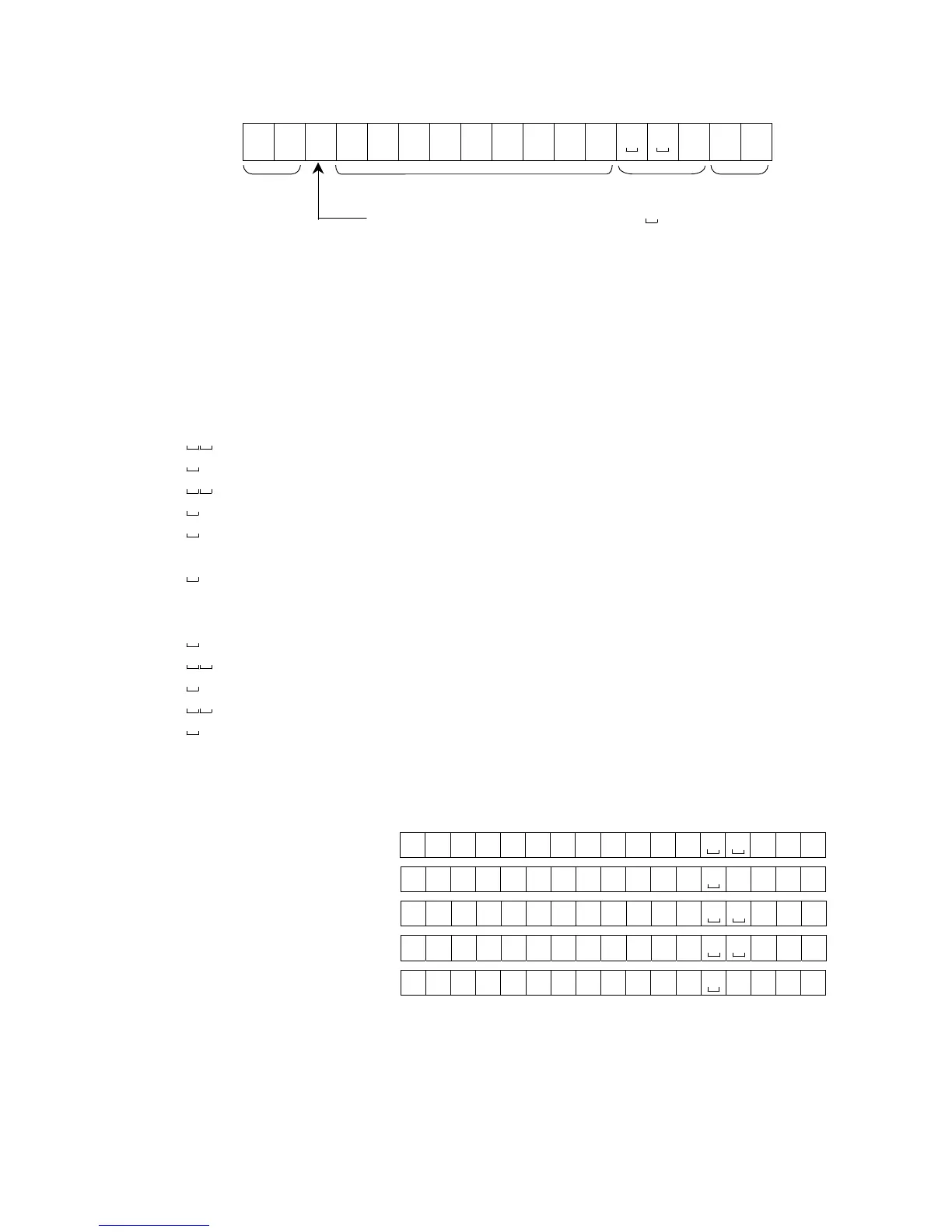
Data format
S T
,
+ 0 0000
.
00
g C
R
L
F
Header Data Unit Terminator
There are four types of headers:
ST : Stable weighing data (including % data)
QT : Stable counting data
US : Unstable weighing data (including counting and % data)
OL : Out of weighing range (Over)
The data is normally 9 digits including a decimal point and a sign.
There are 14 types of units:
g : Weighing data “gram”
P C : Counting data “pcs”
% : Percentage data “%”
o z : Weighing data “decimal ounce”
l b : Weighing data “decimal pound”
o z t : Weighing data “troy ounce”
c t : Weighing data “carat”
m o m : Weighing data “momme”
d w t : Weighing data “penny weight”
G N : Weighing data “grain”
N : Force data “Newton”
t l : Weighing data “tael”
t : Weighing data “tola”
DS : Calculated density (specific gravity) value
The terminator is always C
R
L
F
.
Example of output data:
Weighing data “gram” ST , +001234 . 5
g
C
R
L
F
Counting data Q T , + 0 0 01234 5
P C
C
R
L
F
Percentage data S T , + 0 0 0123 . 4
%
C
R
L
F
Out of range “gram” (+) O L , + 9 9 9999 . 9
g
C
R
L
F
Out of range “pcs” (-) O L , - 9 9 99999 9
P C
C
R
L
F
Data output mode
Stream mode
Set the function to “prt 0”.
The balance outputs the current display data. The data-update rate is approximately
10 times per second. This rate is the same as the display-update.
The balance does not output data while it is in the setting mode.
Separator
(“ ” shows a space.)



 To Next Page