31
10-2. Output example
To print the GLP report, set the function to “info 1” and set the AD-8121B printer to
MODE 3.
To output the GLP report to a personal computer, set the function to “info 2”.
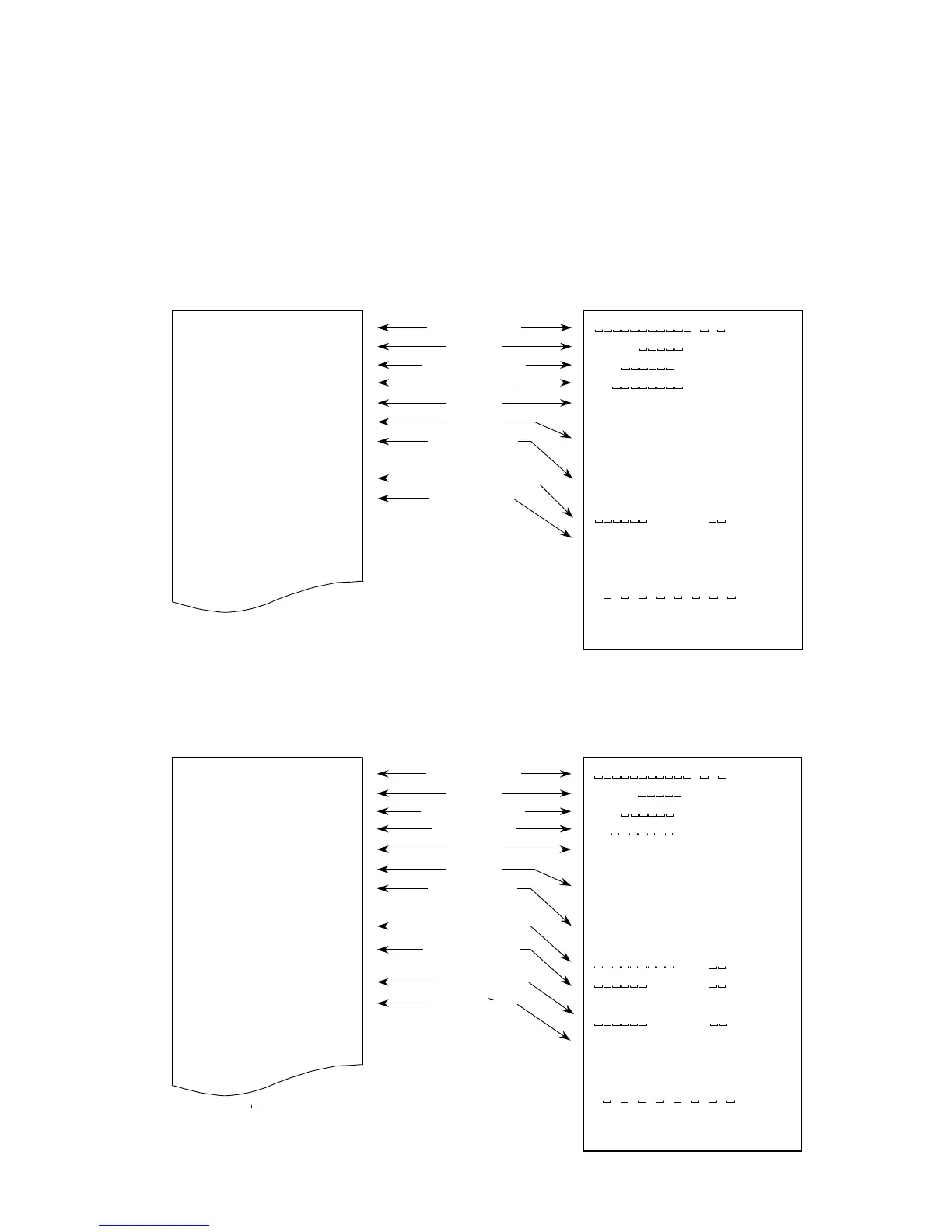
Data format for “calibration report”
Perform calibration using a weight. Then the balance will output a calibration report.
See “7-1. Calibration using a weight” about the calibration.
AD-8121 format “info 1” General format “info 2”
Data format for “calibration test report”
Perform calibration test using a weight. Then the balance will output a calibration test
report. See “10-3. Calibration test using a weight ” about the calibration test.
AD-8121 format “info 1” General format “info 2”
:Space, ASCII 20h
CR :Carriage return, ASCII 0Dh
LF :Line feed, ASCII 04Ah
A & D
MODEL EJ-300
S/N 1234567
ID ABCDEF
DATE 09/03/21
03:15:40 PM
CALIBRATED(EXT.)
ACTUAL
0.00 g
+299.99 g
TARGET
+300.00 g
SIGNATURE
- - - - - - - -
~~~~~~~~~~~A~&~D<CRLF>
MODEL~~~~~EJ-300<CRLF>
S/N~~~~~~1234567<CRLF>
ID~~~~~~~~ABCDEF<CRLF>
DATE<CRLF>
<CRLF>
TIME<CRLF>
<CRLF>
CAL.TEST(EXT.)<CRLF>
ACTUAL<CRLF>
~~~~~~~~~0.00~~g<CRLF>
~~~~~~+229.99~~g<CRLF>
TARGET<CRLF>
~~~~~~+300.00~~g<CRLF>
SIGNATURE<CRLF>
<CRLF>
<CRLF>
-~-~-~-~-~-~-~-~<CRLF>
<CRLF>
<CRLF>
Manufacturer
Model
Serial numbe



 To Next Page