EasyManua.ls Logo

AND EJ-200 - EJ Series Balance Part Names and Functions

Default Icon
44 pages
Print Icon
To Next Page IconTo Next Page
To Previous Page IconTo Previous Page
Loading...
4
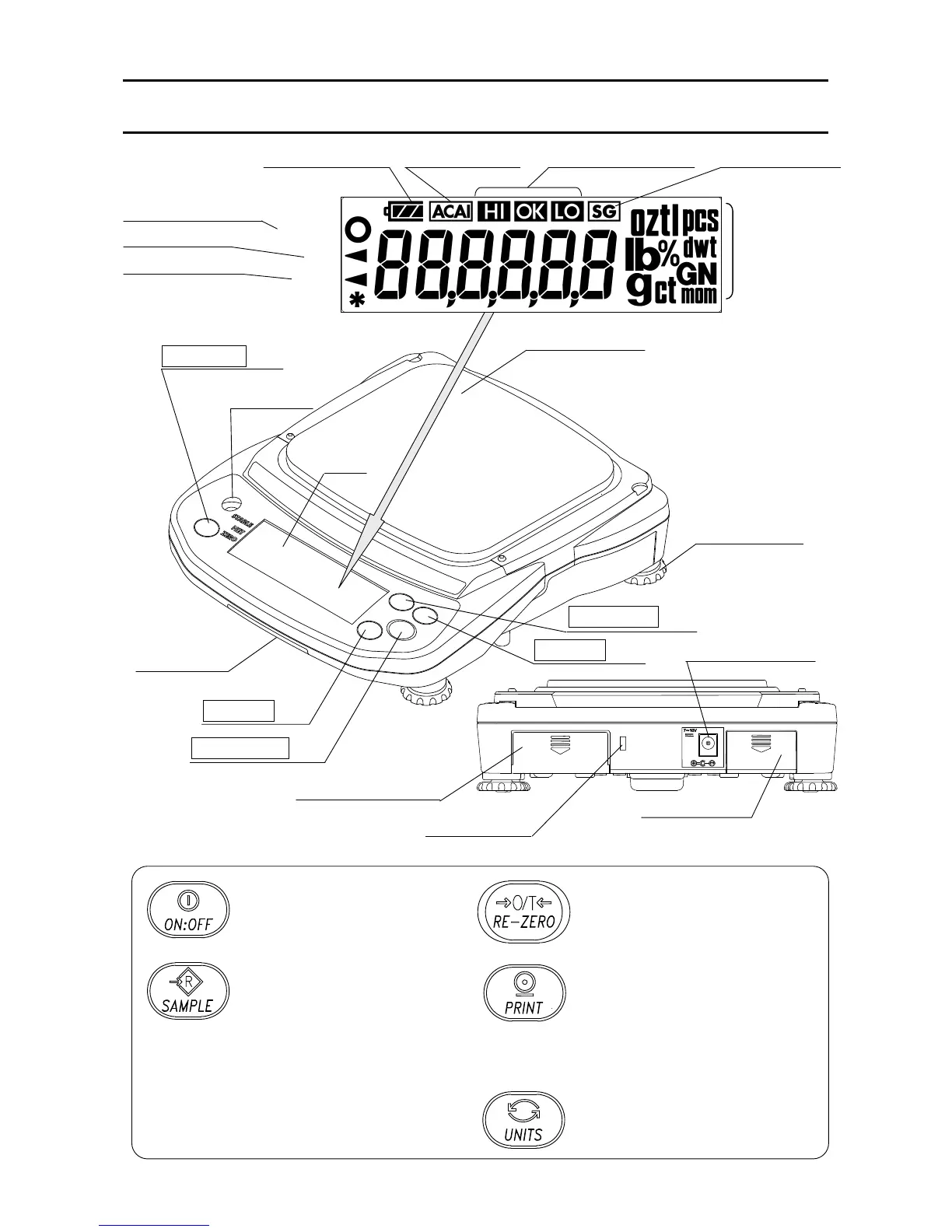
3. PART NAMES AND FUNCTIONS
Turns the power ON or OFF.
Held down to enter the
function setting mode.
pcs mode:
Enters the sample unit
weight storing mode.
% mode:
Enters the 100% weight
storing mode.
Clears the display to zero
(combined zero and tare).
Outputs the weight value to a
printer.
Stores a unit weight, 100%
weight or other setting values
to the balance.
Switches the weighing units.
Weighing pan
Round pan for
EJ-120 / EJ-200 / EJ-300 / EJ-410 / EJ-610.
Leveling foot
S

p
irit level
LCD
ON:OFF key
SAMPLE key
PRINT key
RE-ZERO key
UNITS key
Calibration
switch cover
(bottom)
EJ-02 / EJ-03 slot
AC adapter jack
Batter
y
cove
r
Security slot
(Use a security cable commercially available.)
STABL
E
NE
T
ZER
O
Battery indicator ACAI indicator Comparator results Density
STABLE indicator
NET indicator
ZERO indicator
Weighing
units
(Specific gravity)

Related product manuals