32
“Title block” and “End block”
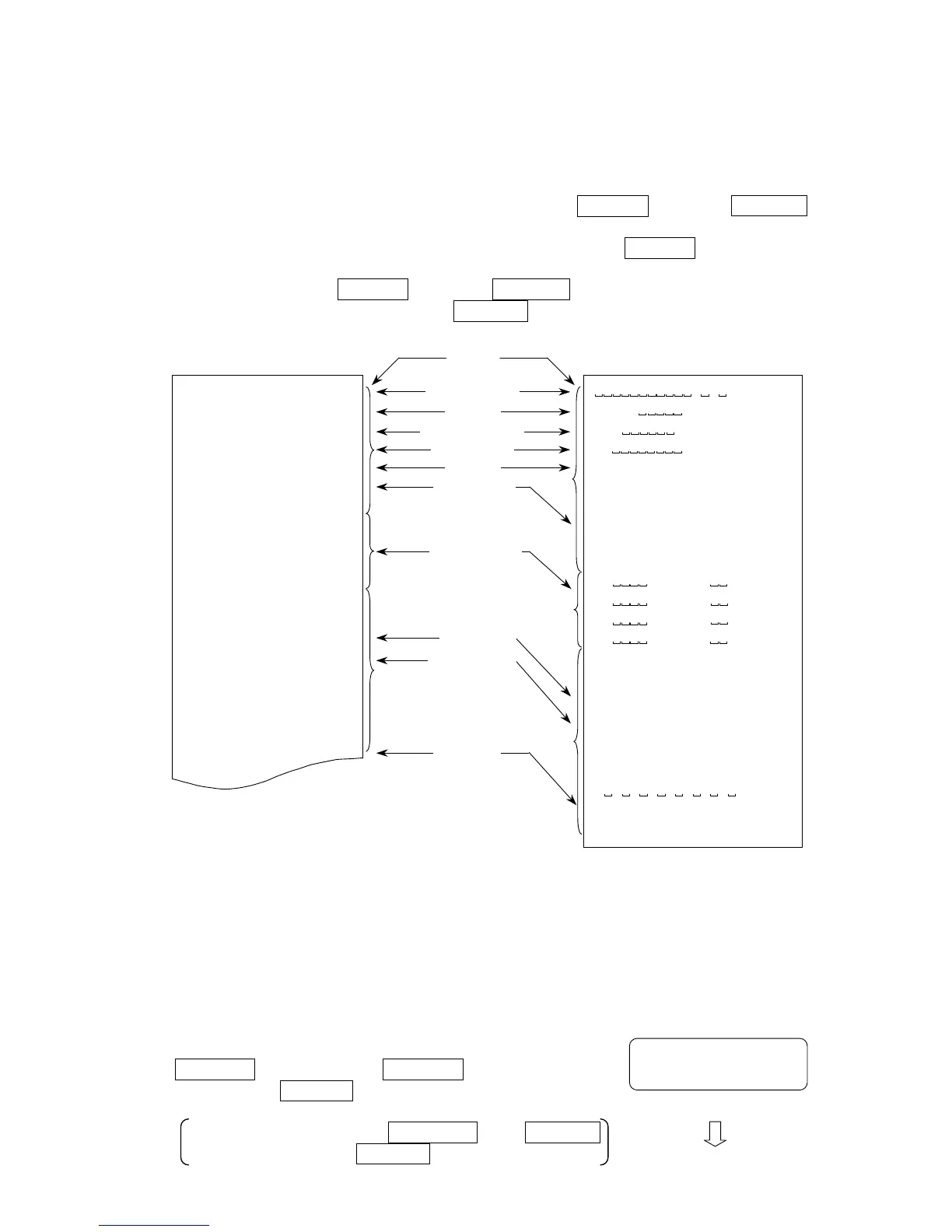
When weight values are recorded as GLP data, a “Title block” and an “End block”
are added to the weight values for the GLP report.
To output the GLP report to the AD-8121B printer, set the printer to MODE 3.
1. With the weight data displayed, press and hold the PRINT key until start is
displayed. Then, the balance outputs the “Title block”.
2. The balance can output the weight data by pressing the PRINT key or selecting
the auto-print mode.
3. Press and hold the PRINT key until recend is displayed. Then, the balance
outputs the “End block” and shows end .
AD-8121 format “info 1” General format “info 2”
:Space, ASCII 20h
CR :Carriage return, ASCII 0Dh
LF :Line feed, ASCII 04Ah
10-3. Calibration test using a weight
Calibration test is to confirm the weighing accuracy using a weight (target weight)
and output the results as a GLP report.
Set the function to “info 1” or “info 2” to perform the calibration test.
Calibration test does not perform calibration.
1. Press and hold the calibration (CAL) switch.
CC appears after Cal . Release the
switch when CC is displayed.
Pressing and holding the SAMPLE and PRINT
keys will also display CC .
CC
Release the CAL switch.
A & D
MODEL EJ-300
S/N 1234567
ID ABCDEF
DATE 09/03/22
01:23:45 PM
WT +123.45 g
WT +213.43 g
WT +312.44 g
WT +321.42 g
END
01:23:56 PM
SIGNATURE
- - - - - - - -
~~~~~~~~~~~A~&~D<CRLF>
MODEL~~~~~EJ-610<CRLF>
S/N~~~~~~1234567<CRLF>
ID~~~~~~~~ABCDEF<CRLF>
DATE<CRLF>
<CRLF>
START<CRLF>
TIME<CRLF>
<CRLF>
<CRLF>
WT~~~~+123.45~~g<CRLF>
WT~~~~+213.43~~g<CRLF>
WT~~~~+312.44~~g<CRLF>
WT~~~~+321.42~~g<CRLF>
<CRLF>
END<CRLF>
TIME<CRLF>
<CRLF>
SIGNATURE<CRLF>
<CRLF>
<CRLF>
-~-~-~-~-~-~-~-~<CRLF>
<CRLF>
<CRLF>
Manufacturer
Model
Serial numbe



 To Next Page