29
Example of density measurement
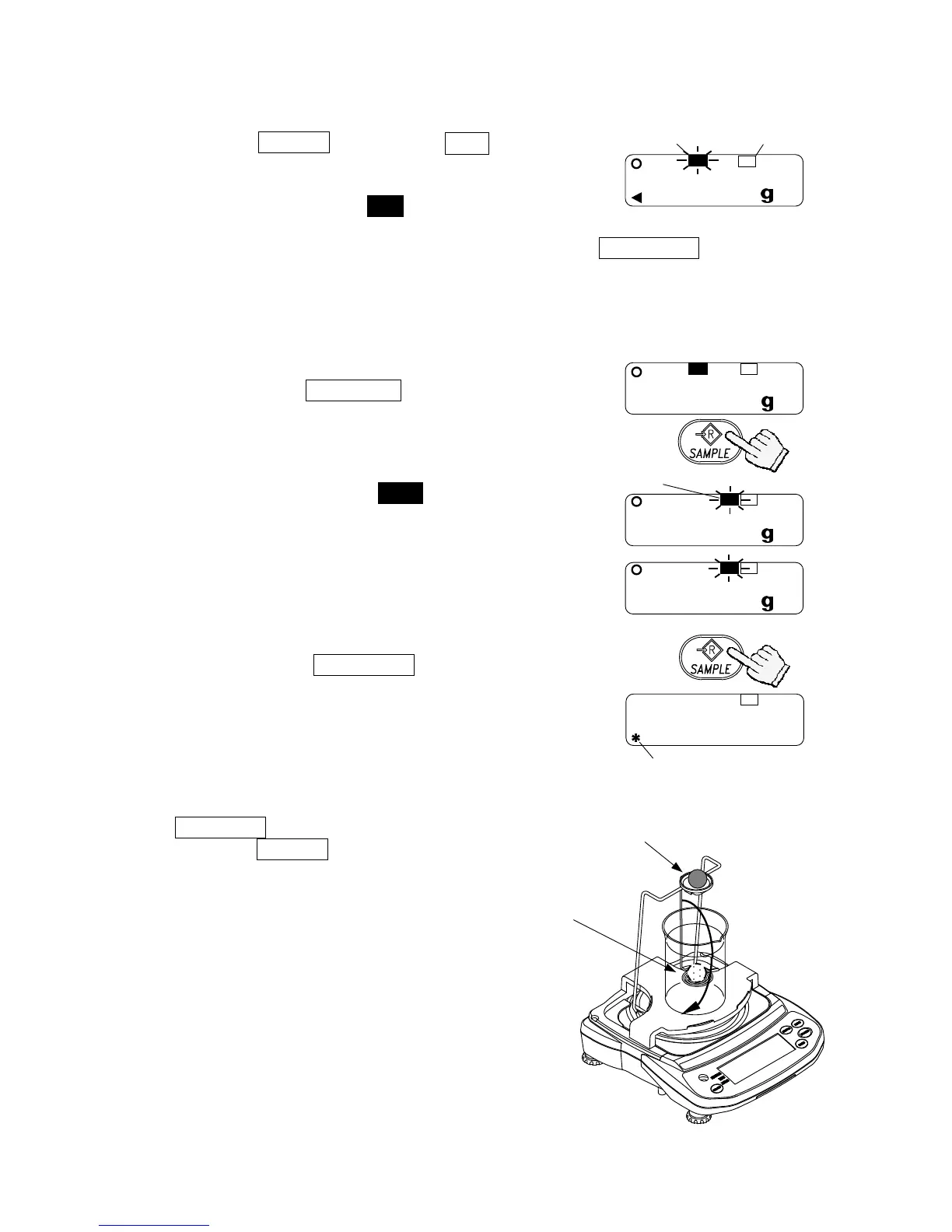
Selecting the density measurement mode
1. Press the UNITS key to select
SG
.
The weighing unit is “g”.
The display shows that HI blinks and the balance
is measuring the weight in air.
When the display does not show zero, press the RE-ZERO key to set the
display to zero.
2. Place a sample on the upper pan.
3. Wait for the STABLE indicator to be displayed
and press the SAMPLE key to store the
weight in air.
4. The display shows that LO blinks and the
balance starts to measure the weight in water.
5. Place the sample on the lower pan in water.
Adjust the amount of water so that the sample
is about 10 mm below the water surface.
6. Wait for the STABLE indicator to be displayed
and press the SAMPLE key. Then the
balance reads the weight in water and shows
the density (specific gravity) of the sample.
7. To continue the density measurement, press the
SAMPLE key again. To exit this measurement,
press the UNITS key.
20.00
SG
HI
20.00
SG
LO
Measuring
weight in water.
17.51
SG
LO
To weigh in water.
To weigh in air.
The display shows
the density.
88.01
SG
SG indicato



 To Next Page