33
10. ID Number and GLP Report
10.1. Main Objectives
The ID number is used to identify the balance when Good Laboratory Practice (GLP) is used.
The ID number is output on the "Calibration Report", "Calibration Test Report" and "Title block".
The GLP output format is selected at the "GLP output (info)" of the "Function Table".
The balance can output the following reports for GLP.
"Calibration Report" of the calibration using the internal weight.
"Calibration Report" of the calibration using an external weight.
"Calibration Test Report" of the calibration using the internal weight.
"Calibration Test Report" of the calibration using an external weight.
"Title block" and "End block" for weighing data.
10.2. Setting the ID Number
Step 1 Press and hold the RANGE key to display ba5fnc .
Step 2 Press the RANGE key several times to display id .
Step 3 Press the PRINT key. You can set the ID number using the following keys.
RANGE key The key to increment the digit.
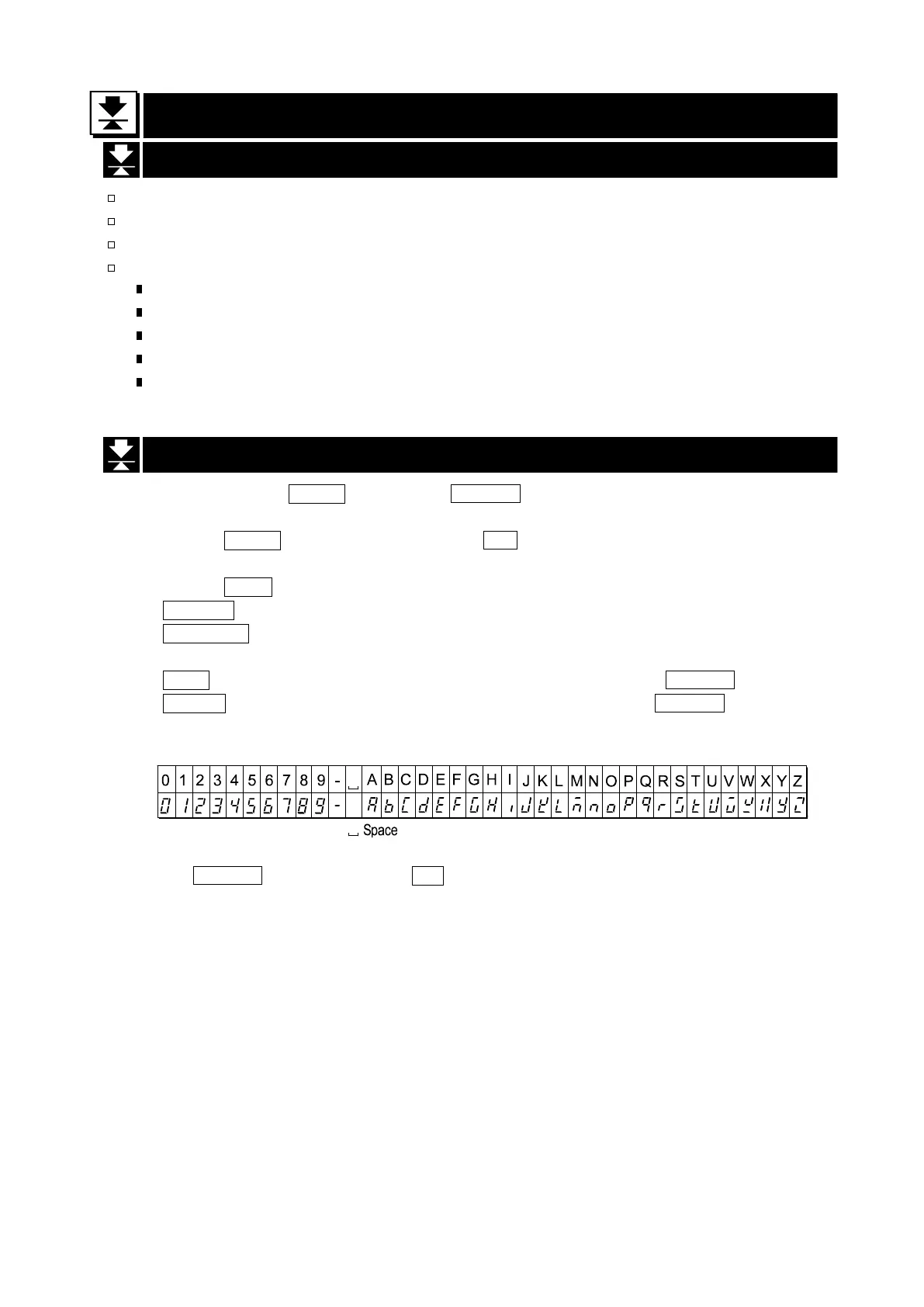
RE-ZERO key The key to select the character of the digit. Refer to the following table for
the "Display Character Set".
CAL key The key to cancel the new ID number and display ba5fnc .
PRINT key The key to store the new ID number and display ba5fnc .
Display Character Set
Step 4 With ba5fnc displayed, press the CAL key to return to the weighing mode.


 To Next Page