d. The monitor inflates the cuff until sufficient pressure has built up for a measurement. Then the
monitor slowly releases air from the cuff and carries out the measurement. Finally the blood pressure
and pulse rate will be calculated and displayed on the LCD screen separately. Irregular heartbeat
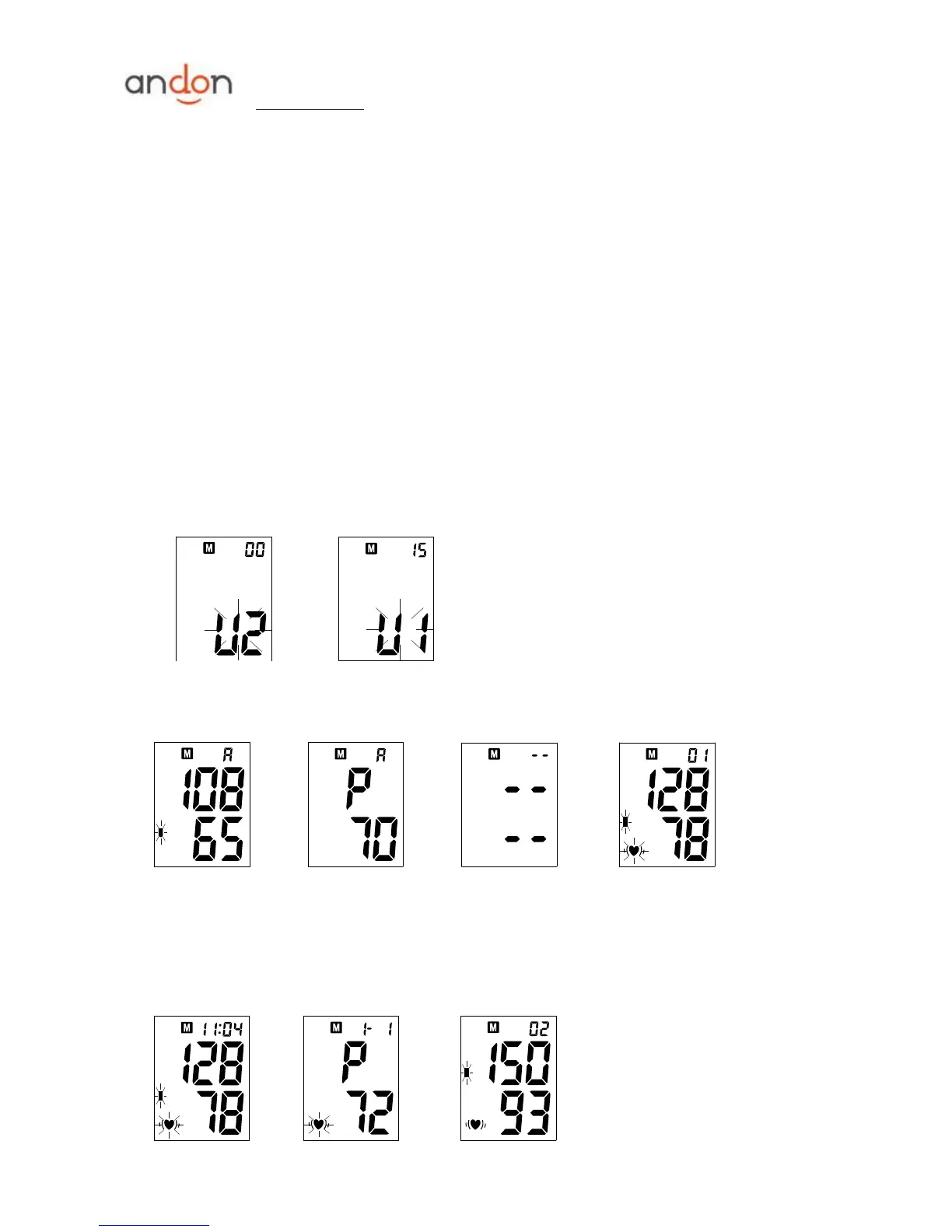
symbol (if any) will blink. See picture 6-4&6-5. The result will be automatically stored in the memory
bank.
e. After measurement, the monitor will turn off automatically after 1 minute of no operation. Alternatively,
you can press the ―START‖ button to turn off the monitor manually.
f. During measurement, you can press the ―START‖ button to turn off the monitor manually.
Note: Please consult a health care professional for interpretation of pressure measurements.
7. DISPLAYING STORED RESULTS
a. In Clock Mode, press ―MEM‖ button, the current memory bank and the amount of results in this bank will
be displayed. See picture 7. Press ―START‖ button to change over to other bank. See picture 7-1.
Confirm your selection by pressing ―MEM‖ button. The current bank can also be confirmed automatically
after 5 seconds with no operation.
Picture 7 Picture 7-1
b. After selecting the memory bank, the LCD will display the average value of the last thirty results in this
bank, See picture 7-2 &7-3. If no result stored, LCD will show dashes as picture 7-4.
Picture 7-2 Picture 7-3 Picture 7-4 Picture 7-5
c. When the average value is displayed, press the ―MEM‖ button, the most recent result will be displayed.
See picture 7-5. Followed by, the blood pressure and pulse rate will be shown separately. Irregular
heartbeat symbol (if any) will blink. See picture 7-6&7-7. Press ―MEM‖ button again to review the next
result. See picture 7-8. In this way, repeatedly pressing the ―MEM‖ button displays the respective results
measured previously.


 To Next Page