22
* Approximately 3 seconds after
the "locked" screen appears,
the display will return to
the previous screen.
1
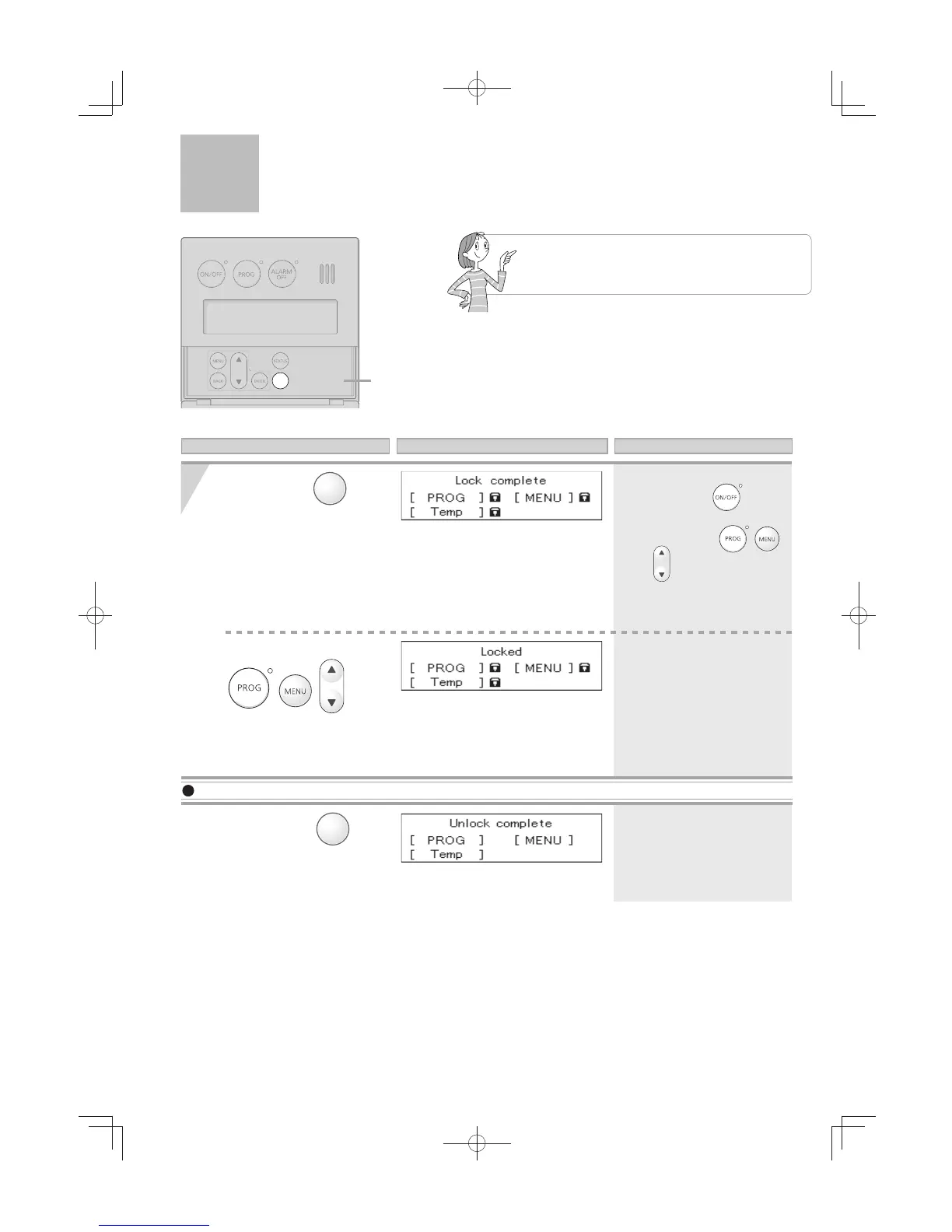
By locking the remote controller, the
settings cannot be accidentally changed
if a button is pressed by mistake.
Press and hold
button
for approximately
2 seconds to lock the
remote controller.
* The operation can be locked
regardless if the
button is
“ON” or “OFF”.
* The operations of , ,
and
buttons are locked.
*
Approximately 3 seconds after locking
the remote controller, the display will
return to the previous screen.
If you press these buttons
*
Approximately 3 seconds after unlocking
the remote controller, the display will
return to the previous screen.
To Unlock the Remote Controller
Press and hold
button
for approximately
2 seconds to unlock the
remote controller.
Cover shown in
the open position.
Operation Screen Display Description
while the remote controller
is locked, the “Locked”
screen will appear.
Locking the Remote Controller
[For All Systems]




 To Next Page