28
1
2)
1)
1)
2
3
* This adjustment can be made
regardless of whether the
button is ON/OFF.
2)
The screen returns to the previous screen.
* If the display is left untouched
for approximately 20 seconds
without pressing the
button,
the setting will be completed, and
when the
button is turned
ON, the home screen will be
restored.
* To check system status. ( p.16)
*
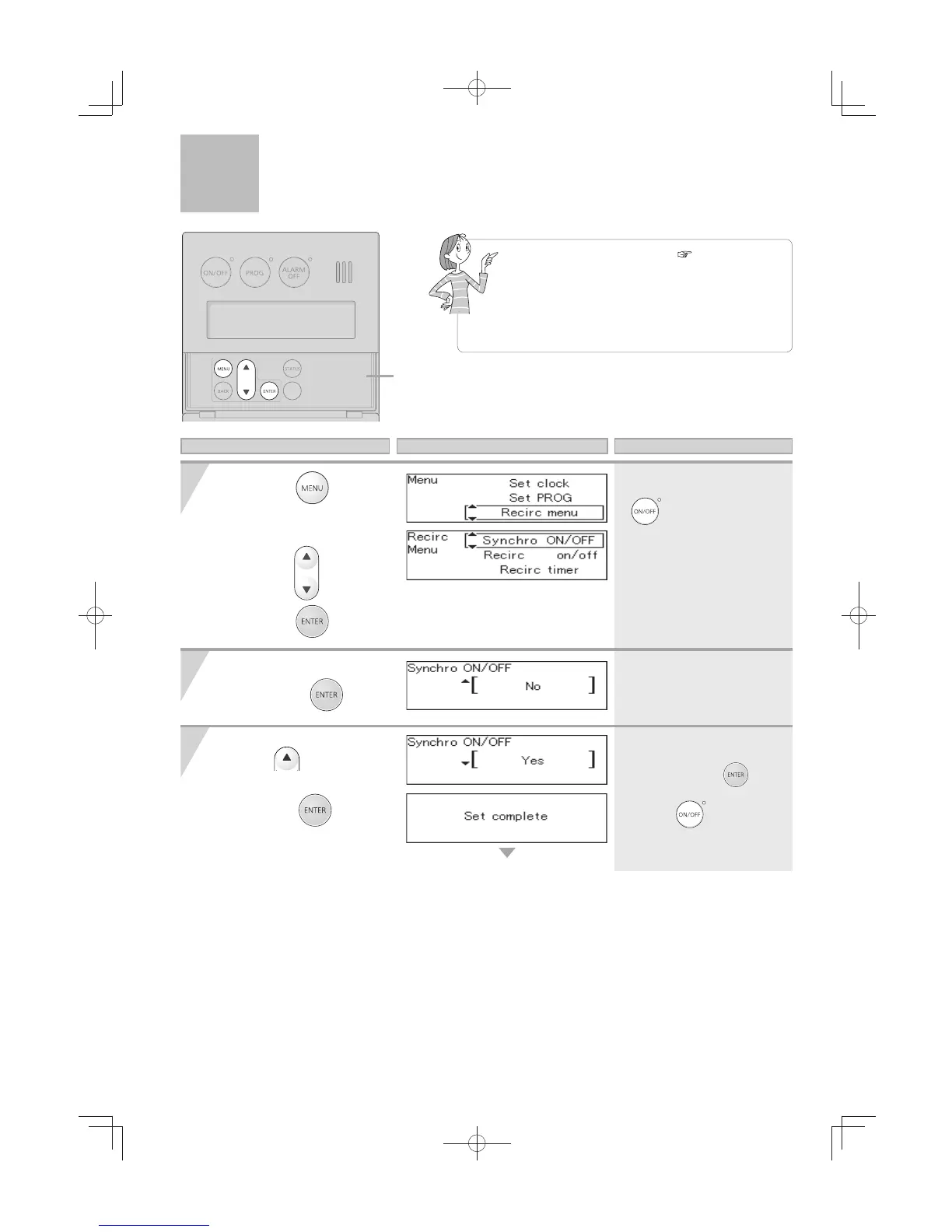
When “synchro ON/OFF” is set to “Yes”,
recirculation can be activated automatically.
* To change “synchro ON/OFF” from “Yes”
to “No”, follow the same procedure as
described below.
Select "Synchro ON/OFF"
and press the
button.
1) Press
.
2) Press the
button.
Cover shown in
the open position.
1) Press the
button
inside the cover,
Select "Recirc menu"
using the
buttons.
2) Press the
button.
Operation Screen Display Description
Enabling Automatic Recirculation Operation
[For System[Rcrc]]




 To Next Page