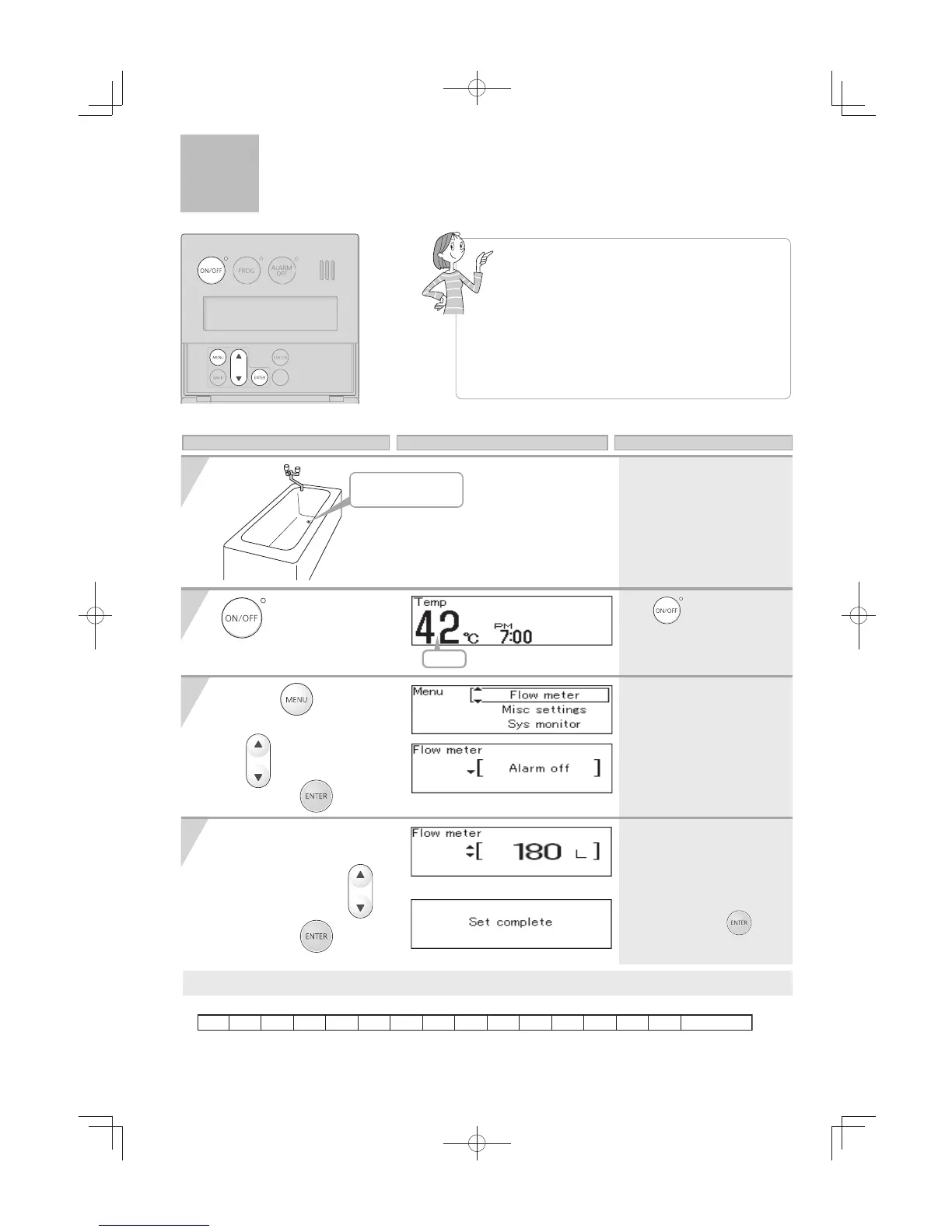
* The current setting
temperature is displayed.
* The current hot water filling
volume is displayed.
Adjust the Flow Meter
Alarm volume setting
1)
Change the volume with
to
your desired hot
water volume.
2) Press the
button.
* The set hot water volume will
be stored in memory.
* The screen returns to the
home screen.
button is "ON".
1)
Press the
button inside the
cover, Select "Flow meter" using
the
buttons.
2) Press the
button.
* If the display is left untouched
for
approximately
20 seconds
without pressing the
button
,
the setting will be completed and
the home screen will be restored.
Preparation
(Default setting = Alarm off)
Operation Screen Display Description
If the flow meter alarm is being used to indicate when
water delivery volume is reached to the preset volume.
•
If any hot water is being used besides what is going
into the tub, the alarm will sound before the tub is full.
•
If there was water in the tub before the fill
began, or if the water is not shut off manually
when the alarm sounds, the tub may overflow
.
•
If there was water in the tub before the fill
began, the temperature in the tub after it is full
may be different from the temperature setting.
Fill Volume Options
Flow Meter Alarm
[Single Water Heater Only]




 To Next Page