EasyManua.ls Logo

Angelcare AC017 - User Manual

Angelcare AC017
8 pages
Print Icon
To Next Page IconTo Next Page
Loading...
OWNER’S MANUAL
Model AC017
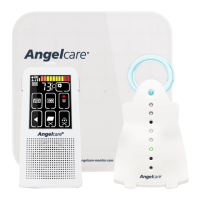
Movement Monitor
TABLE OF CONTENTS
WARNINGS...............................................................................................................................................................................2
SETUP REQUIREMENTS ................................................................................................................................................................. 3
Setting up the Nursery Unit ..........................................................................................................................................................4
Positioning the movement Sensor Pad .....................................................................................................................................4
Turning ON your monitor ............................................................................................................................................................... 5
Getting to know your monitor......................................................................................................................................................5
Troubleshooting ................................................................................................................................................................................ 7
Limited warranty ............................................................................................................................................................................... 8
Technical specifications .................................................................................................................................................................. 8
For assistance, FAQs or guidance with your monitor
please visit our Customer Support page at angelcare.co.uk
01mf6A_Manuel_AC017_UK_12643.indd 1 18-01-24 14:37

Questions and Answers

  • H
    Harold ArnoldAug 14, 2025
    How to fix Angelcare AC017 Baby Monitor loss of connectivity?
    • K
      Kevin JimenezAug 14, 2025
      If you are experiencing loss of connectivity with your Angelcare Baby Monitor and the Nursery Unit blue light flashes and emits a beep every 20 seconds, try bringing the units closer together. You can also press and hold for 2 seconds the Nursery Unit Pairing button; the Nursery Unit will emit a beep and will flash blue to confirm connectivity.
  • T
    Tyler RamirezAug 17, 2025
    Why Angelcare AC017 Baby Monitor has no power?
    • M
      Michele HarrisAug 17, 2025
      If your Angelcare Baby Monitor has no power, check or replace the batteries. Also, ensure that the monitor is turned ON.
  • N
    Nicholas MonroeAug 20, 2025
    What to do if my Angelcare Baby Monitor is flashing red?
    • J
      Jennifer WareAug 21, 2025
      If your Angelcare Baby Monitor is flashing red, it means no movement is detected or the Sensor Pad has lost connectivity. Ensure there is no bedding between the mattress and the Sensor Pad. The Sensor Pad must rest on a completely flat and firm surface. If the cot has a spring or slat base, place a hard board between the cot base and the Sensor Pad measuring at least 33 x 33 cm and 6 mm thick. Also, make sure the Sensor Pad is positioned as described under the setup requirements, and the sensitivity may need to be adjusted.
  • R
    Ronald WhiteAug 25, 2025
    Why is my Angelcare AC017 Baby Monitor flashing yellow?
    • B
      burnsjamesAug 25, 2025
      If your Angelcare Baby Monitor is flashing yellow, it indicates that the Nursery Unit batteries are low.
  • J
    Joe AlvarezAug 27, 2025
    What to do if Angelcare Security Sensors Sensor Pad flashes red?
    • D
      Donald PalmerAug 27, 2025
      If the Angelcare Security Sensor's Sensor Pad flashes a red light, it indicates that no movement is being detected or the Sensor Pad has lost connectivity. First, ensure that no bedding is placed between the mattress and the Sensor Pad. The Sensor Pad should rest on a completely flat and firm surface; if your crib has a spring or slat base, insert a hard board (at least 13’’ x 13’’ (33 x 33 cm) and 1/4’’ (6 mm) thick) between the crib base and the Sensor Pad. Also, verify the Sensor Pad's positioning according to the setup requirements and adjust the sensitivity if needed.
  • P
    Peter AdkinsAug 31, 2025
    How to fix Angelcare Security Sensors loss of connectivity?
    • H
      Heather KellyAug 31, 2025
      If the Angelcare Security Sensor Nursery unit blue light flashes and emits a sound every 20 seconds, it means there is a loss of connectivity. To resolve this, try bringing the units closer together. Additionally, press and hold the Nursery Unit Pairing button for 2 seconds. The Nursery Unit will emit a sound and flash blue to confirm connectivity.
  • N
    Natasha HernandezSep 3, 2025
    Why is my Angelcare Security Sensors Nursery Unit flashing yellow?
    • K
      Kendra AndersonSep 3, 2025
      If the Angelcare Security Sensor Nursery Unit is showing a flashing yellow light, it indicates that the Nursery Unit batteries are low.
  • J
    Jose RyanSep 6, 2025
    How to troubleshoot Angelcare Security Sensors no power?
    • J
      Jamie GreenSep 6, 2025
      If your Angelcare Security Sensor has no power, check or replace the batteries. Also, ensure that the monitor is turned on.
  • C
    Cory MendozaSep 10, 2025
    What does it mean when Angelcare Security Sensors Sensor Pad flashes yellow?
    • D
      Derrick AndrewsSep 10, 2025
      If the Angelcare Security Sensor Pad is flashing a yellow light, it means the Sensor Pad battery is low.

Summary

Safety Warnings

General Safety Guidelines

Crucial safety guidelines and precautions for using the monitor and its components to prevent injury.

Setup and Installation

Setting Up the Nursery Unit

Guide to setting up the Nursery Unit, including battery installation and optimal placement.

Positioning the Movement Sensor Pad

Instructions for correctly positioning the movement Sensor Pad within the cot for accurate monitoring.

Operating the Monitor

Turning On and Testing

Steps to power on the monitor, pair the Sensor Pad, and test its functionality.

Pausing and Sensitivity Adjustment

How to pause monitoring and adjust the Sensor Pad's sensitivity level for optimal performance.

Battery Status Indicators

Understanding the low battery indicators for both the Nursery Unit and the Sensor Pad.

Troubleshooting and Indicators

Resolving Common Issues

Solutions for false alarms, no sound, connectivity loss, power issues, and sensor pad problems.

Understanding Indicator Lights

Explanation of the Nursery Unit and Sensor Pad light indicators and their meanings.

Warranty and Specifications

Limited Warranty Information

Details on the product's limited warranty terms, conditions, and exclusions.

Technical Specifications

Product specifications including range, power supply, and transmission frequency details.

Angelcare AC017 Specifications

General IconGeneral
BrandAngelcare
ModelAC017
CategoryBaby Monitor
LanguageEnglish

Related product manuals