EasyManua.ls Logo

Angelcare AC320 - User Manual

Angelcare AC320
17 pages
Print Icon
To Next Page IconTo Next Page
Loading...
Keep users guide for future reference. Please read the warnings and
safety instructions carefully before assembling & using the product.
Failure to follow the warnings and the instructions could result in serious
injury or death or damage to the product.
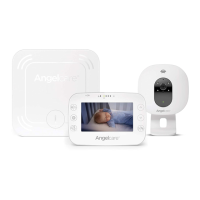
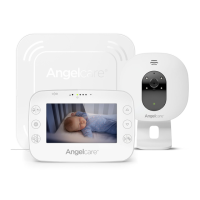
Model AC320
Baby Video Monitor
WARNING
Model AC327
Baby Movement Monitor,
with Video
Model AC337
Baby Movement Monitor,
with Video
OWNER’S MANUAL
IMPORTANT  INTENDED USE
is product is NOT intended and should NOT be used to prevent Sudden Infant Death Syndrome (SIDS).
is product is NOT intended to diagnose, treat, mitigate, cure or prevent any disease or condition.
is is a product to monitor the movement of healthy babies and is not a substitute for parental care.
CFO_ANGE_Manuel_AC327_NA.indd 1 2018-10-31 10:45 AM

Questions and Answers

  • J
    Jason HatfieldAug 18, 2025
    What to do if Angelcare AC320 emits loud noises?
    • K
      Kevin HamiltonAug 18, 2025
      If your Angelcare Baby Monitor is emitting loud noises (feedback), move the units further apart, at least 3 meters. You can also try decreasing the volume on the Parent Unit.
  • Q
    qcastilloAug 20, 2025
    Why is there no sound on my Angelcare Baby Monitor?
    • T
      tracy13Aug 21, 2025
      If no sound is being transmitted on your Angelcare Baby Monitor, first check the volume level on both the Parent Unit and the Nursery Unit to ensure they are appropriately set. Also, try bringing the Parent Unit closer to the Nursery Unit. Ensure that the Parent Unit is adequately charged.
  • C
    Cindy BrownAug 23, 2025
    What to do if my Angelcare Baby Monitor has weak reception?
    • W
      Wendy SmithAug 23, 2025
      If your Angelcare Baby Monitor has weak reception, try the following: * Bring the units closer together. * Change the position of one or both units. * Place the units on a flat surface, out of the baby's reach. * Recharge the Parent Unit.
  • T
    taylorkimberlyAug 26, 2025
    What to do if my Angelcare AC320 has static?
    • M
      Michael MitchellAug 26, 2025
      If your Angelcare Baby Monitor is experiencing static, distortion, or interference, rotate the Parent Unit or move it away from the source of interference.
  • F
    freemansallyAug 28, 2025
    How to fix black screen on Angelcare AC320?
    • M
      Mr. Daniel SimmonsAug 28, 2025
      If the screen on your Angelcare Baby Monitor Parent Unit is black, first, turn the unit back on by pushing and holding the POWER ON/OFF button for 2 seconds. If that doesn't work, recharge the Parent Unit.
  • S
    Stephen MillerAug 30, 2025
    Why does my Angelcare movement sensor pad have false alarms?
    • J
      Juan BarberAug 30, 2025
      If your Angelcare movement sensor pad is giving false alarms, consider these potential solutions: * Replace the Sensor Pad battery CR2450. * Turn OFF the Nursery Unit. * Ensure the Nursery Unit is turned OFF after removing the baby from the cot. * Make sure there is no bedding between the mattress and the Sensor Pad. * Ensure the Sensor Pad is on a flat, firm surface with the printed side facing up. * Adjust the sensitivity level. Refer to Warnings 3 to 11 and see STEP 4, TEST THE SENSOR PAD.
  • M
    Melissa RivasSep 2, 2025
    What to do if Angelcare AC320 Baby Monitor has weak reception?
    • M
      Mr. Clayton OrtizSep 2, 2025
      If you're experiencing weak reception with your Angelcare Baby Monitor, try these steps: Bring the units closer together, change the position of either the parent unit or the nursery unit, place the units on a flat surface away from the baby's reach, and ensure the parent unit is fully recharged.
  • P
    paul60Sep 4, 2025
    Why is there no sound being transmitted on my Angelcare Baby Monitor?
    • T
      Taylor HallSep 4, 2025
      If no sound is being transmitted on your Angelcare Baby Monitor, first check the volume levels on both the Parent Unit and the Nursery Unit to ensure they are appropriately set. If the volume is adequate, try moving the Parent Unit closer to the Nursery Unit. Also, ensure that the Parent Unit is adequately charged.
  • J
    Julie StevensSep 7, 2025
    What to do if Angelcare Baby Monitor parent unit screen is black?
    • W
      warrenamandaSep 7, 2025
      If the Parent Unit screen on your Angelcare Baby Monitor is black, try turning the unit back ON by pushing and holding the POWER ON/OFF button for 2 seconds. If that doesn't work, recharge the Parent Unit.
  • S
    Shelley DaviesSep 9, 2025
    What to do if Angelcare AC320 Baby Monitor has static, distortion, interferences?
    • A
      Andrew SnyderSep 9, 2025
      If your Angelcare Baby Monitor is experiencing static, distortion, or interference, rotate the Parent Unit or move it away from the source of interference.

Summary

Safety and Warnings

Strangulation Hazard

Keep cords out of reach of children to prevent strangulation risk.

Movement Sensor Pad Interference

Understand factors affecting the Sensor Pad's performance and false alarms.

Battery Safety Instructions

Guidelines for handling, replacing, and disposing of batteries safely.

Setup and Installation

Setting Up the Parent Unit

Step-by-step guide for preparing and charging the Parent Unit.

Setting Up the Sensor Pad

Instructions for installing and preparing the Sensor Pad for use.

Setting Up the Nursery Unit

Guide for installing the Nursery Unit, including wall-mount and tabletop options.

Monitor Operation and Testing

Testing the Sensor Pad

Procedures to verify the Sensor Pad is functioning correctly and detecting movement.

Monitor Settings and Configuration

Pairing Menu

Procedures for pairing Nursery Units and Sensor Pads with the Parent Unit.

Alerts and Troubleshooting

Troubleshooting Common Issues

Sensor Pad Alarm Issues

Resolving problems related to no alarms or false alarms from the Sensor Pad.

Connectivity and Pairing

Re-pairing Nursery and Parent Units

Steps to restore lost connection between the Nursery and Parent Units.

Angelcare AC320 Specifications

General IconGeneral
CameraYes
Movement Sensor PadYes
Sensor Pad SensitivityAdjustable
Two-way TalkYes
Battery LifeUp to 10 hours
Temperature SensorYes
Sound ActivationYes
Parent Unit PowerRechargeable battery
Night LightYes
TypeAudio and Video Monitor
DisplayColor LCD
RangeUp to 250 meters
LullabiesYes

Related product manuals