EasyManua.ls Logo

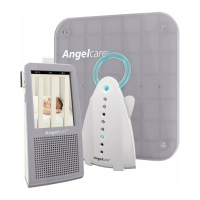
Angelcare AC1100 - User Manual

Angelcare AC1100
20 pages
Print Icon
To Next Page IconTo Next Page
Loading...
INSTRUCTION MANUAL
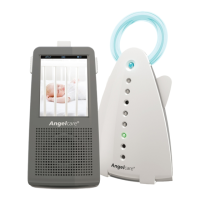
THE ULTIMATE DIGITAL BABY MONITOR
Video, Movement and Sound
Model AC1100
AC11000 UK 5.13.2012
with
Touch-Screen

Other manuals for Angelcare AC1100

Questions and Answers

  • B
    Brian SotoSep 7, 2025
    How to reduce interference on Angelcare AC1100 Baby Monitor?
    • T
      Terry KleinSep 7, 2025
      If you're getting interference or noise from your Angelcare Baby Monitor Parent Unit, such as interference from other monitors, wireless phones, networks, or walkie-talkies, it could be due to the Parent Unit being located near motorized devices, fluorescent lights, or televisions. Keep both the Parent Unit and the Nursery Unit away from any devices that could be a source of interference.
  • J
    Jessica OlsonDec 1, 2025
    Why is there no sound on my Angelcare AC1100?
    • P
      pswansonDec 1, 2025
      If there is no sound being transmitted from your Angelcare Baby Monitor, here are a few things to check: * If the sound transmission is set to ‘Voice Activated’, the sound in the baby’s room might not be loud enough. Try increasing the microphone sensitivity or activating Continuous Sound transmission. * One of the units might be turned off due to low or incorrectly installed batteries. Check or replace the batteries in both units, and/or recharge the Parent Unit. * One of the units could be off because the AC adapters aren't connected properly, or the mains switch is turned off. Verify that all AC adapters are working correctly and the mains switch is on. * Ensure both units are turned on. * The volume level on the Parent Unit might be off. Increase the volume level using the U...
  • M
    Michael McphersonDec 1, 2025
    Why is my Angelcare Baby Monitor SensorPad giving false alarms?
    • D
      David ParkerDec 1, 2025
      If your Angelcare Baby Monitor SensorPad is giving false alarms, there might be several reasons: * The baby was removed from the bed, and the Nursery Unit wasn't switched off. Ensure you turn off the Nursery Unit when the baby is not in bed. * The SensorPad plug isn't properly connected to the Nursery Unit. Check the connection, unplug, and reconnect the SensorPad plug to the Nursery Unit. * There is bedding between the mattress and SensorPad, or the mattress isn't resting on a flat surface. Remove any bedding and ensure the SensorPad rests on a completely flat and rigid surface. Consider placing a 6mm thick piece of plywood under the SensorPad. * The sensitivity setting of the SensorPad is too low. Adjust the dial on the back of the Nursery Unit to increase the sensitivity. The s...
  • K
    Kyle MitchellSep 18, 2025
    How to fix static and interference on Angelcare AC1100 Baby Monitor?
    • B
      barberdonaldSep 18, 2025
      If you're experiencing static, distortion, or interference with your Angelcare Baby Monitor, it could be due to the Parent Unit being located near motorized devices, fluorescent lights, or a television. Try rotating the Parent Unit or moving it away from the source of interference.
  • S
    Sergio YoungSep 16, 2025
    Why won't the green light turn on on my Angelcare Baby Monitor Nursery Unit?
    • H
      hicksmarissaSep 16, 2025
      If the green power ON indicator light on your Angelcare Baby Monitor's Nursery Unit isn't lighting up, first check if the AC adapters are properly connected and that the electrical outlet is working. If not, check the connections or try a different outlet. Also, ensure that the Nursery Unit is turned ON by pushing and holding the left wing for 2 seconds.
  • M
    Monica SchwartzSep 14, 2025
    How to stop feedback noise on my Angelcare AC1100 Baby Monitor?
    • H
      Holly CaldwellSep 14, 2025
      If your Angelcare Baby Monitor's Parent Unit is emitting feedback or loud noises, it could be because the units are too close to each other; move them at least 3 meters (10 feet) apart. Alternatively, decrease the volume on the Parent Unit.
  • D
    Dalton AllenSep 12, 2025
    Why is there no video on my Angelcare Baby Monitor?
    • A
      angelaadamsSep 13, 2025
      If there is no video transmission on your Angelcare Baby Monitor, it might be because the video screen has been turned off or the Power Save Function has been activated. * Press the ON/OFF button on the left-hand side of the Parent Unit to start the video transmission. * Press the video screen to start the video transmission. * Deactivate the Power Save Function.
  • C
    Casey TownsendSep 12, 2025
    Why is the mattress mouldy under my Angelcare AC1100 Baby Monitor?
    • G
      Gabrielle McmahonSep 12, 2025
      If the mattress used with your Angelcare Baby Monitor has become mouldy, it's likely due to not enough air circulation under the mattress. If you've placed plywood under the SensorPad, drill holes in it to allow air circulation. The SensorPad itself doesn't radiate any energy or heat.
  • P
    Peter RuizSep 9, 2025
    Why is my Angelcare AC1100 Baby Monitor making a loud howling noise?
    • J
      james43Sep 9, 2025
      If you are experiencing feedback (a loud howling noise) from the Parent Unit of your Angelcare Baby Monitor, it is likely that the Parent Unit and the Nursery Unit are too close together. Keep the units at least 3 metres/10 feet apart and decrease the volume level on the Parent Unit.
  • S
    Sara StricklandAug 20, 2025
    Why is my Angelcare AC1100 Baby Monitor giving false alarms?
    • R
      Robin FranklinAug 21, 2025
      There are several reasons why your Angelcare Baby Monitor might be giving false alarms. It could be because the baby was removed from the crib and the Nursery Unit wasn't switched off, so turn off the Nursery Unit. Check if the Sensor Pad cord is properly connected to the Nursery Unit; if not, unplug and reconnect it. Ensure the Sensor Pad rests on a completely flat and rigid surface; you might need to place a 6 mm (1/4”) masonite board under it. Also, the baby might be in a very deep sleep or has moved to the edge of the crib; in this case, adjust the sensitivity by referring to the Movement section.

Summary

Frequently Asked Questions

Monitor Beeping and Alarming

Addresses common issues with the monitor beeping or alarming during setup and operation.

Moses Basket Monitoring

Explains how to adjust settings for monitoring a baby in a Moses basket.

Alarm Sounds and Notifications

Details the different alarm sounds and their meanings, including movement and low battery alerts.

International Travel Considerations

Provides guidance on using the monitor when traveling abroad and adapter requirements.

Travel Cot and Connection Issues

Covers using the monitor in a travel cot and troubleshooting connection loss after trips.

SensorPad Compatibility and Safety

Discusses compatible mattresses and the safety of the SensorPad.

SensorPad Usage and False Alarms

Explains SensorPad duration, monitoring premature babies, and causes of false alarms.

Important Safety Instructions

Installation, Ventilation, and Cord Safety

Covers safe placement of units, ventilation needs, and cord protection to prevent strangulation.

Water, Heat, Battery, and Cleaning Safety

Details precautions against liquid damage, heat sources, battery use, and safe cleaning practices.

Vibration and False Alarm Prevention

Advises on avoiding external vibrations and common causes for false movement alarms.

Setup and Component Overview

Reception Tips and FCC Compliance

Provides advice for improving wireless reception and details FCC warning compliance.

Parent Unit Features and Components

Identifies and describes the features and components of the Parent Unit.

Nursery Unit and SensorPad Features

Details the features and components of the Nursery Unit and the SensorPad.

Monitor Installation and Testing

Parent Unit Installation

Step-by-step guide for installing the Parent Unit, including battery insertion and charging.

SensorPad Installation Under Mattress

Instructions for correctly positioning the SensorPad beneath the baby's mattress.

Nursery Unit Installation and Cord Securing

Guide for installing the Nursery Unit, securing cords, and positioning the camera.

Testing Your Angelcare Monitor

Procedures for testing sound, movement detection, alarm function, and battery mode.

Monitor Operation and Settings

Main Menu: Sound and Movement Controls

Explains how to adjust sound levels, mute, and enable/disable movement detection.

Main Menu: Video, Hold, and Temperature

Covers enabling video, using hold mode, and setting temperature alerts.

Main Menu: Timer and Sub-Menu Access

Details how to use the timer and access the sub-menu for further settings.

Sub-Menu: Screen Saver and Sensitivity

Configuration options for screen saver delay and SensorPad sensitivity adjustment.

Advanced Settings and Functions

Sub-Menu: VOX, Alarm, and Battery

Settings for VOX mode, alarm types (sound/vibration), and battery capacity display.

Sub-Menu: Key Tone Settings

Option to enable or disable audible key tones for unit interactions.

Linking Units and Night Vision

Status indicators for unit link strength and settings for infrared night vision.

Zoom, Pager, and Talk-Back Functions

Features for zooming the video, locating the parent unit, and communicating via talk-back.

Troubleshooting and Product Information

Problem Solving Common Issues

Addresses frequent issues like false alarms, no sound, weak reception, and screen problems.

Limited Warranty and Specifications

Details the product's limited warranty and lists factory settings and technical specifications.

Angelcare AC1100 Specifications

General IconGeneral
Maximum range200 m
Voice activationYes
Channels quantity64 channels
Smartphone support-
Built-in speaker(s)No
Product colorGrey, White
Battery typeAAA
Power source typeAC, Battery
Battery technologyNickel-Metal Hydride (NiMH)
Number of batteries supported3
Frequency band2404.125 - 2478.375 GHz
Display diagonal2.75 \

Videos

How to Troubleshoot Blue Display on Angelcare AC1100 Baby Monitor

Related product manuals