
 Need help?
Do you have a question about the Animo CB 5W and is the answer not in the manual?
Mapping of Dutch terms for menu items and functions.
Mapping of English terms for menu items and functions.
Mapping of German terms for menu items and functions.
Mapping of French terms for menu items and functions.
Identification of buttons and display elements on the control panel.
Identification of components related to hot water and drainage.
Detailed measurements for CB 5W, CB 10W, and CB 20W models.
Visual representation of the appliance's physical dimensions.
Explains the manual's objective and intended audience.
Explains the meaning of icons and symbols used in the manual.
Lists the ComBi-line models detailed in this manual.
Specifies the machine's designated purpose and limitations.
Information on obtaining service and guarantee conditions.
Important precautions for safe operation and maintenance.
Safety rules to follow during appliance installation.
Safety measures for using the appliance daily.
Description of safeguards like on/off switch, stop button, and dry-boil protection.
Information on packing materials and appliance disposal.
Overview of the ComBi-line's features and capabilities.
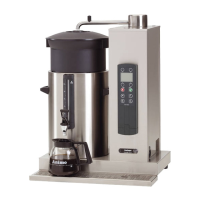
Lists and describes the main parts of the appliance for reference.
Details on capacity, boiler content, and hour capacity.
Specifications for electrical connection and water system.
Physical dimensions and weight of the appliance.
Specifies surrounding conditions for optimal appliance performance.
Lists recommended Animo brand maintenance and cleaning agents.
Guidance on suitable coffee and filter paper types.
Steps for safely unpacking and verifying the appliance's completeness.
Guidelines for preparing the installation site and appliance placement.
Instructions for connecting to the water supply and recommended treatment.
How to connect the overflow pipe for proper drainage.
Wiring instructions for connecting the appliance to the power supply.
Steps for securely mounting the appliance to a wall.
How to adapt the swivel arm protection for optimal use.
Procedure to flush the flow water system before initial use.
Procedure to flush the hot water boiler system before initial use.
Setting up language, time, and date.
Initial configuration of coffee and hot water parameters.
Explains the function of each button on the control panel.
Details on the On/Off switch, Timer, and Selection buttons.
Explains symbols for boiler, brew volume, and position indicators.
Explains symbols for clock, timer, scale, container heating, and leaking.
Symbols indicating container or swivel arm position faults.
Symbols related to resolving errors and restarting processes.
Steps to prepare the appliance for daily operation.
Rules for optimal coffee brewing, including filter and coffee usage.
Steps to start the brewing process and choose volume.
Instructions for adding coffee and starting the brew cycle.
How to monitor progress and post-brew care.
Steps for brewing tea using the appliance.
Tips on optimal extraction time and container care.
How to program the appliance for timed brewing.
Explains the timer display and important operational notes.
Procedure for dispensing hot water from the dedicated system.
Advice on temperature and usage after periods of inactivity.
Instructions for cleaning the exterior and electrical connections.
Routine cleaning steps for the inner pot and other parts.
Steps for removing coffee residue using a special remover.
Detailed instructions for disassembling and cleaning the tap.
Procedure for safely cleaning the gauge glass and its components.
Identifies the parts of the gauge glass assembly for cleaning.
Procedures for periodic descaling of both systems.
How to reset temperature protection mechanisms if triggered.
Steps to safely prepare the appliance for moving.
Lists Animo scale remover, coffee fur remover, and their article numbers.
Lists filters, blenders, containers, and other parts with article numbers.
Step-by-step guide to enter the operator menu using a PIN.
Lists available functions within the operator menu.
How to navigate the counters menu.
Details on daily/total coffee and hot water counters.
Introduction to the descaling functions.
Information on tracking litres until next descaling is needed.
Instructions for preparing the machine and solution for descaling.
Step-by-step guide to run the coffee maker descaling program.
Information on the hot water counter and descaling signal.
Steps to start the descaling program for the hot water system.
How to set the appliance language and current time.
How to set the date and manage sound signal preferences.
Lists available settings within the coffee menu.
Option to enable or disable appliance sound signals.
Adjusting the amount of water used per brew cycle.
Changing display units and setting cup volume.
Setting the volume for jug dispensing.
Customizing volumes for the four brew selection buttons.
Enabling/disabling automatic heating for containers.
Setting the descaling reminder based on water hardness.
Adjusting the amount of coffee grounds per litre.
Configuring pauses during brewing to prevent filter overflow.
Adjusting the initial water volume for brewing.
Setting the time for post-brew dripping.
Setting temperature units and choosing to display temperature.
Setting the desired temperature for hot water dispensing.
Setting the descaling reminder for the hot water system.
Procedure to reset all settings to factory defaults.
Explains error messages related to the coffee maker.
Explains error messages related to the boiler system.
Additional error codes for the boiler system.
Error messages related to hot water temperature issues.
 General
| Brand | Animo |
|---|---|
| Model | CB 5W |
| Category | Coffee Maker |
| Language | English |











 To Next Page