OptiMeOptiMe
2021/01 Rev. 0.4
2 / 38
Reset an error (operator)
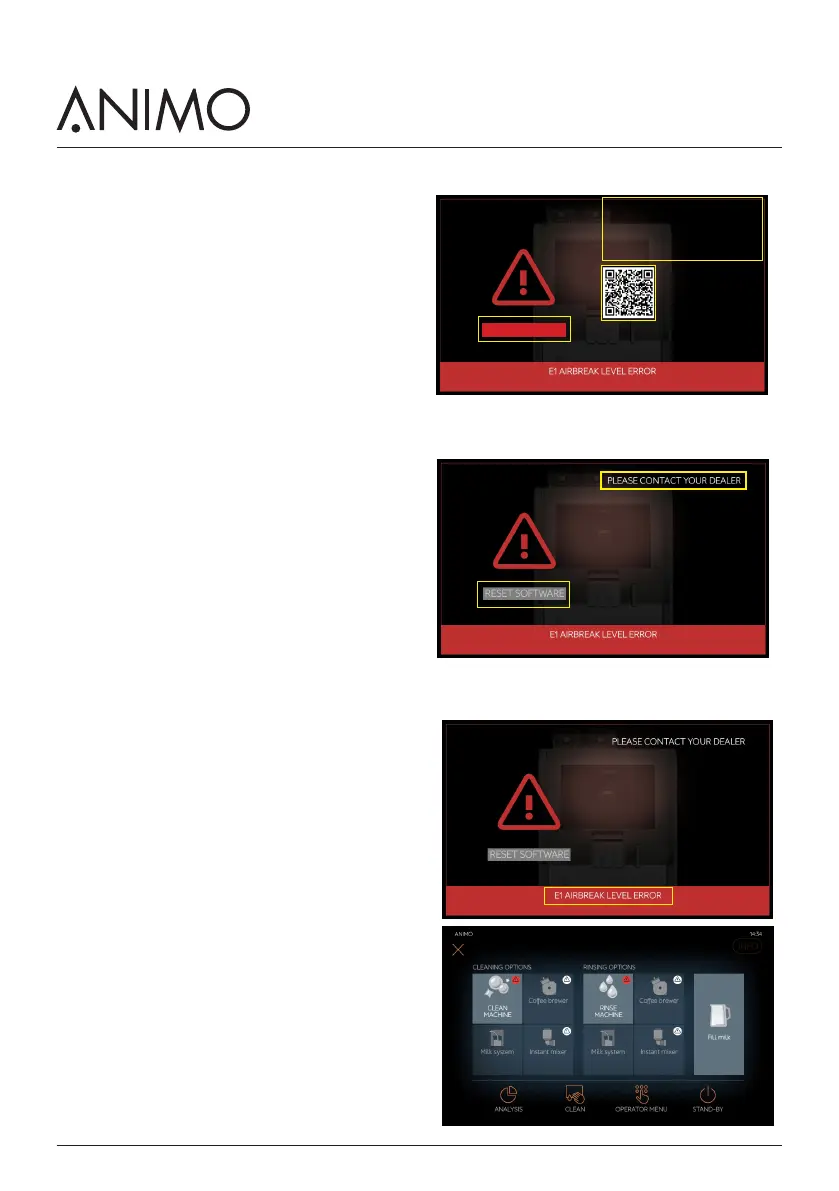
Follow the instructions [C] and [D] is displayed, for
example: check water pressure and restore it. The
operator solves the problem, someone closed the water
tap accidentally.
1. First open the door and than press the
reset button [A].
2. Close the door. The internal Application will restart.
3. When no error is shown anymore the problem is
solved. When the error returns you can repeat it
two more times. (3 reset attempts can be made in
total) .
4. After 3 reset attempts the reset button [A] is not
active anymore. The display will now show the
message [C] PLEASE CONTACT YOUR DEALER.
It is therefore very important that you entered your
dealer details during installation so your customer
know who to contact.
Reset an error (service engineer)
If your service technician wants to reset the software
and the reset button [A] is no longer active, there are
two options
1. Open the door.
2. Switch the machine OFF, and 5 seconds later ON
again.
3. The second option is given below.
Menu access via the error display
You can still access the service menu when the display
shows you an error [B].
1. Open the door.
2. Press the error text line [B] in the red bar at the
bottom. The menu will appear. Close the door for
easy navigation.
3. Enter the OPERATOR MENU
Check the water supply (pressure), open the
water tap completely. Check the hoses for
kinks. Check the level of the (optional) water
tank. Open door and press reset
DEALER INFO:
Name
Phone number
Email address
C
D
A
SCAN QR CODE FOR MORE
INFORMATION OR TIPS
RESET SOFTWARE
DEALER INFO:
Name
Phone number
Email address
C
A
DEALER INFO:
Name
Phone number
Email address
B












 To Next Page