2221
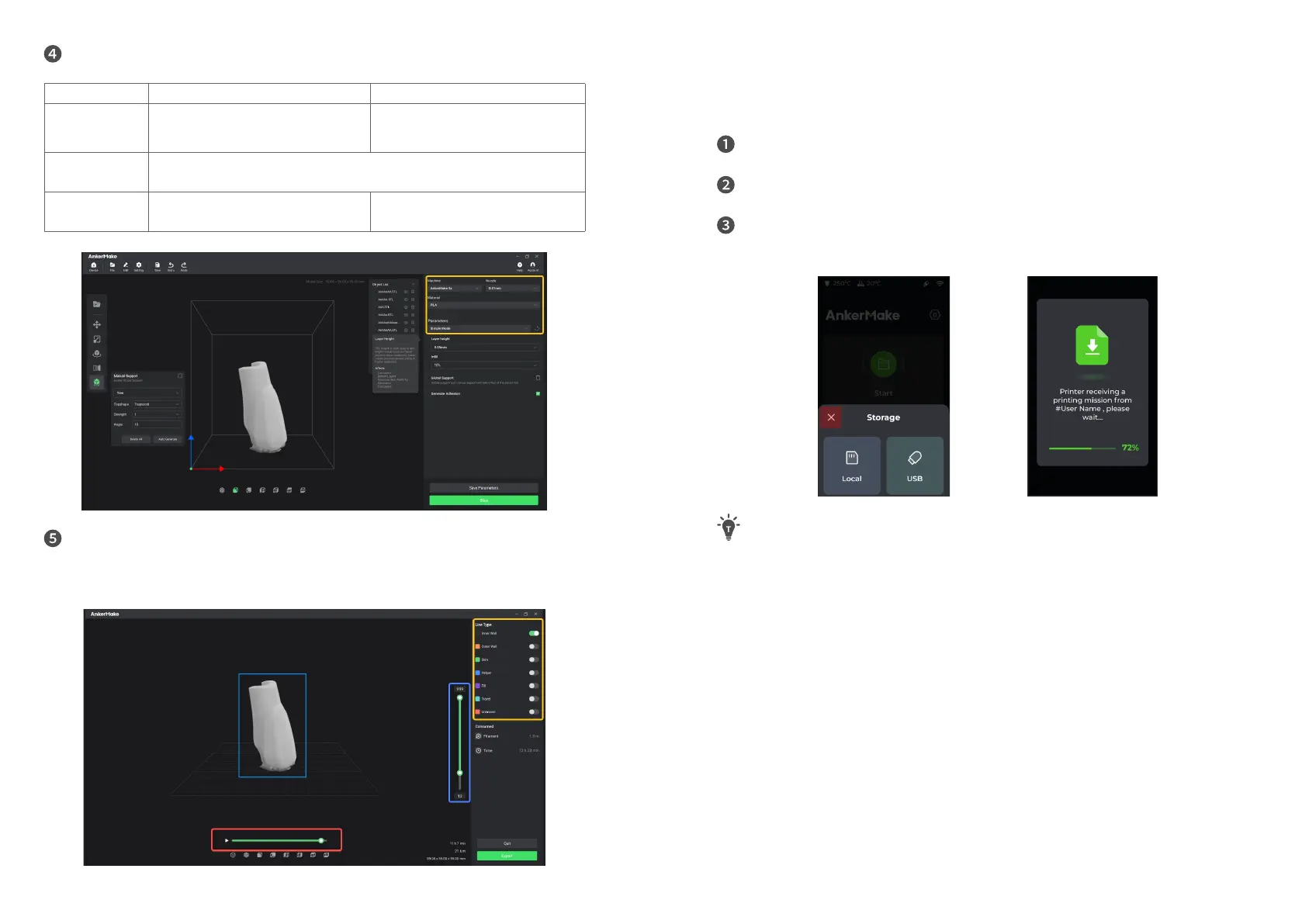
Select your device, materials and preset parameters to slice.
Easy Mode Professional Mode
Denition
•
Get started quickly.
•
Built-in prole.
•
All parameters can be customized
to meet professional requirements.
•
Meet all slicing requirements.
Materials
Supported
•
PLA+
、
ABS
、
PETG
、
TPU by default.
•
Customized materials.
Adjustable
Parameters
Layer height, Inll type, Global support,
General Adhesion.
All
Slice, preview and export a le with Gcode format.
• Yellow Frame: Shows different structures.
• Red Frame: Scans planning path of current layer.
• Blue Frame: Previews different heights.
Importing Files
You have three options for importing les to be printed.
Plug your USB ash drive that stores les into the USB-C port, then tap
Print
>
USB
and select a le to print.
Transfer the Gcode le to this device through the AnkerMake app, then tap
Print
>
Local
and select a le to print.
Transfer the Gcode le to this device through the AnkerMake Slice software, then
tap
Print
>
Local
and select a le to print.
No documents can be received during printing.


 To Next Page