5
BEFORE FIRST USE
Unpack the appliance and check if all parts are there and undamaged. Should this not be the case,
return the product to Kmart for replacement.
Danger of suffocation! Keep all packaging materials away from children.
Dispose of the packaging materials properly. Inform yourself at the local authorities regarding
collection points or garbage separation.
Remove all protective foils and packaging material prior to use.
POWER SUPPLY
Insert the AC adapter into a AC 100V-240V ~ 50/60Hz mains outlet and the other end of the cord int
he
n the back of the unit.
INSERTING BATTERIES FOR MEMORY BACKUP
It is advisable to fit batteries (not supplied) in the battery compartment to prevent the loss of the
display time and settings during a power failure. During a power failure, the unit can save the time
1. Disconnect the radio from power.
2. Drive out the screw on the battery cover.
. Remove the battery compartment door and insert 2 x AAA size batteries, matching the polarity
(+ and -) as shown in the battery compartment
.
3
. Replace the battery compartment door.
Note: When operating with batteries only, the display will be blank and the clock will only remain
accurate for a short period of time. The clock accuracy will decrease due to the voltage drop of the
backup batteries. It is important that the mains supply is restored as soon as possible. If no backup
batteries are installed or the power interruption is prolonged, you will need to set the clock again.
o
DC 5V jack
repeatedlypressthe
buttontoset
the
correct
hourdigits.
4.)Press theSETbutton toconrmthehoursettingandtheminute
digits
will
ash
topromptforinput.
5.)While the minute digits are ashing, repeatedlypressthe
until
the correct
minute digits are displayed.
6.)Press theSET button againtocompletetheclocksetting.
SETTING THE CLOCK
or(3) (4)
(6)
button
or(3) (4)
(6)
4
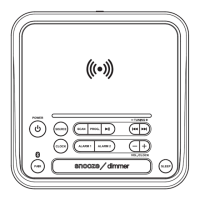
1.) Press the button (1)
to put the Radio into standby mode.
2.) To set 12H or 24H system, press and hold the SET button (6), press the (3)or (4)
button to select, press the SET button (6) again to confirm.
3.) The hour digit will flash,
o
t



 To Next Page