PERATION
DIMMER FUNCTION
2.) Press
the AM/FM button repeatedly
to
select
the
FM
mode.
TheFM
frequency
3.) Pressandholdeitherthe
buttontoautomaticallysearchforastation,
NOTE:
6.) Repeat
steps3-5tosearchfor,andstorethedesiredstations.20stationscan
bestored
in
total.
7.) Press the button
TheLEDdisplay willshowthefrequencyofthe
selected.
Thentheunitwillstartplayback.
8.) Adjustthesoundlevelbypressingthe
Press the button repeatedly to fine tune the received station.
4.)
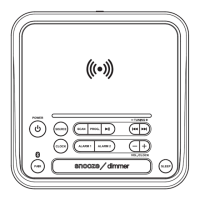
Press and hold the MEM button (5), "P01" will blink on display, then press the
MEM
NOTE:
i. Fully extend and relocate the FM antenna to get better reception.
theunit standbymode,presstheSNOOZE button
to
adjust
the
LED display
brightness to high or low level.
button to select the storage location.
it will stop and play
when a station is found.
Put into
(2)
or(3) (4)
(3)
(4)
Press the MEM button (5) again to confirm the setting.
5.)
(5)
(11)
(8)
1.) Press the button (1)
to turn on the Radio.
indicator will light up.
or(3) (4)
or
to recall the stored stations, then press the
to select the desired station.
or(3) (4)
presetstation
button.
or
(7)
(9)
FM O
Or press and hold the SET (6) button to scan and store the available stations automatically.
PERATIONAM O
2.) Press
the AM/FM button repeatedly
to
select
the
AM
mode.
TheFM
frequency
3.) Pressandholdeitherthe
buttontoautomaticallysearchforastation,
it will stop and play
when a station is found.
(2)
or(3) (4)
1.) Press the button (1)
to turn on the Radio.
indicator will turn off.
6.) Repeat
steps3-5tosearchfor,andstorethedesiredstations.20stationscan
bestored
in
total.
7.) Press the button
TheLEDdisplay willshowthefrequencyofthe
selected.
Thentheunitwillstartplayback.
8.) Adjustthesoundlevelbypressingthe
4.)
Press and hold the MEM button (5), "P01" will blink on display, then press the
MEM
button to select the storage location.
(3)
(4)
Press the MEM button (5) again to confirm the setting.
5.)
(5)
or
to recall the stored stations, then press the
to select the desired station.
or(3) (4)
presetstation
button.
or
(7)
(9)
Or press and hold the SET (6) button to scan and store the available stations automatically.
NOTE:
i. Relocate the unit to get better reception.
7



 To Next Page