6
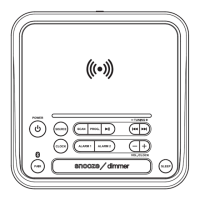
2.)Pressandholdthe or buttonuntilthehourdigits
blinks.
TheAlarm indicator willlightdependingonwhichalarmis
chosen.
3.)
When
the
hour
digits
blinks,
press
the
to
adjust
your
desired
4.)Press
the buttontosavethehoursetting,the
minute
digits
willblink.
5.)Whentheminutedigitsblink,pressthe
adjustyourdesired
6.) theminutesetting.
7.)
Press
to
select wakeup mode for buzzer (showing “buzz”)
or
radio(showing“rAd”).
8.)
Pressthe
to select the wakeup volume.
TURNING THE ALARM ON/OFF
Pressthe todeactivatethealarm.The
previous
presetswill
becancelledandyoucanfollowthealarmsettingstepstoresetthe
alarm.
Whenthealarmrings,presstheSNOOZE button once.Thealarm
will
stop
andringing
Thesleeptimerallowsyoutoturntheunitoffafterthepresettimeisreached.
1.)Selectthedesiredradiostation
setthe
volume
to
the
comfortable
level.
the SNOOZE button repeatedly to select a sleep time.
Each
time
thebutton
ispressed,thesleeptimewillbedecreasedin10minute
increments.
Theunitwillplayfortheselectedperiodoftimethenautomatically
turn
off.
3.) To cancel the Sleep timer function, press SNOOZE button (8) repeatedly until "OFF"
appears on the display.
NOTE:
Press SNOOZE(8) to show the remaining time.
2.) Press
SLEEP TIMER
SNOOZE FUNCTION
SETTING THE ALARMS
button
or(3) (4)
hourdigits.
(7)
(9)
to
button
minutedigits.
the
button
or(3) (4)
button
button
2.)
(8)
(8)
1.) Press the button (1)
to put the Radio into standby mode.
ringing
or
(7)
(9)
or(3) (4)
Press
the buttontosave
or
(7)
(9)
Press
the buttontosave.
or
(7)
(9)
Press
the buttonto
or
(7)
(9)
or(3) (4)
1.) Press the button (1)
to put the Radio into standby mode.
or
(7)
(9)
ring again after 9 minutes.
save and finish setting.
STOP THE ALARM RINGING
Whenthealarmrings,pressthe button
(1)
to stop ringing.
NOTE:press and hold the button (7) for Alarm 1
press and hold the button (9) for Alarm 2



 To Next Page