Page 10 of 16
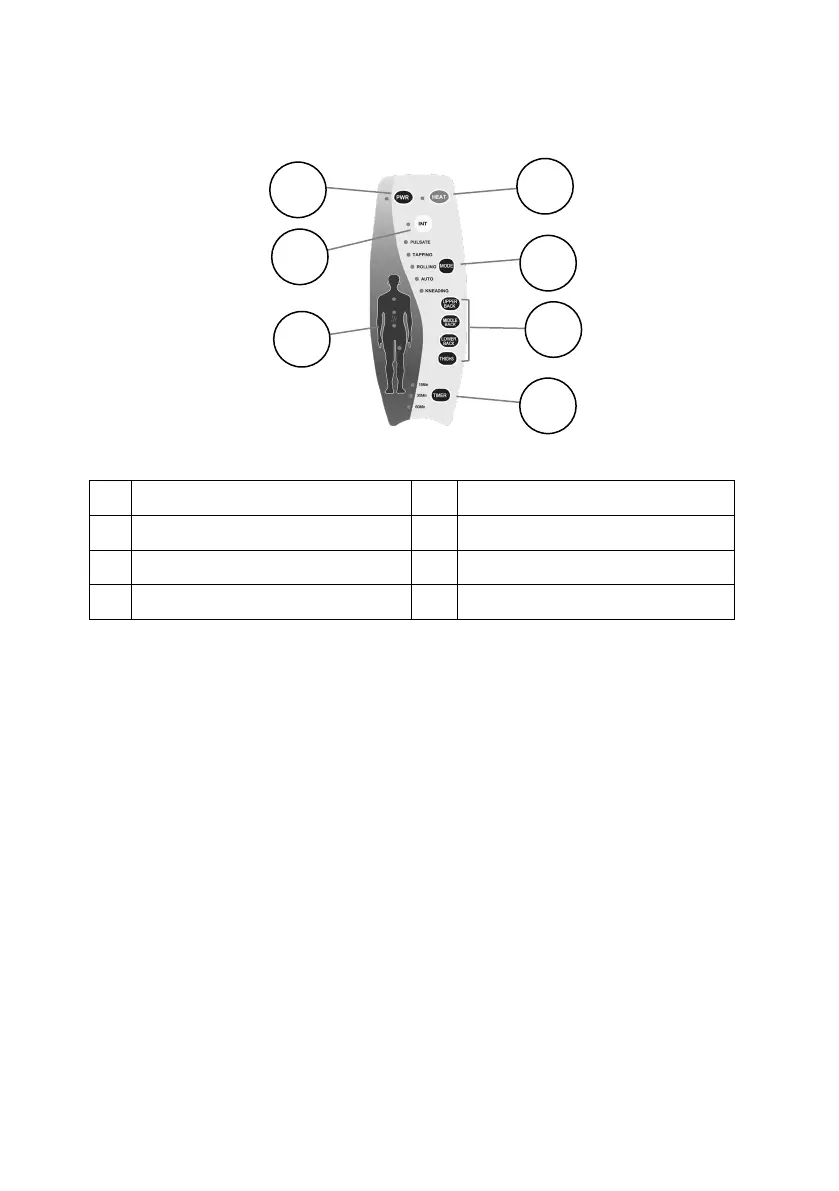
6 Massager Controller
Note: When first turned on, the controller will default to Mode “Auto”. You can then
change the Mode or operate the massage zones manually.
1 On / Off “PWR” Button 5 Manual Selector Button
2 Heater On / Off Button 6 Body Diagram Zone Indicator
3 Intensity “INT” Button 7 Auto-Off Timer Selector Button
4 Mode Selector Button
6.1 On / Off “PWR” Button:
Press the On / Off “PWR” Button to switch On.
The Indicator Light will illuminate and the massager will start in the default Auto
mode.
Press again and the controller will turn Off. The indicator light will turn off.
6.2 Heat Button:
With power supplied to the Controller, press the Heat button and the Massager
Middle Back heater will start to heat and the Auto-Off timer will default to 15
minutes.
The Indicator Light will illuminate indicating it is heating.
Press this button again, and the Heater will turn off, as indicated by the indicator
light turning off.



 To Next Page