REPLACE LIGHT BULB
The Anova Precision® Oven uses a high
temperature G9 Halogen Lamp, 120 V, 25 W
inside the cavity. If the light requires
replacement, follow these steps:
1. Unplug the oven from the power supply
2. Ensure the oven is cool before
attempting.
3. Open the door and look to the upper
surface of the cavity.
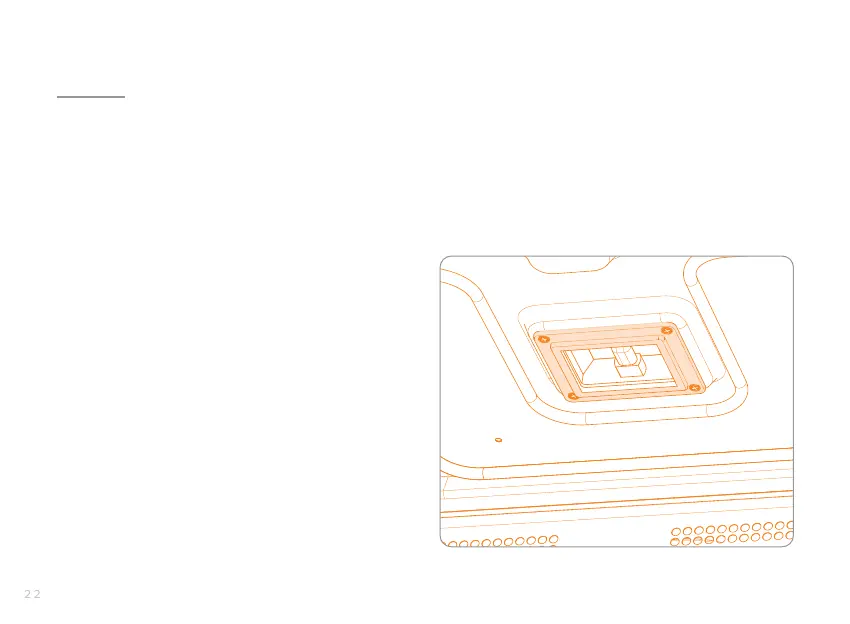
4. Carefully remove all four screws that hold
the light cover in place. See fig. 3.
5. While removing the fourth and final screw,
place a hand over the cover to avoid it
falling o.
6. Set the cover aside.
7. Carefully grasp the bulb and pull it straight
out of the socket (towards the front of the
oven).
8. Insert a new bulb and follow these steps
in reverse to re-assemble
NOTE: Do not overtighten the screws as this could
cause damage to the glass.
figure 3: light cover and screws


 To Next Page