249
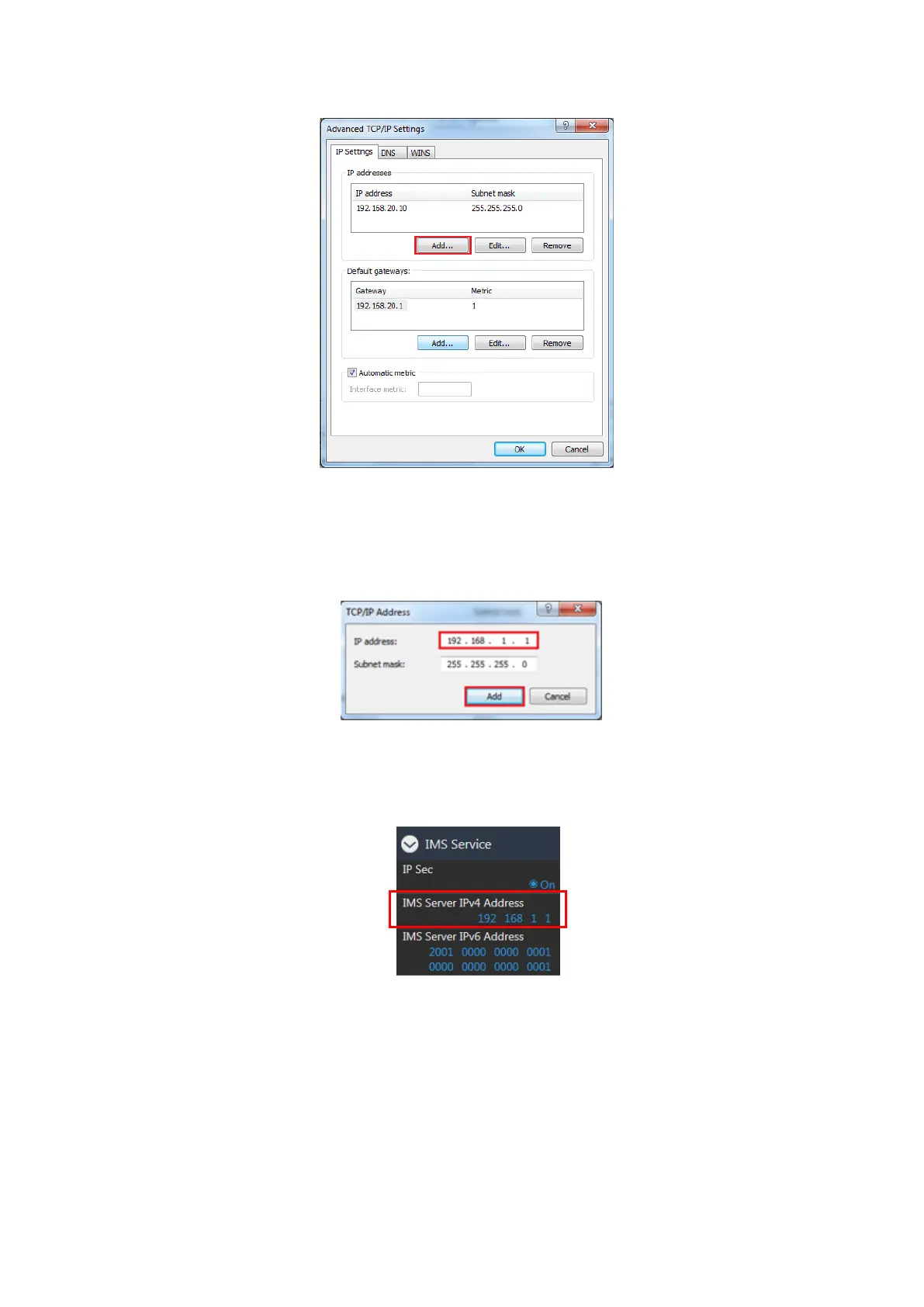
5. Click Add… to open the TCP/IP Address window.
Figure 7.1.2.5-5 Advanced TCP/IP Settings Window (MT8821C)
6. Click Add… to open the TCP/IP Address window.
7. Set IP address and Subnet mask as follows:
IP address: 192.168.20.10
Subnet mask: 255.255.255.0
Figure 7.1.2.6-6 TCP/IPv4 Address Window (MT8821C)
NOTE: Set the same IP address as with IMS Server IPv4 Address setting in the IMS Service settings of
Call Processing Parameters.
Figure 7.1.2.7-7 IMS Server IPv4 Address Setting Screen (MT8821C)
8. Click OK to close the TCP/IPv4 Address window.
9. Click OK twice to close the Internet Protocol (TCP/IP) Properties window.
10. Click Close close the Application Server1 Status window.















 To Next Page