8
Connecting the Front I/O Ports
3.1 USB 2.0 Ports
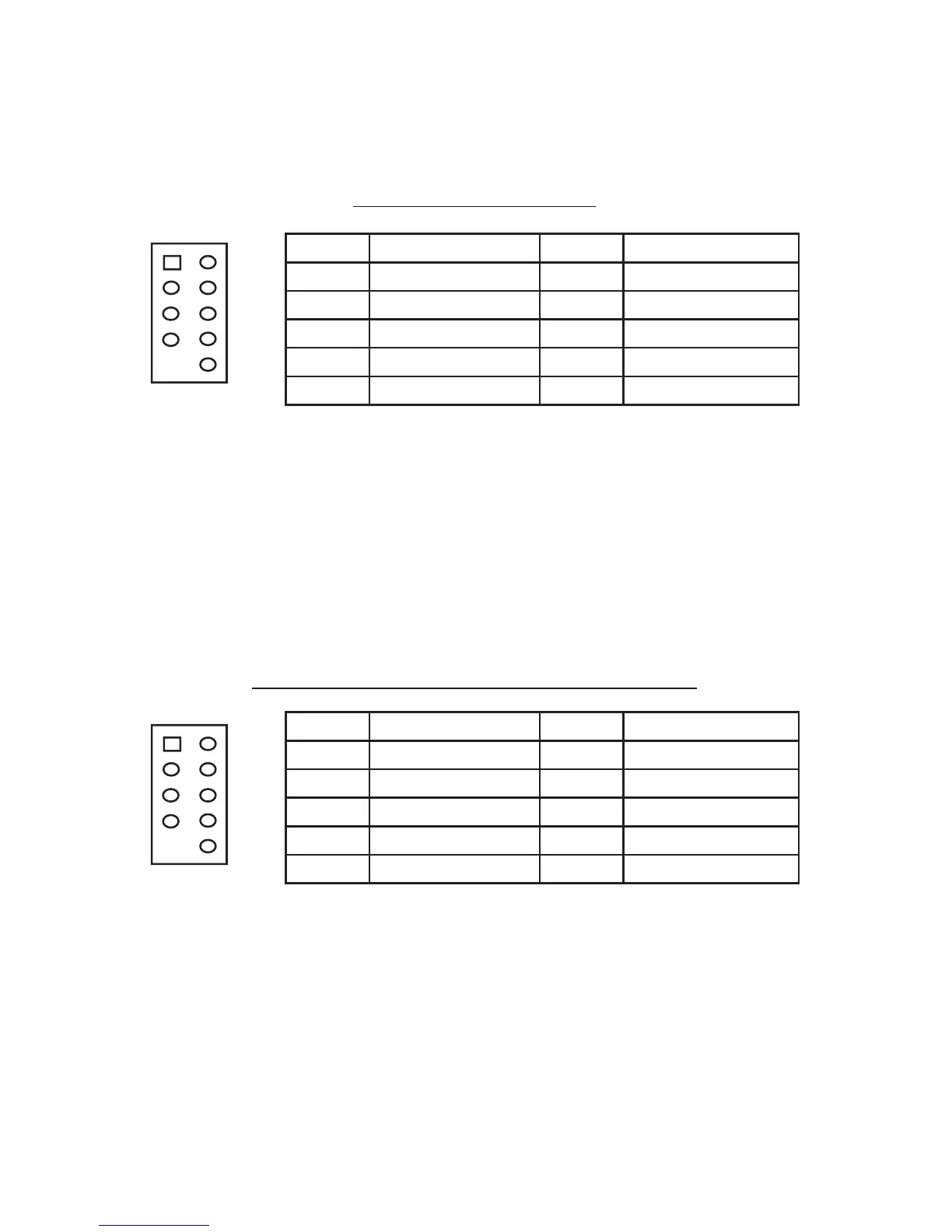
Connect the front I/O panel USB cable to the USB header pin on your mother-
board. Check the motherboard manual to ensure that it matches the table below:
Motherboard USB Pin Layout
Locate the internal USB connector on your motherboard and connect the
corresponding cable.
3.2 eSATA Port
Connect the front I/O panel SATA cable to a standard SATA connector on your
motherboard.
3.3 IEEE 1394 Port
Connected to the Skeleton front I/O panel there is an Intel® standard 10-pin
connector. The pin assignments for these connectors are as follows:
Pin Assignment for Front Panel IEEE 1394 Connector
Locate the internal IEEE 1394 connector on your motherboard and connect the
corresponding cable.
Pin Signal Names Pin Signal Names
1
USB Power 1
2
USB Power 2
3
Negative Signal 1
4
Negative Signal 2
5
Positive Signal 1
6
Positive Signal 2
7
Ground 1
8
Ground 2
9
Key (No Connection)
10
Empty Pin
12
10
9
Pin Signal Names Pin Signal Names
1 TPA+ 2 TPA–
3 Ground 4 Ground
5 TPB+ 6 TPB–
7 +12V (Fused) 8 +12V (Fused)
9 Key (No Pin) 10 Ground
12
109



 To Next Page