7
4. Connect the data and power connectors from the motherboard and power
supply to the device.
Note: It may be necessary to remove the motherboard tray and/or side screens as
detailed in sections 2.2 and 2.3 to effectively route cables to your devices.
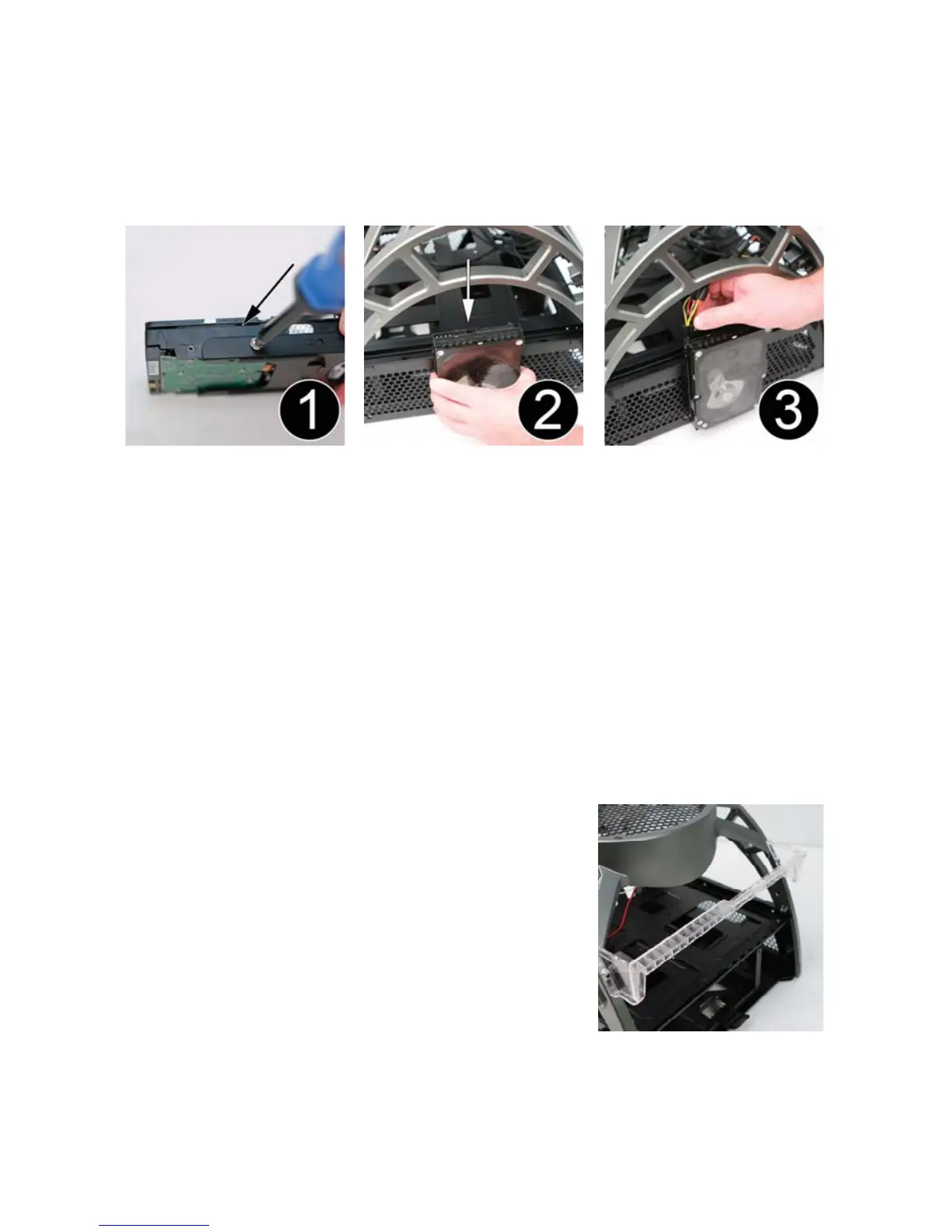
2.8 3.5” Device Frame-Mounted Installation
Your Antec Skeleton case has the ability to mount up to four additional 3.5”
devices externally on the Frame for additional storage capacity.
1. Align your 3.5” device with the included 3.5” device mounting plates and
secure them together with the included screws.
2. Hook the mounting plate along the sides of the Frame.
3. Connect the data and power connectors from the motherboard and power
supply to the device.
For extra stability and security, your mounted 3.5” device can be attached to the
inside of the screen panels with screws.
Note: It may be necessary to remove the motherboard tray and/or side screens as
detailed in sections 2.2 and 2.3 to effectively route cables to your devices.
2.9 PCI Card Mounting Bar installation
The Skeleton includes a PCI card mounting bar to help
stabilize your system’s PCI cards.
1. Align the PCI card mounting bar with the screw
holes on the back side of the Frame.
2. Mount the bar to the Frame with the screws
provided.



 To Next Page