12
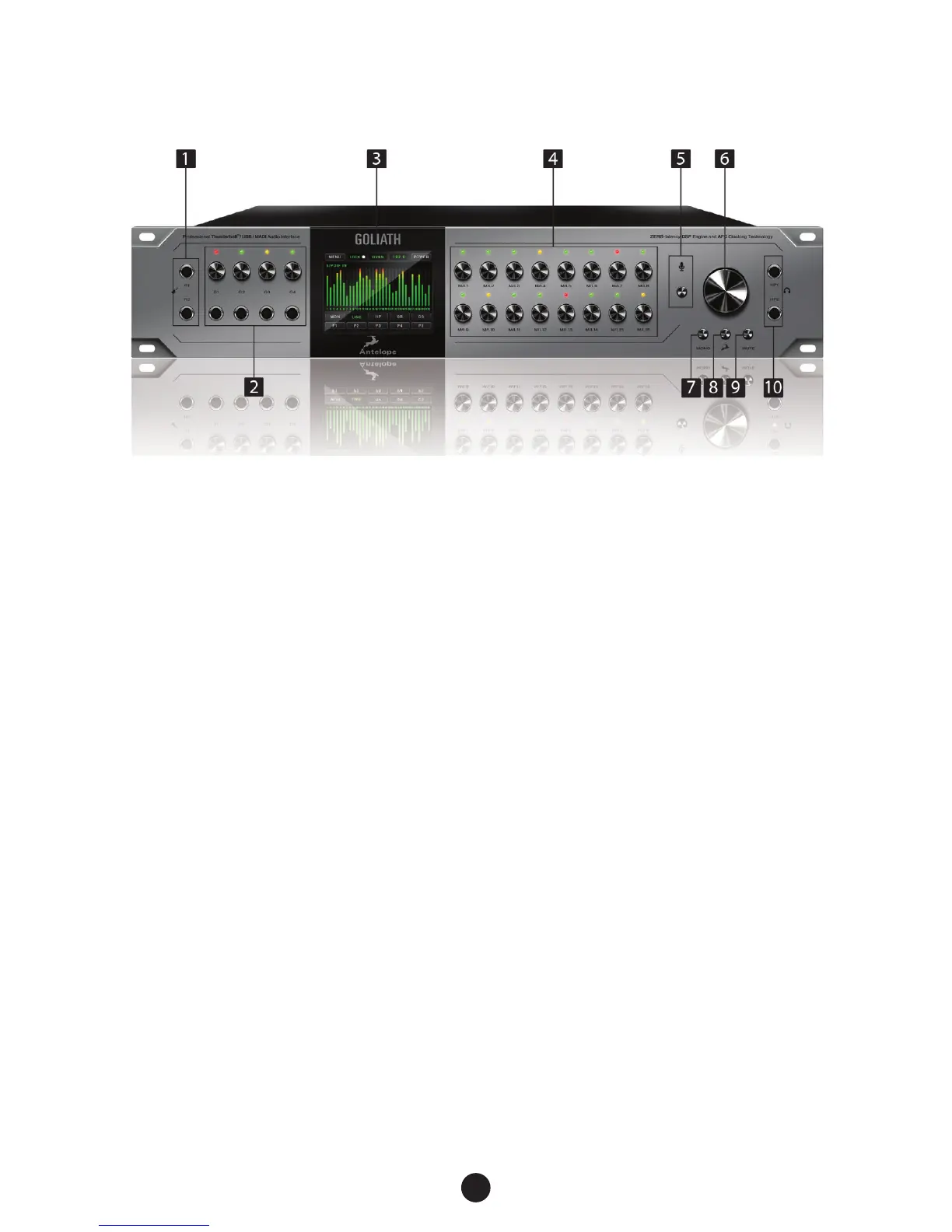
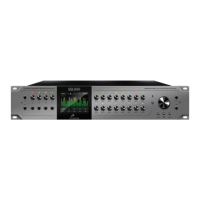
1. 2 Re-amp outputs
These outputs are direct outputs that should be used with guitar ampliers for
re-amping.
2. 4 Instrument Inputs
Hi-Z Inputs with dedicated rotary control knobs. Hi-Z Inputs are suitable for connecting
instruments such as bass or guitar to the Goliath.
3. High resolution “capacitive touch” TFT display
Multi function touch screen that displays various information.
4. Channel Gain Control knobs / Input Selectors
To adjust the input signal of the channel, turn the knob left/right. Value can be adjusted
in 1 dB steps. The peak indicator lights in response to the level of the input signal. Press
and hold the rotary knob to mute the corresponding channel.
To switch between the input modes (Mic, Line, Hi-Z on inputs 1-4) press the rotary knob.
Please ensure that your selection matches the type of input signal.
5. Talkback button and Talkback mic
Press the talkback button to activate the talkback microphone. This can be distributed to
the selected headphones and/or monitors using the software control panel.
6. Main Rotary Control
Big knob for monitor outs, line outs or HP volume control. By pressing it you can cycle
through the different outputs, the Reamp and Monitor Volume.
5. Front Panel Explained


 To Next Page