6
This section describes connections between system components. Configuration of
input and output will be discussed later, in section 3.
2.1 VIDEO INPUT AND OUTPUT
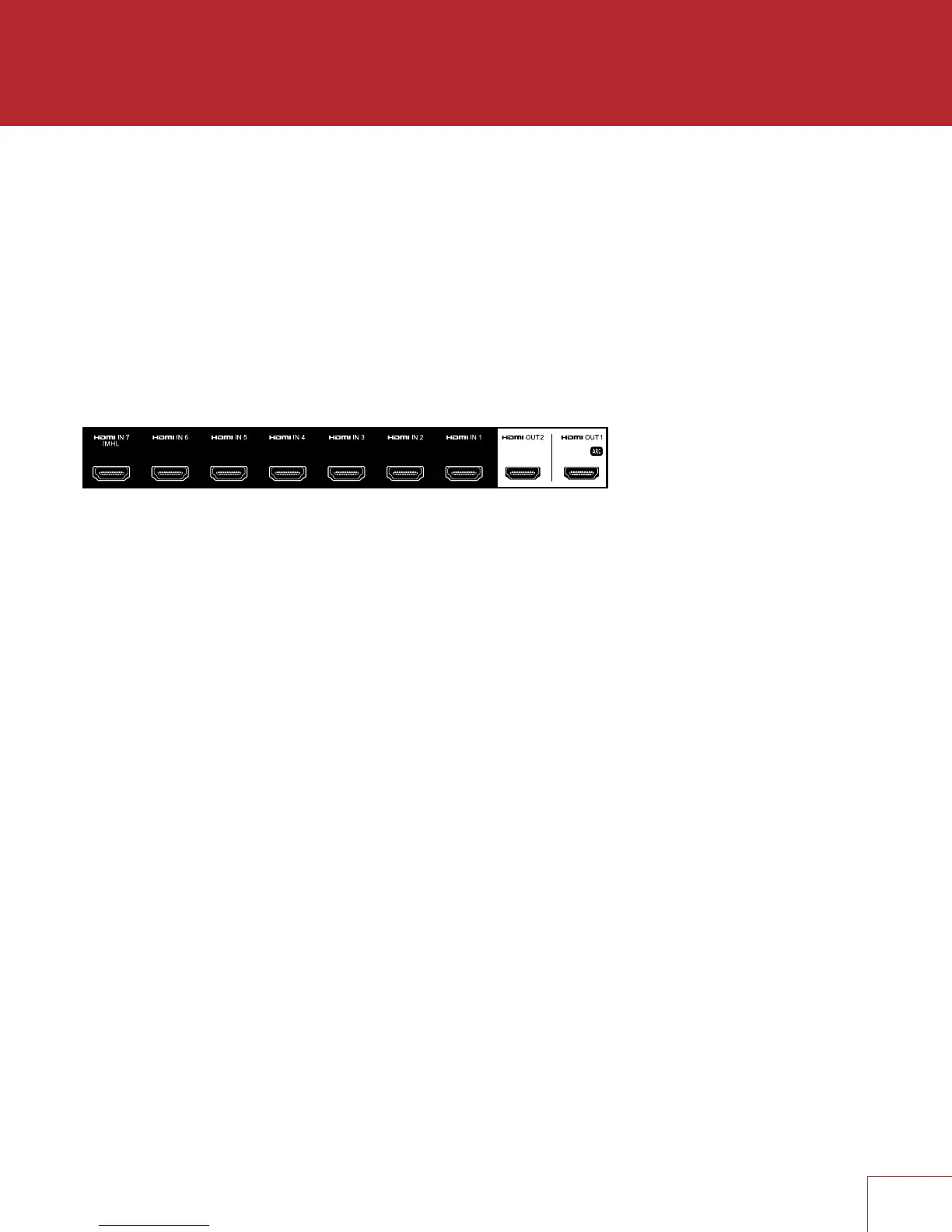
With HDMI connection, video and audio are carried together. Connect HDMI output
from MRX to a display with HDMI input – one with the appropriate version of High-
bandwidth Digital Content Protection (HDCP) is required to display copy-protected
material.
HDMI input 7 is also an MHL input (Mobile High-denition Link). Use this input if
the source component also supports MHL, for example smaller media players that
receive power through this interface.
Insert HDMI cables gently because the connector is more delicate than traditional
ones. Damaged cables can damage jacks, and replacement jacks are not covered by
warranty therefore replacing HDMI cables is recommended if there is any chance that
the existing ones have been used improperly.
Use only certied High Speed cables and connecting devices. Cables and connecting
devices that worked in an older setup do not necessarily work with newer video
formats such as Deep Color, UHD, or high frame rates. If you are using adapters or
port savers, start troubleshooting by eliminating them since they can affect bandwidth.
CONNECTIONS


 To Next Page