Right-hand button (5).
With instrument removed
• Long press (at least 2 seconds): sends a jet of water to the instruments
(Turbine, Micromotor and Scaler) (Water Clean System function); the jet
stops when the button is released.
• Short press: enables/disables the spray function.
The control works only when the Turbine and Micromotor are
in working position.
• A short sound warns of the switching.
When the LEDs (8) are on, they indicate operation WITH
spray.
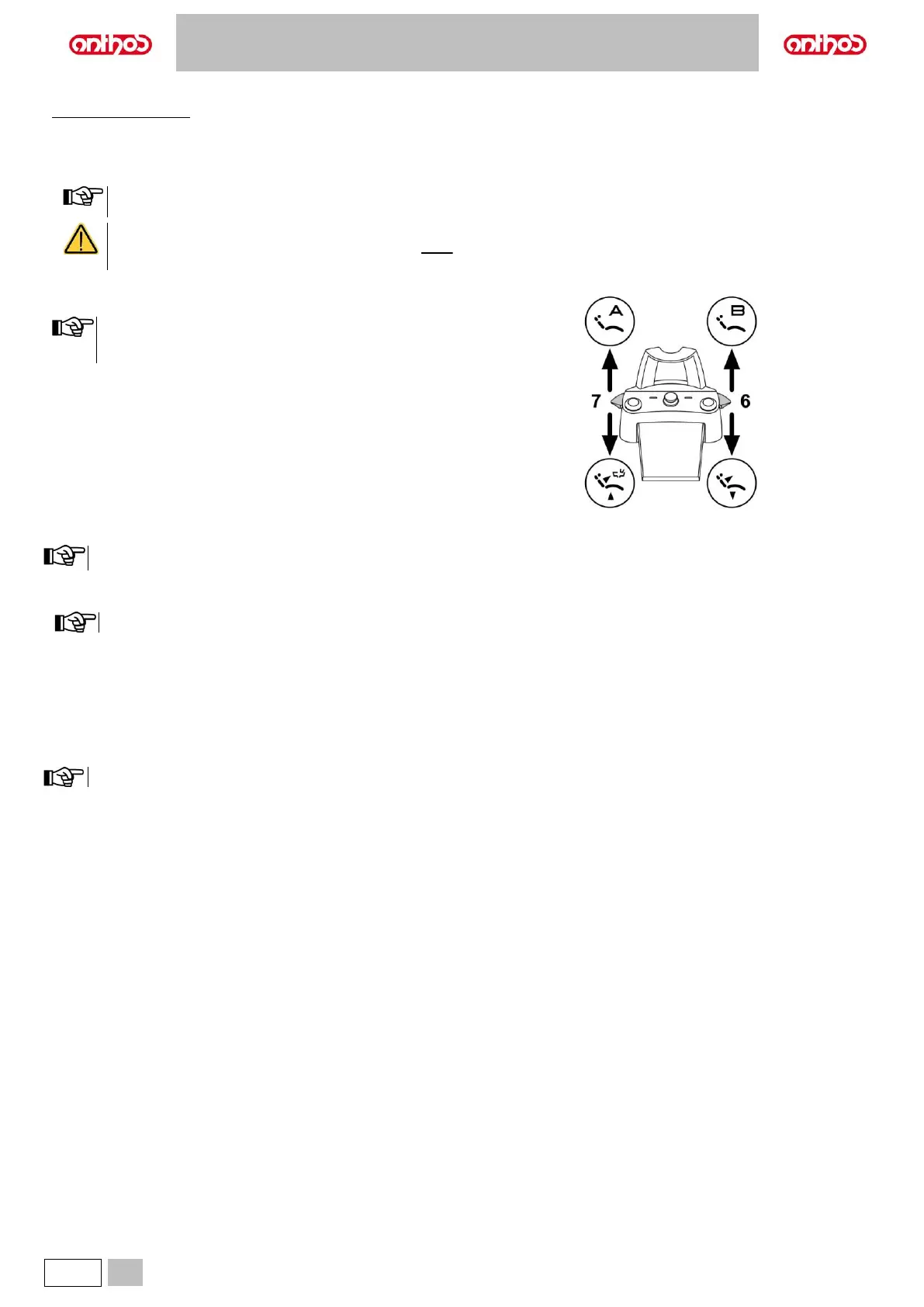
With instruments at rest, the lever can control all dental chair
movements; with instruments removed, only down controls are
active.
Pressure:
• recalls dental chair reset position (patient entry/exit).
Lifted:
• recalls the stored dental chair position "B".
With instruments at rest, the lever can control all dental chair movements; with instruments removed, only down controls are active.
Pressure:
• recalls patient rinse position.
When the lever is actuated the second time, the dental chair reaches its work position.
Lifted:
• recalls the stored dental chair position "A".
Protection against liquid penetration.
The foot control is protected against liquid penetration. Degree of protection: IPX1.
Cleaning.
Clean the foot control using a suitable product (see Paragraph 1.5).
If the foot control slips on the floor, remove any dust from the slip-proof rubber found under the base with a moist cloth.



 To Next Page