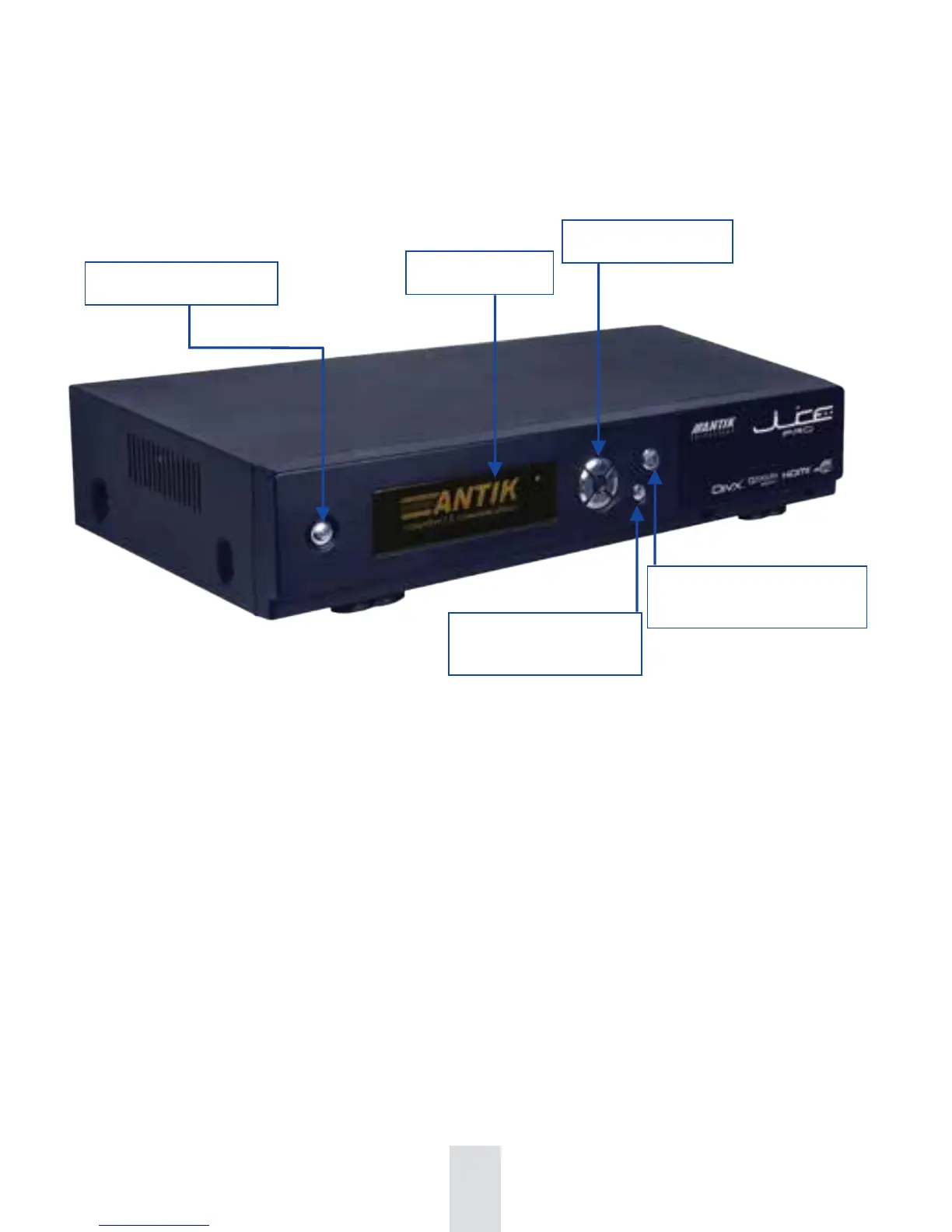
Standby Button
Display
Navigation arrows
MENU- to display or exit
from the menu
OK - confirmation
of selected option
IDENTIFICATION OF PARTS
Front Panel
By pressing the M button on front panel you obtain a basic menu of front panel:
Restart, IP Info, Language, IP Conf, Reinit, TV Output, GUI Menu.
RESTART - Restart STB, Restart GUI - possibility to restart set-top box or GUI application
itself.
IP INFO - Values displaying: IP, MAC, INT VLAN, IPTV VLAN, GATEWAY, DNS 1, DNS 2,
MASK, DHCP, GUI Version.
LANGUAGE - Language selection
IP CONF - Possibility to turn on/off DHCP server and setting of INT VLAN and IPTV VLAN.
REINIT - Factory settings - Set your STB into the initial settings in terms of TV outputs,
channel editor, display, parental lock, password and language-depending on your
television service provider.
Reload sources - Downloading of actual channels and EPG sources.
TV OUTPUT - Setting of TV mode (Single, Single+PiP, Dual+REC, Dual) and correct TV
outputs (HDMI 16:9 (PAL) - 720p, SCART 4:3 (PAL) - CVBS etc.)
GUI MENU - By selecting this option you can move within set-top box menu via front panel
buttons.
68


 To Next Page