SETTINGS – TV OUTPUTS
Use right arrow to enter the right side of Settings. Use Menu button to return to the
left side of Settings.
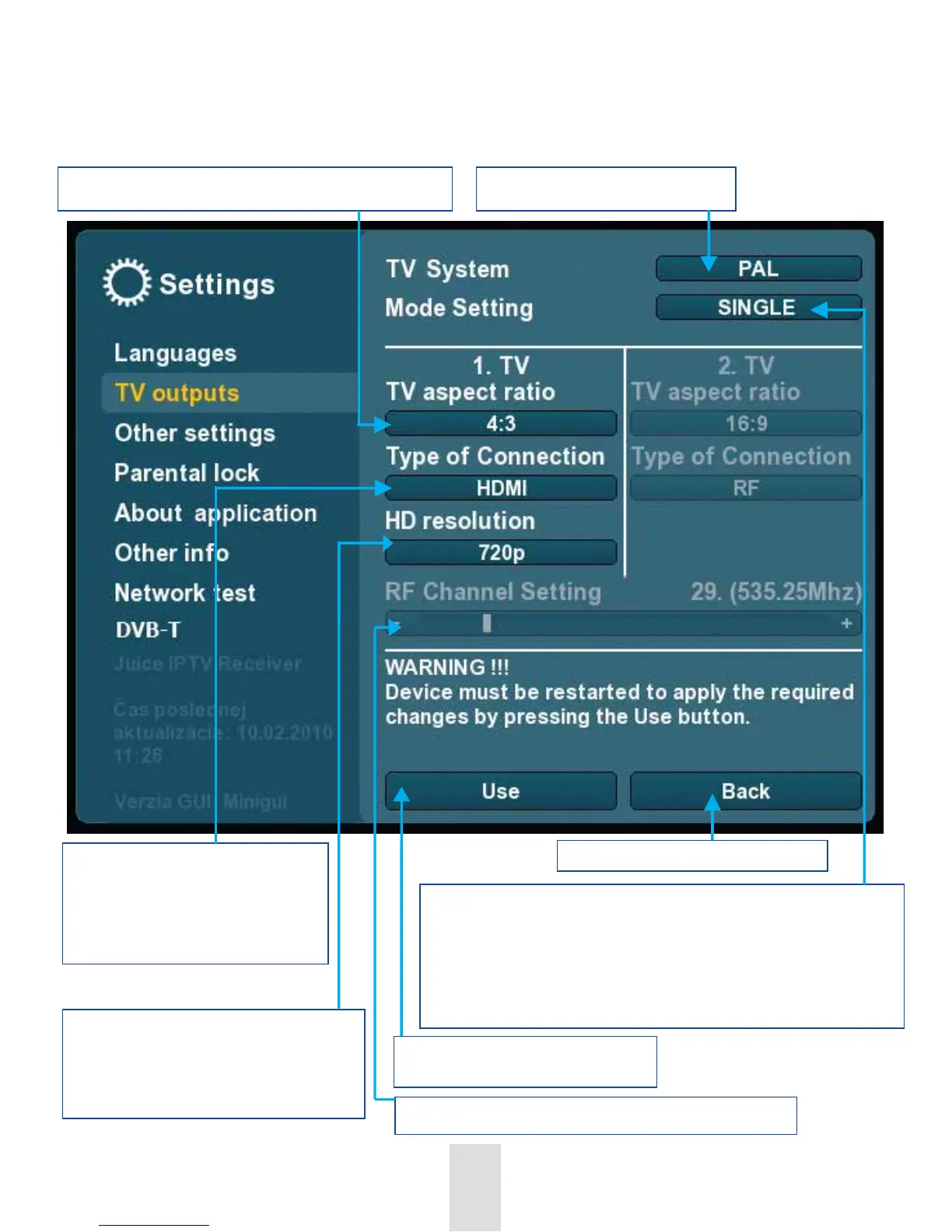
Various types of connections of
set-top box to TV. HDMI / DVI
monitor / YPbPr / SCART-
CVBS / SCART- S-video/RF
When Type of connection is HDMI or
DVI monitor or YPbPr you may
choose HD resolution
1080i / 720p / 576i - (480i for NTSC).
Selecting the right channel for RF type of connection
Confirming of the selected choice.
Set-top box will restart.
Return to the left side of Settings
Single – connecting of 1st TV set
Single+PIP – connecting of 1st TV set+PIP functionality
Dual+Rec - possibility to watch one channel and record different
one by external recording device
Dual - connecting of two TV sets
TV aspect ratio: Switching the formats 16:9 / 4:3
Broadcast system PAL / NTSC
79


 To Next Page