EasyManua.ls Logo

Antunes Chick-fil-A RT-2 - User Manual

Antunes Chick-fil-A RT-2
20 pages
Print Icon
To Next Page IconTo Next Page
Loading...
P/N 1011309 Rev. B 04/17
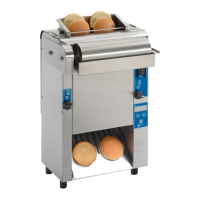
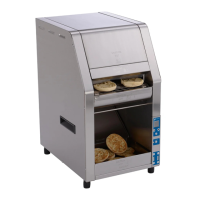
Mini Radiant Toaster
Model RT-2
Mfg. Number
9210906
www.antunes.com
EQUIPMENT
Radiant Toaster

Questions and Answers

  • B
    Brittany JenkinsAug 16, 2025
    How to troubleshoot unusual sounds from Antunes Chick-fil-A RT-2?
    • R
      Robert AlvarezAug 16, 2025
      Unusual sounds from the Antunes Toaster may be due to several reasons. Start by adjusting the conveyor belt chains. Also, lubricate the motor drive chain. If the sound persists, contact Antunes Technical Service, as the conveyor shaft bearing may be binding.
  • J
    Joseph Tucker PhDAug 19, 2025
    What causes unusual sounds from the fans in my Antunes Chick-fil-A RT-2 Toaster?
    • K
      Katherine PittmanAug 19, 2025
      Unusual sounds from the fans in your Antunes Toaster can be caused by failed cooling fans. Verify that the vents on the toaster are unblocked and not near other heating appliances, and clean the fans. Another reason might be that the cooling fans are dirty and need to be cleaned. If the error persists, contact Antunes Technical Service.
  • M
    michaelbrownAug 22, 2025
    What does 'Conv Fan Fault' mean on my Antunes Chick-fil-A RT-2 Toaster display?
    • J
      James HudsonAug 22, 2025
      The 'Conv Fan Fault' message indicates that the upper cooling fan is either dirty or faulty. Inspect the cooling vents at the top and bottom (back of unit) and ensure they are clean. Also, ensure that the unit has enough space on both sides and at the rear. If the condition continues, contact Antunes Technical Service.
  • H
    Heather SmithAug 26, 2025
    How to fix Antunes Toaster when there is no control display?
    • J
      Jessica DicksonAug 26, 2025
      If the Antunes Toaster display is not working, first ensure the power cord is properly plugged into the electrical outlet. Check if the Hi-Limit has tripped and allow the unit to cool before resetting it. Also, verify the circuit breakers are on and inspect the power cord, plug, and outlet for any damage. Check and replace or align the communication cable if it's faulty. If the transformer is faulty, replace it.
  • M
    Mary SmithAug 28, 2025
    What to do if my Antunes Chick-fil-A RT-2 display reads 'Hi-Limit Tripped'?
    • S
      stephen67Aug 28, 2025
      If the display reads “Hi-Limit Tripped,” allow the Antunes Toaster to cool down for 10-15 minutes. Then, remove the Hi-Limit control cap at the rear of the unit and press the Hi-Limit Reset button. Turn the unit on and test it. If the issue continues, contact Antunes Technical Service for assistance.
  • T
    Todd ShortAug 31, 2025
    Why Antunes Chick-fil-A RT-2 conveyor does not turn on?
    • C
      carlosmckinneyAug 31, 2025
      If the conveyor belt/chain has stretched, measure and adjust it as described in the Maintenance section of this manual. Ensure the setscrew is tight on the flat part of the shaft if the sprocket is loose. Reinstall the drive chain if it came off the sprocket(s). Check for any internal obstructions within the conveyor system and clear them. Also, make sure to lubricate the chain.
  • B
    belljoseSep 2, 2025
    What causes 'High Intern Temps' message on my Antunes Chick-fil-A RT-2 Toaster?
    • M
      Michelle WoodSep 3, 2025
      The 'High Intern Temps' message indicates that the toaster's electrical compartment is overheating due to a lack of airflow. Inspect the cooling vents at the top and bottom (back of unit) and ensure they are clean. Make sure the unit has enough space on both sides and at the rear.
  • M
    Michael KhanSep 6, 2025
    Why does the conveyor hesitate on my Antunes Chick-fil-A RT-2?
    • K
      Kelsey SullivanSep 6, 2025
      Conveyor hesitation in your Antunes Toaster can be due to a few reasons. First, check for loose or misaligned sprockets and tighten the set screws. Another potential cause is a loose or stretched motor drive chain; try tightening or replacing it. If these steps don't resolve the issue, contact Antunes Technical Service.
  • A
    afitzpatrickSep 9, 2025
    Why do crowns/heels get stuck and burn in my Antunes Chick-fil-A RT-2 Toaster?
    • J
      Jared MartinezSep 9, 2025
      If crowns and/or heels must be forced into the toaster and buns are sticking and burning, it could be that the conveyor belt chains are skipping on the sprockets. Adjust the conveyor belt chains according to the Maintenance section of this manual. If the drive motor stalls intermittently, contact Antunes Technical Service.
  • G
    Gregory RogersSep 12, 2025
    What to do if my Antunes Chick-fil-A RT-2 display reads 'Motor Running Slow'?
    • P
      Philip NorrisSep 12, 2025
      If the display reads “Motor Running Slow”, check the bottom wire conveyor and surrounding areas for any obstructions or jams. If the wire conveyor belt is too loose or sagging, remove the necessary links to shorten it. If the wire conveyor belt is broken or damaged, replace it.

Summary

General Information and Assistance

General

General information about the toaster's manual and operation.

Service and Technical Assistance

Contact information and procedures for obtaining technical support.

Warranty Information

Overview of the toaster's warranty coverage and important notes.

Important Safety and Warnings

Important Safety Information

Essential safety guidelines for the safe operation of the unit.

Warnings

Critical warnings regarding operation and maintenance hazards.

Specifications

Installation

Operating Instructions

Toasting Product

How to insert and toast product correctly in the toaster.

Product Adjustments and Settings

Adjusting Toast Quality

Steps to change the toasting darkness level.

Purging Product

Procedure for removing product from the toaster.

Factory Reset

How to restore the toaster to its original factory settings.

Toaster Settings and Maintenance

Toaster Settings

Recommended settings for toasting various products.

Shutting Down the Toaster

Steps to properly turn off and cool down the toaster.

Hi Limit Reset Button

How to reset the unit's high-limit control.

Maintenance

General maintenance procedures for the toaster.

Quarterly Maintenance and Error Messages

Quarterly Maintenance

Periodic maintenance tasks for the toaster.

Inspect Conveyor Belt Chain

Checking the condition and tension of the conveyor belt chain.

Measuring Conveyor Belt Chain

Procedure for checking and adjusting conveyor belt chain length.

Error Messages

Understanding and responding to toaster error codes.

Fan Cleaning Procedures

Cleaning the Fans

Instructions for cleaning the top and bottom cooling fans.

Top Fan Cleaning

Steps to clean the upper cooling fan assembly.

Bottom Fan Cleaning

Steps to clean the lower cooling fan assembly.

Conveyor Belt Chain Procedures

Adding;Removing Conveyor Belt Chain Links

How to adjust conveyor belt chain tension by adding or removing links.

Replacing the Conveyor Belt Chain

Procedure for replacing the entire conveyor belt chain.

Troubleshooting

Replacement Parts

Wiring Diagram

Limited Warranty

Antunes Chick-fil-A RT-2 Specifications

General IconGeneral
BrandAntunes
ModelChick-fil-A RT-2
CategoryToaster
LanguageEnglish

Related product manuals