EasyManua.ls Logo

Antunes HCT-5H - User Manual

Antunes HCT-5H
24 pages
Print Icon
To Next Page IconTo Next Page
Loading...
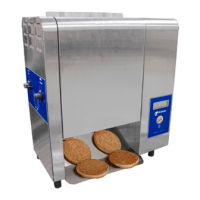
HCT-5H BUN TOASTER
1
P/N 1011256 Rev. I 3/18
McDonald’s
HORIZONTAL CONTACT TOASTER
HCT-5H
MFG. NO. 9210850
Place this manual in the Toaster section
of your Equipment Manual.
Manufactured exclusively for
McDONALD’S
®
BY
A.J. ANTUNES & CO.
180 KEHOE BLVD.
CAROL STREAM, ILLINOIS 60188, U.S.A.
PHONE: +1-630-784-1000
TOLL FREE: +1-877-392-7854
FAX: +1-630-784-1650
www.antunes.com
TABLE OF CONTENTS
This manual is for the exclusive use of licensees and employees of McDonald’s Systems, Inc..
© McDonald’s Corporation All Rights Reserved
Owner Information .....................................................2
General ......................................................................2
Service/Technical Assistance ....................................2
Warranty Information .................................................2
Specifications .............................................................3
Electrical Specifications & Plug Configuration ..........3
Pass Through Time ...................................................3
Dimensions ................................................................3
Important Safety Information ....................................4
Installation ...................................................................5
Unpacking ..................................................................5
Location .....................................................................5
Operation .....................................................................6
Operating Instructions ...............................................6
Adjusting Toast Quality ..............................................6
Language Selection ...................................................6
Programming ..............................................................7
Control Panel .............................................................7
Settings ......................................................................7
Purging Product from Toaster ....................................7
Factory Reset ............................................................7
Maintenance ................................................................ 8
Daily Cleaning ...........................................................8
Quarterly Maintenance ..............................................9
Troubleshooting .......................................................12
Replacement Parts ...................................................16
Wiring Diagram .........................................................21
Notes..........................................................................22
LIMITED WARRANTY
The Antunes Food Service Equipment Division of A.J. Antunes & Co. provides the following limited warranty to the original purchaser of all McDonald’s Equipment.
All components are warranted against defects in the material and workmanship for a period of two (2) years from date of original installation.
If any part becomes defective during the period of this Warranty, Antunes Food Service will pay labor costs to an Authorized Service Agent to replace the part plus
travel expenses.
Antunes Food Service reserves the right to make changes in design or add improvements on any products. The right is always reserved to modify Equipment
because of factors beyond our control and government regulation. Changes to Equipment do not constitute a warranty charge.
This warranty is exclusive and is in lieu of all other warranties, expressed or implied, including any implied warranty of merchantability or fitness for a particular
purpose, each of which is expressly disclaimed. The remedies described above are exclusive, and in no event shall A.J. Antunes & Co. or any of its Divisions be
liable for special consequential or incidental damages for the breach or delay in the performance of this warranty.
WARRANTY EXCLUSIONS
The cost of Installation.
Equipment that has been damaged due to shipment. Purchaser should
make damage claim directly upon carrier.
Alteration, misuse, abuse.
Improper storage or handling.
Improper maintenance.
Failure to follow proper Installation instructions, including electrical
connection.
Improper or unauthorized repairs.
Scheduled Maintenance procedures as outlined in your MRC Card.
This Warranty does not cover Consumable items. NOTE: The Conveyor Belt
wraps are consumable items that can be easily adjusted or replaced accord-
ing to the Maintenance Section of this product’s Owner’s Manual.
Water pressure problems or contamination problems such as foreign material
in water lines or inside solenoid valves due to an incoming water source.
Freight, foreign, excise, municipal or other sales or use taxes.
Consequential damages such as loss of profit, loss of time, the cost of repair-
ing or replacing other property which is damaged, or any other incidental
damage of any kind.
Scan with mobile device or enter URL
for product and service information.
A.J. Antunes & Co.
HCT-5H & HRT-5H
http://tiny.cc/ajaHCT-HRT

Questions and Answers

  • S
    Sarah NielsenAug 18, 2025
    What does it mean if the display reads “Control Temperature Fail” on my Antunes Toaster?
    • N
      Nicholas WardAug 18, 2025
      If your Antunes Toaster's display reads 'Control Temperature Fail', it means the electrical compartment is overheating due to a lack of airflow. Inspect the cooling fan on the side to ensure it's operating and clean. For further assistance, contact Antunes Technical Support at +1-877-392-7854 (toll free).
  • A
    Alexandra BrownAug 20, 2025
    What to do if the display reads “Internal Fault” on my Antunes Toaster?
    • A
      afieldsAug 20, 2025
      If your Antunes Toaster display reads 'Internal Fault', it indicates a control board malfunction. Try cycling the power off and then on again. If the message persists, contact Antunes Technical Support at +1-877-392-7854 (toll free) for assistance.
  • A
    Arthur MillerAug 22, 2025
    What to do if the display reads “Hi-Limit Tripped” on my Antunes HCT-5H?
    • J
      James WhiteAug 23, 2025
      If the display of your Antunes Toaster reads 'Hi-Limit Tripped', it means either Hi-Limit A or B has tripped. To resolve this, remove the black cap and firmly press the green buttons. For further assistance, it's recommended to contact Antunes Technical Support at +1-877-392-7854 (toll free).
  • J
    Jaime MccallAug 26, 2025
    What to do if the display reads “Conveyor Stopped” on my Antunes HCT-5H Toaster?
    • M
      melissa53Aug 26, 2025
      If your Antunes Toaster displays 'Conveyor Stopped', it indicates a mechanical obstruction is stalling the conveyor motor. Check the conveyor belts and surrounding areas for any obstructions or jams. For further assistance, contact Antunes Technical Support at +1-877-392-7854 (toll free).
  • X
    xjonesAug 28, 2025
    Why are buns being over compressed in my Antunes Toaster?
    • J
      Jasmine DouglasAug 28, 2025
      If the buns are being over compressed in your Antunes Toaster, it could be due to several reasons: * The compression setting might be incorrect; use the recommended setting #4. * The buns might not be sliced to acceptable dimensions; contact your bun supplier for inspection. * Expired buns are being used; ensure you are using only unexpired buns. * There could be a mechanical problem within the conveyor system. For further assistance, contact Antunes Technical Support at +1-877-392-7854 (toll free).
  • A
    Austin HowardAug 30, 2025
    Why do buns stick and burn in my Antunes HCT-5H Toaster and must be forced in?
    • C
      Courtney JonesAug 30, 2025
      If the buns must be forced into the Antunes toaster, sticking and burning, it can be caused by: 1. Worn upper and/or lower black belts that need replacement (replace all belts every 3 months). 2. Rear top and/or bottom spring-loaded rollers in the unlocked state (verify the roller is properly seated and extended). 3. Black belts worn due to improper daily cleaning or being over 3 months old (follow the daily maintenance for the belts). 4. Improper compression setting (use recommended compression #4). 5. Mechanical problem within the conveyor system. For further assistance, contact Antunes Technical Support at +1-877-392-7854 (toll free).
  • N
    Nicole AdamsSep 2, 2025
    What does it mean if the display reads “USB Power” on my Antunes HCT-5H?
    • S
      Samuel MasonSep 2, 2025
      If your Antunes Toaster display reads 'USB Power', it means an unauthorized device is overloading the rear USB port. Remove the device from the port. Only approved devices for special toaster software loading should be used. For further assistance, contact Antunes Technical Support at +1-877-392-7854 (toll free).
  • J
    jennyspencerSep 4, 2025
    Why do the black belts appear too loose & sagging on my Antunes HCT-5H Toaster?
    • C
      carneysheliaSep 4, 2025
      If the black belts appear too loose and sagging on your Antunes Toaster, it's likely that the rear top and/or bottom spring-loaded rollers are in the unlocked state. Verify the roller is properly seated and extended towards the rear to apply tension to the belt. For further assistance, contact Antunes Technical Support at +1-877-392-7854 (toll free).
  • T
    Troy KingSep 6, 2025
    Why are buns toasting too light in my Antunes HCT-5H?
    • T
      Terry SmithSep 7, 2025
      If the buns are toasting too light in your Antunes Toaster, several factors could be the cause: * Incorrect temperature set-points or motor speed: Perform a factory reset. * Improper compression setting: Use the recommended compression setting #4. * Worn black belts: Follow the daily maintenance and quarterly belt replacement schedule. * Light/Dark settings need adjustment: Adjust the Light/Dark settings to achieve a darker product. * Using refrigerated buns: Ensure only room temperature buns are used. * Carbon buildup on the platen heater surface: Clean any buildup. For further assistance, contact Antunes Technical Support at +1-877-392-7854 (toll free).
  • S
    Steven LyonsSep 9, 2025
    Why are buns toasting too dark in my Antunes Toaster?
    • O
      opaceSep 9, 2025
      If the buns are toasting too dark in your Antunes Toaster, it could be due to: * Incorrect temperature set-points or motor speed: Perform a factory reset. * Improper compression setting: Use the recommended compression #4. * Worn black belts: Follow the daily maintenance & quarterly belt replacement. * Light/Dark settings: Adjust to achieve a lighter product. For further assistance, contact Antunes Technical Support at +1-877-392-7854 (toll free).

Summary

LIMITED WARRANTY

Owner Information

General

Service and Technical Assistance

Warranty Information

Specifications

Electrical Specifications and Plug Configuration

Details electrical requirements and plug type for the toaster.

Pass Through Time

Specifies the time it takes for product to pass through the toaster.

Dimensions

Provides physical measurements of the toaster unit.

Important Safety Information

General Safety Guidelines

Key safety rules for operating the toaster.

Electrical Safety Precautions

Warnings and requirements related to electrical safety.

Installation

Unpacking Instructions

Instructions for opening the packaging and identifying components.

Location Guidelines

Guidelines for placing the toaster in its operational area.

Operation

Operating Procedures

Step-by-step guide to starting and using the toaster.

Language Selection Setup

Procedures for setting the display language on the toaster.

Adjusting Toast Quality

How to adjust compression, temperature, and toast shade.

Programming and Settings

Control Panel Overview

Explanation of the control panel layout and indicators.

System Settings Adjustment

How to navigate and adjust various toaster settings.

Factory Reset Procedure

Steps to restore the toaster to its default factory settings.

Purging Product from Toaster

How to force product out of the toaster using conveyor speed.

Daily Cleaning

Quarterly Maintenance

Belt Inspection and Replacement

Guidance on checking belt condition and replacement criteria.

Removing Conveyor Belts

Installing Conveyor Belts

Troubleshooting Guide

Display Error Codes and Solutions

Addresses common display messages and their troubleshooting steps.

Replacement Parts

Parts List - Diagram A

Lists and identifies components shown in the first parts diagram.

Parts List - Diagram B

Lists and identifies components shown in the second parts diagram.

Wiring Diagram

Notes

Antunes HCT-5H Specifications

General IconGeneral
ManufacturerAntunes
ModelHCT-5H
TypeConveyor Toaster
Voltage208-240V
ConstructionStainless Steel
Phase1
Belt Width5 inches

Related product manuals