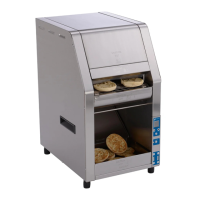
HCT-5H BUN TOASTER
7
P/N 1011256 Rev. I 3/18
McDonald’s
Control Panel
Access the Control Panel by facing the front of the unit
and moving to the left side of the unit. The LEDs on the
control panel light to signify when each item is operat-
ing. The Service LED lights and the corresponding LED
blinks when the unit requires service. A message also
appears on the display.
Settings
Follow the steps below to view and adjust settings.
1. When the unit is plugged in, press and hold the
MENU button (Figure 4) for five seconds. The
control panel displays “Platen A”
NOTE: The unit does not have to be turned on in
order to access the settings menu.
2. Press ◄ and ► (Figure 4) to scroll through the
settings, which appear in the following order:
• Platen A
• Platen B
• Platen C
• Units (°C/°F)
• Buzzer (On/Off)
• Language
• Service Messages
• Controls Temperature
• Motor (view only)
• Conveyor (view only)
3. To change a setting, press the OK button and
then press ◄ and ► to adjust as needed. Press
the OK button again to save the changes. See
Figure 3.
NOTE: The Elapsed Time and Control Temperature
can not be adjusted.
The table below describe platen and motor settings
depending on the Compression Knob setting:
When using recommended Compression Setting of #4
A Platen: 540° F (282° C)
B Platen: 540° F (282° C)
C Platen: 490° F (254° C)
Conveyor Speed: 22.0 seconds
PROGRAMMING
Figure 3. HCT-5H Control Panel
Purging Product from Toaster
To purge product from the toaster, press and hold ◄
and ► together. This speeds up the conveyors to force
product out of the front of the toaster.
Table 1. Temperature/Compression Settings
Factory Reset
To reset the unit to the factory default settings:
1. Turn the unit off
2. Press and hold ◄ and ► and turn the unit on.
3. The toaster displays “Factory Settings Restored”
on the display.
NOTE: For ALL Units, this sets the display tempera-
ture to °F (Fahrenheit). Refer to the “Settings” sec-
tion of this manual to change the display tempera-
ture to °C (Celsius).
Menu Button
Power Button Service LEDs Platen LEDs
Left (Back)
Button
OK
Button
Right (Forward)
Button
Display
Panel


 To Next Page
 Loading...