EasyManua.ls Logo

AnyCubic MEGA ZERO - Page 28

AnyCubic MEGA ZERO
47 pages
Print Icon
To Next Page IconTo Next Page
To Previous Page IconTo Previous Page
Loading...
Print
model
If
you
can't
improve
the
model
printing
effect
by
fine-tuning
the
adjustable
nuts,
please
level
again.
After
several
times
of
leveling,
if
the
printing
effect
is
still
poor,
it
may
be
that
the
D-shape
wheels
do
not
run
smoothly
or
idling
during
printing.
The
D-shape
wheels
has
been
adjusted
in
factory,
but
they
may
be
loose
due
to
transportation.
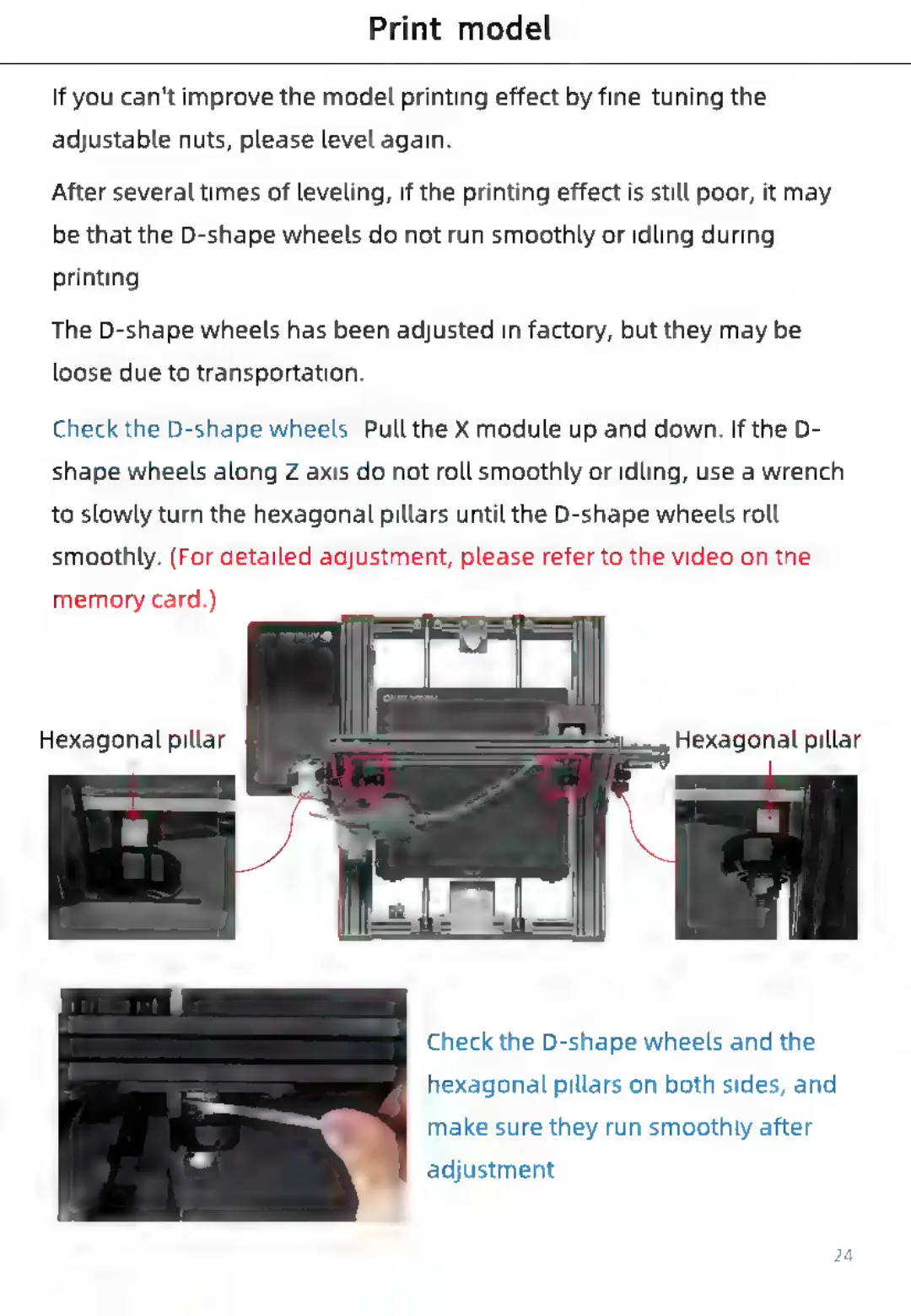
Check
the
D-shape
wheels:
Pull
the
X
module
up
and
down.
If
the
D-
shape
wheels
along
Z
axis
do
not
roll
smoothly
or
idling,
use
a
wrench
to
slowly
turn
the
hexagonal
pillars
until
the
D-shape
wheels
roll
smoothly.
(For
detailed
adjustment,
please
refer
to
the
video
on
the
memory
card.)
Check
the
D-shape
wheels
and
the
hexagonal
pillars
on
both
sides,
and
make
sure
they
run
smoothly
after
adjustment.

Related product manuals