EasyManua.ls Logo

AnyCubic MEGA ZERO - Manual Leveling

AnyCubic MEGA ZERO
47 pages
Print Icon
To Next Page IconTo Next Page
To Previous Page IconTo Previous Page
Loading...
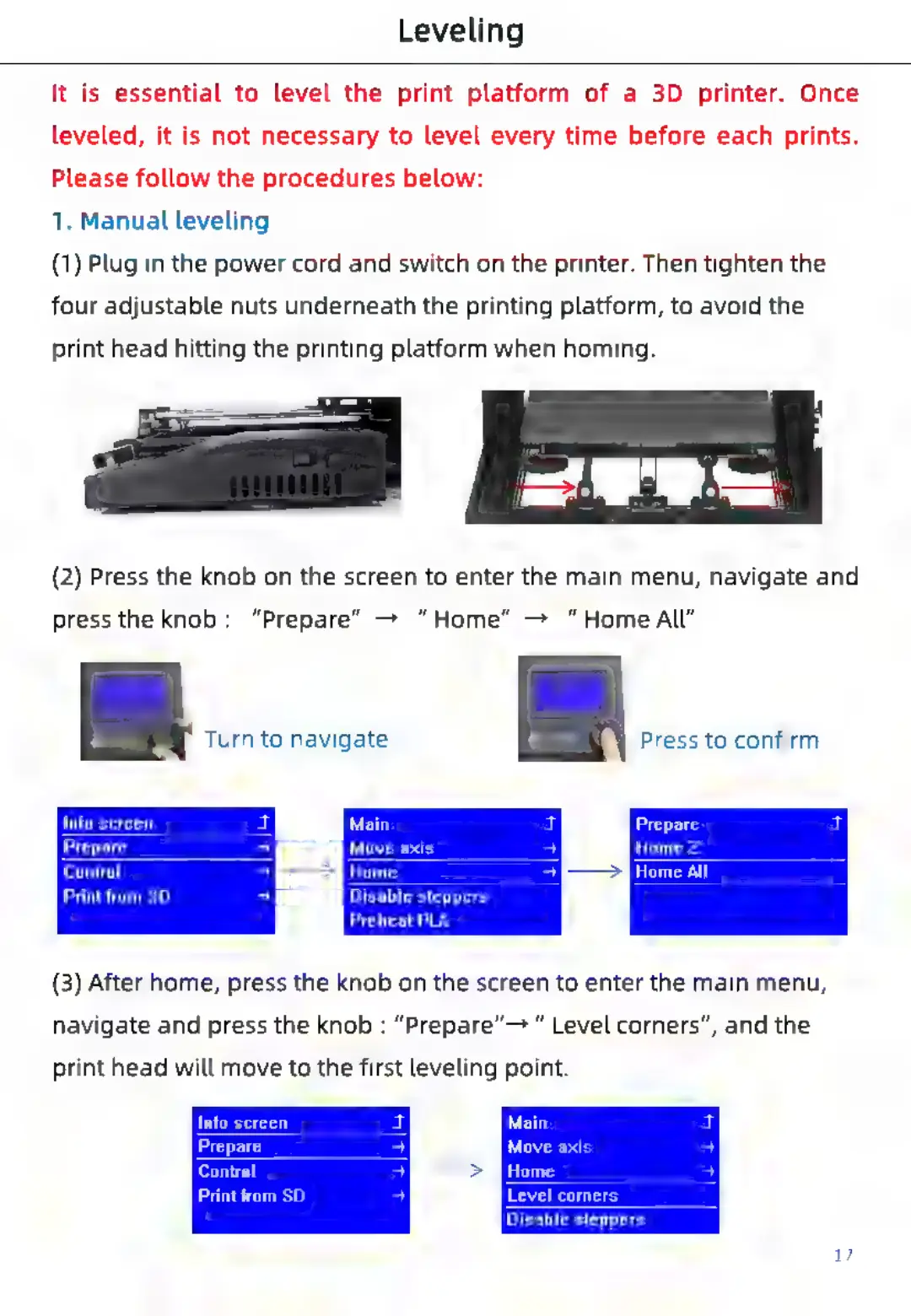
Leveling
It
is
essential
to
level
the
print
platform
of
a
3D
printer.
Once
leveled,
it
is
not
necessary
to
level
every
time
before
each
prints.
Please
follow
the
procedures
below:
1.
Manual
leveling
(1)
Plug
in
the
power
cord
and
switch
on
the
printer.
Then
tighten
the
four
adjustable
nuts
underneath
the
printing
platform,
to
avoid
the
print
head
hitting
the
printing
platform
when
homing.
(2)
Press
the
knob
on
the
screen
to
enter
the
main
menu,
navigate
and
press
the
knob:
“Prepare”
>
“Home”
—>
“HomeAll”
.
Turn
to
navigate.
Press
to
confirm.
Main
Info
screen
Prepare
Move
Control
ay
>
[mrs
Print
from
SD
Disable
steppers
Prepare
Home
Z
a)
Ci
Preheat
PLA
(3)
After
home,
press
the
knob
on
the
screen
to
enter
the
main
menu,
navigate
and
press
the
knob
:
“Prepare”—
Level
corners”,
and
the
print
head
will
move
to
the
first
leveling
point.
Info
screen
Main
Prepare
Move
axis
Control
Home
Print
from
SD
Level
corners
Disable
steppers

Related product manuals