EasyManua.ls Logo

AnyTone AT-500M - User Manual

AnyTone AT-500M
13 pages
Print Icon
To Next Page IconTo Next Page
Loading...
Qixiang Electon Science & Technoloyg Co.,Ltd.
www.anytone.net
A1.190716
Question and Answer IconNeed help?

Do you have a question about the AnyTone AT-500M and is the answer not in the manual?

Summary

KNOW ABOUT THIS RADIO

Control Panel Overview

Identifies and explains the main controls and indicators on the radio's front panel.

LCD Display Functions

LCD Symbol and Feature Explanations

Details the various symbols and features displayed on the radio's LCD screen.

HOW TO USE THIS RADIO

Power, Volume, and Channel Operations

Guides on powering the radio on/off, adjusting volume, and changing channels.

Squelch and ASQ Adjustment

Explains how to set and adjust the Squelch (SQ) and Automatic Squelch Control (ASQ) levels.

Mode, Lock, and Emergency Channel Functions

Covers switching modes, locking keys, and using emergency channels.

Scanning and VOX Operation

Details how to initiate scanning and activate the Voice Operated Exchange (VOX) feature.

Advanced Functions and Menu Navigation

Explains PA mode, Talkback, Norms control, and menu access.

External Speaker and Menu Settings

Describes installing an external speaker and accessing radio menu settings.

Key Menu Settings: CTCSS, Power, Scan

Details menu settings for CTCSS/DCS, RF power, and scan type.

Key Menu Settings: Mic, VOX, Talkback

Details menu settings for microphone, VOX sensitivity, and talkback level.

Key Menu Settings: Noise Blanker, Offset

Details menu settings for noise blanker, offset direction, and RF gain.

Key Menu Settings: Backlight, Timer, -5 KHz

Details settings for backlight, timer, and -5KHz frequency function.

Band Name and Emergency Channel Configuration

Guides on setting band names and configuring emergency channels.

Restore Factory Defaults

Explains the procedure to reset the radio to its original factory default settings.

SPECIFICATIONS

General and Transmitter Specs

Lists general operating parameters and transmitter performance specifications.

Receiver Specifications

Lists receiver performance characteristics and technical details.

WARNING AND COMPLIANCE

FCC Rules and Licensing Information

Outlines FCC compliance, operating conditions, and licensing requirements for the device.

Summary

KNOW ABOUT THIS RADIO

Control Panel Overview

Identifies and explains the main controls and indicators on the radio's front panel.

LCD Display Functions

LCD Symbol and Feature Explanations

Details the various symbols and features displayed on the radio's LCD screen.

HOW TO USE THIS RADIO

Power, Volume, and Channel Operations

Guides on powering the radio on/off, adjusting volume, and changing channels.

Squelch and ASQ Adjustment

Explains how to set and adjust the Squelch (SQ) and Automatic Squelch Control (ASQ) levels.

Mode, Lock, and Emergency Channel Functions

Covers switching modes, locking keys, and using emergency channels.

Scanning and VOX Operation

Details how to initiate scanning and activate the Voice Operated Exchange (VOX) feature.

Advanced Functions and Menu Navigation

Explains PA mode, Talkback, Norms control, and menu access.

External Speaker and Menu Settings

Describes installing an external speaker and accessing radio menu settings.

Key Menu Settings: CTCSS, Power, Scan

Details menu settings for CTCSS/DCS, RF power, and scan type.

Key Menu Settings: Mic, VOX, Talkback

Details menu settings for microphone, VOX sensitivity, and talkback level.

Key Menu Settings: Noise Blanker, Offset

Details menu settings for noise blanker, offset direction, and RF gain.

Key Menu Settings: Backlight, Timer, -5 KHz

Details settings for backlight, timer, and -5KHz frequency function.

Band Name and Emergency Channel Configuration

Guides on setting band names and configuring emergency channels.

Restore Factory Defaults

Explains the procedure to reset the radio to its original factory default settings.

SPECIFICATIONS

General and Transmitter Specs

Lists general operating parameters and transmitter performance specifications.

Receiver Specifications

Lists receiver performance characteristics and technical details.

WARNING AND COMPLIANCE

FCC Rules and Licensing Information

Outlines FCC compliance, operating conditions, and licensing requirements for the device.

Overview

The AnyTone AT-500M is a 10-meter radio designed for communication in the 28-29.7 MHz frequency range. This device is manufactured by Qixiang Electron Science & Technology Co., Ltd. and is intended for use in various communication scenarios, including amateur radio operations.

Function Description:

The AT-500M operates in both AM and FM modulation modes, offering flexibility for different communication needs. It features a comprehensive set of controls and indicators, including:
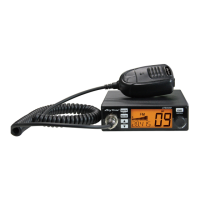
  • Mode/Keypad Lock: A function to prevent accidental changes to settings.
  • Squelch Control (SQ/ASQ): Allows users to adjust the squelch level to filter out background noise. ASQ (Automatic Squelch) provides an automatic noise reduction feature.
  • Microphone Jack: For connecting the included microphone.
  • Channel Selectors (UP/DN): Buttons for navigating through channels.
  • Emergency Channel: Dedicated access to pre-programmed emergency channels (defaulting to channel 9 and 19).
  • Power On/Off and Volume Control: A single knob for turning the radio on/off and adjusting the audio output.
  • External Speaker Jack: For connecting an external 8Ω speaker with a 3.5 mm mono connector.
  • Antenna Jack: For connecting the radio's antenna (UHF, SO-239 type).
  • LCD Display: Provides visual feedback on various settings and operational status, including RF Gain, Squelch status, Noise Blanker, Talkback, HI-CUT, Roger Beep, TX/RX S-meter, Channel/Frequency, Offset Direction, BAND name, Channel number, and Alpha channel.
  • VOX Function: Enables voice-activated transmission without pressing the PTT (Push-To-Talk) button.
  • PA Function: Allows the radio to be used for public broadcasting, with adjustable audio level.
  • Talkback Level: Adjusts the volume of the intercom function.
  • Norms Control: Allows users to view and potentially adjust regulatory norms.
  • Scan Function: Automatically scans through channels.
  • Menu Operations: Provides access to a range of customizable settings.

Important Technical Specifications:

General:

  • Modulation Mode: AM/FM
  • Frequency Range: 28-29.7MHz
  • Frequency Tolerance: ±5.0ppm
  • Input Voltage: 13.8V (Standard version), 12+24V (Optional version)
  • Dimensions: 185x124x38mm
  • Weight: 620g
  • Operating Temperature Range: -20℃ to +50℃
  • Current Drain:
    • Transmit: 5A MAX
    • Receive (Squelched): 0.3A
    • VOL Max: 0.7A
  • Antenna Connector: UHF, SO-239

Transmitter:

  • Power Output: AM 7W, FM 15W
  • Transmission Interference: Inferior to 4nW
  • Frequency Response: 300-3000Hz
  • Modulated Signal Distortion: Inferior to 5%
  • Output Impedance: 50 ohms

Receiver:

  • Sensitivity: Less than 1uV for 10dB(S+N)/N
  • Image Rejection: 70dB
  • Adjacent Channel Rejection: 60dB
  • IF Frequencies: 1st 10.695MHz, 2nd 455KHz
  • Automatic Gain Control (AGC): Less than 10dB change in audio output for inputs from 10 to 50000uV
  • Squelch: Less than 1uV
  • Audio Output Power: 2Watts at 8Ω, less than 10% distortion
  • Frequency Response: 300-3000Hz

Usage Features:

  • Power On/Off: Turn the VOL switch clockwise to power on, anti-clockwise to power off.
  • Volume Control: Rotate the VOL switch clockwise to increase volume, anti-clockwise to decrease.
  • Channel Control: Short press [UP]/[DN] for single-step channel changes; hold for fast channel changes.
  • Squelch (SQ/ASQ) Control:
    • Short press [SQ/AQ] to enter SQ/AQ level adjustment. Use microphone [UP]/[DN] to change level.
    • Long press [SQ/AQ] to activate ASQ. Use microphone [UP]/[DN] to adjust ASQ level.
  • Mode Control (AM/FM): Short press [AM/FM] to switch between AM and FM modes.
  • Keypad Lock: Long press [AM/FM] for 2 seconds to lock/unlock keys.
  • Emergency Channel: Short press [EMG] to cycle through programmed emergency channels.
  • Scan Function: Hold [UP]/[DN] for 5 seconds to start scanning. Short press [UP]/[DN] to change scan direction. Exit with [AM]/[FM] or [PTT].
  • VOX Function: Activate by pressing [PTT] + [EMG]. Deactivate with the same combination. VOX sensitivity and time are adjustable in the menu.
  • PA Function: Turn on PA mode; "PA" and modulation mode (AM/FM) will flicker. Adjust audio level with the volume knob.
  • Talkback Level: Adjust during intercom function by holding PTT and using [UP]/[DN].
  • Norms Control: Hold [AM/FM] to power on until LCD displays norms. Use [UP]/[DN] or microphone [UP]/[DN] to navigate.
  • Menu Operations: Long press [EMG] to enter the menu. Use microphone [UP]/[DN] or arrow keys to navigate and select settings. Short press [EMG] to confirm. Long press [EMG] or wait 10 seconds to exit and save.
  • CTCSS/DCS (CATSET): Encode/decode settings (optional).
  • Beep Sound (KEYOP): Turn on/off beep sound.
  • RF Power Setting (REPOW): Low, middle, or high power (valid in HF or HAM mode).
  • Scan Type Setting (SCM): Squelch scan (Sq) or time scan (tL).
  • HI-CUT Setting (HICUT): Turn on/off HI-CUT function.
  • Microphone Gain (MIC SET): 1-9 levels.
  • Microphone Type (MIC TP): Electronic (EL) or Dynamic (dy).
  • VOX Sensitivity (VOX L): 1-9 levels.
  • VOX Time (VOX T): 1-9 levels.
  • Talkback Level Control (TAL BAK): OF, 1-9 levels.
  • Noise Blanker (ANL/NB): Turn on/off ANL/NB function.
  • Offset Direction (REPSET): Negative (-), positive (+), or off (valid in HF or HAM mode).
  • RF Gain Level Control (RFGAIN): AU 03,06,09~48 (automatic RFG function if AUTO RFG is on).
  • RB Sound Setting (ROGOP): Turn on/off Roger Beep sound.
  • Backlight Color Setting (COLOR): Orange, Green, Blue, Cyan, Yellow, Purple, White.
  • Backlight Brightness (BRIGHT): 1-6 levels.
  • Time Out Timer (TOTSET): 1-10 minutes.
  • Frequency -5KHz Function (RU-5K): Turn on/off -5KHz function (valid in HAM mode).
  • Band Name Setting: Modify the two-digit band name.
  • Emergency Channel Setting: Configure emergency channels (valid in HF or HAM mode).
  • Resume Factory Default: Reset the radio to factory settings.

Maintenance Features:

  • FCC Compliance: The device complies with Part 15 of the FCC Rules, ensuring it does not cause harmful interference and accepts any interference received.
  • Interference Resolution: Recommendations for resolving interference include reorienting the antenna, increasing separation from the receiver, connecting to a different circuit, or consulting a technician.
  • Licensing Information: Use in the USA is subject to FCC rules and regulations. Any modifications not expressly approved by the manufacturer may void user authority. Transmitter adjustments should only be made by certified technicians.
  • 12/24V Converter (Optional): The radio can be equipped with a built-in 12/24V converter, allowing for operation in vehicles with different power systems. Users should check their version before connecting power supply.
  • Factory Reset: A dedicated menu option allows users to restore the radio to its original factory default settings, which can be useful for troubleshooting or reconfiguring the device.

AnyTone AT-500M Specifications

General IconGeneral
BrandAnyTone
ModelAT-500M
CategoryRadio
LanguageEnglish

Related product manuals