MHPTV TX Quick Start Guide
MHPTV-QSG-DOC-V1.1, 12/05/2018 Page 13 of 37
6 RF System Connections
Once the TX cabinet is in position, the next step is to install the RF system and
connect the TX to the Antenna feed or a suitable station load before proceeding
further.
1. Mechanically mount BPF
If you purchased an Anywave BPF, Anywave will design to install the BPF either
on top of the TX cabinet or standing on the floor, according to the transmitter and
the BPF’s dimensions, unless it is specified with order.
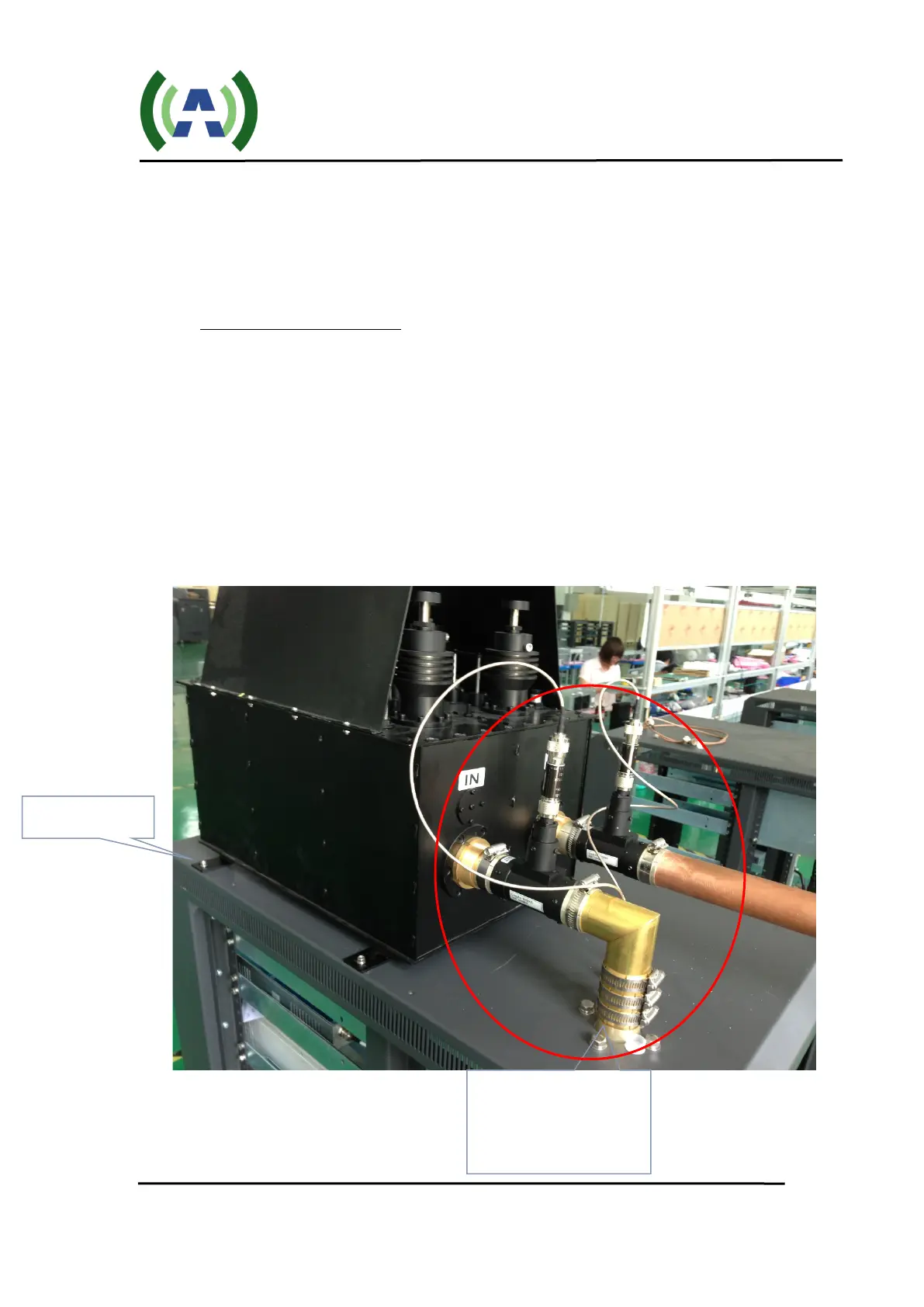
If it is mounted on top of the MPTV cabinet (as shown below), four metal stand-
offs “feet” with mounting hardware are supplied with the BPF to allow it to be
fastened and secured to four holes located in the top panel of the cabinet. Before
securing the BPF with the screws provided, please execute step 2 below, as you
will need to be able to move (slide) the BPF into place, and then apply the mounting
screws.
1 – Mount BPF
2 – Connect Elbow and
Directional Couplers


 To Next Page