Exampleone:byrecallingpreset2,wewantforzone1:selectoratsourceB,musiclevelatmaximum
andmicmixlevelatminimum.Forzone2wewanttheselectoratsourceDandbothmusicasmic
mixlevelat50%.
Firstthingtodo,istosetthecontrols(selectorandlevels)atthedesiredvalues.Todothis,typethe
followinginstructionsintheterminalwindow:
SETSELECTZONE1B<CR>
SETMSCLVLZONE1100<CR>
SETMICLVLZONE10<CR>
SETSELECTZONE2D<CR>
SETMSCLVLZONE250<CR>
SETMICLVLZONE250<CR>
Nowallcontrolsareatthedesiredlevel.Tostoretheminpreset 2,usethefollowinginstruction:
STRPRESET2<CR>
Exampletwo:byrecallingpreset7,wewantonlyzone2tochange.Thewantedcontrolsare:selector
atsourceC,musiclevelat20%andmicmixlevelat70%.Again,firstwewillhavetosetthecontrols
atthedesiredlevels:
SETSELECTZONE2C<CR>
SETMSCLVLZONE220<CR>
SETMICLVLZONE270<CR>
Nowwewanttostoreonlythevaluesfromzone2topreset7:
STRPRESETZONE27<CR>
ApresetcanbeoverwrittenbystoringatthesamepresetnumberorclearedbytheCLRcommand.
Toclearpreset5,usethefollowinginstr uction:
CLRPRESET5<CR>
Toclearthecompletepres etmemory:
CLRPRESETALL<CR>
Recallapreset
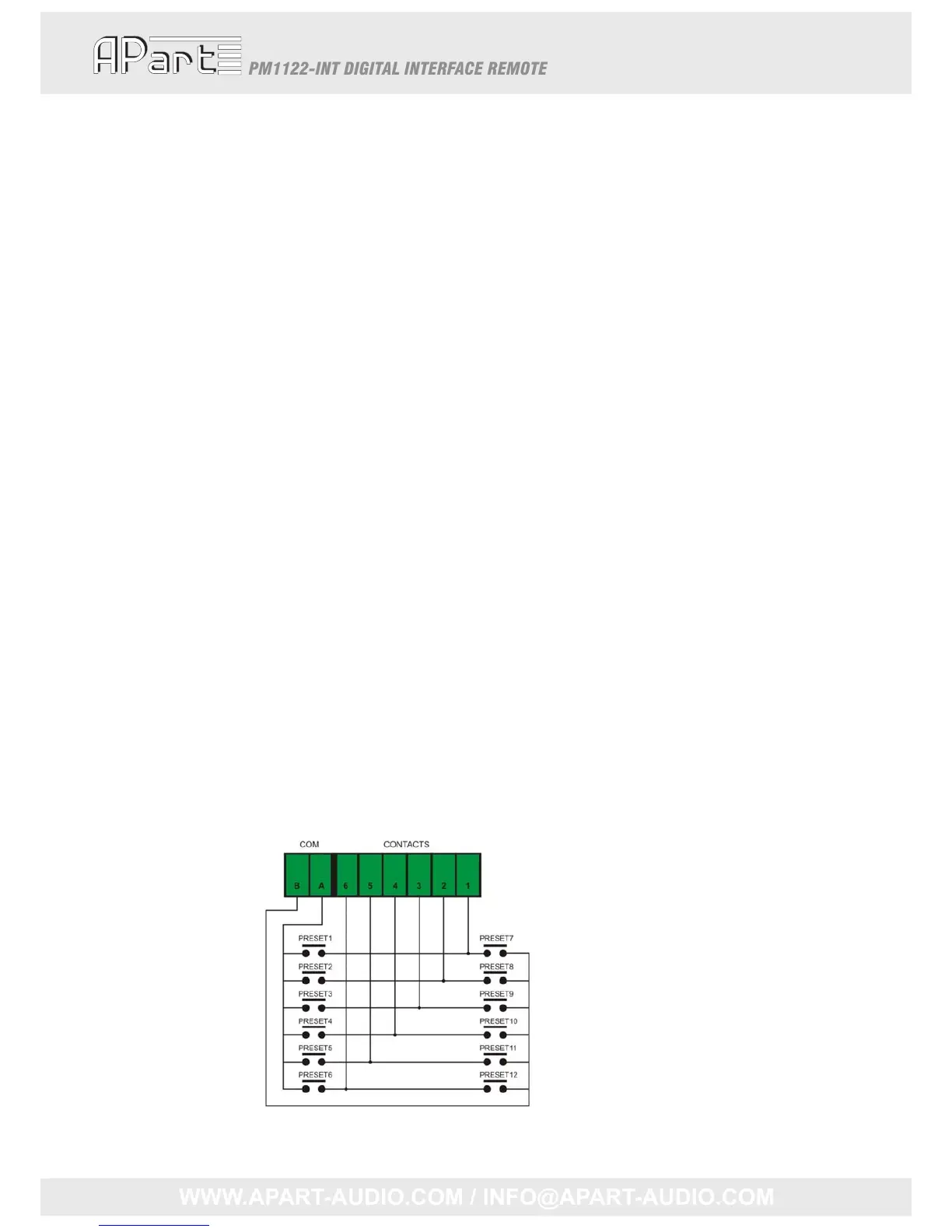
Recallapresetbycontacts
Twotimes6presetscanberecalledthisway.TheEUROBLOCKconnectorhas8pins,COMA,COMB
and1to6.MakingcontactbetweenCOMAandcontact1to6willrecallthecorrespondingpreset1
to6.MakingcontactbetweenCOMBandcontact1to6,willrecallpreset7to12.Thecontactcan
bemomentaryorcontinuoussobothpushbuttonswitchesasrotaryswitchescanbeused.
12



 To Next Page