5Smart-UPS Rack-Mount2U 750/1000/1500 VA 120/230 Vac, 3000 VA 100/120/208/230 Vac, 2200 VA 120 Vac
Rear panel connectors
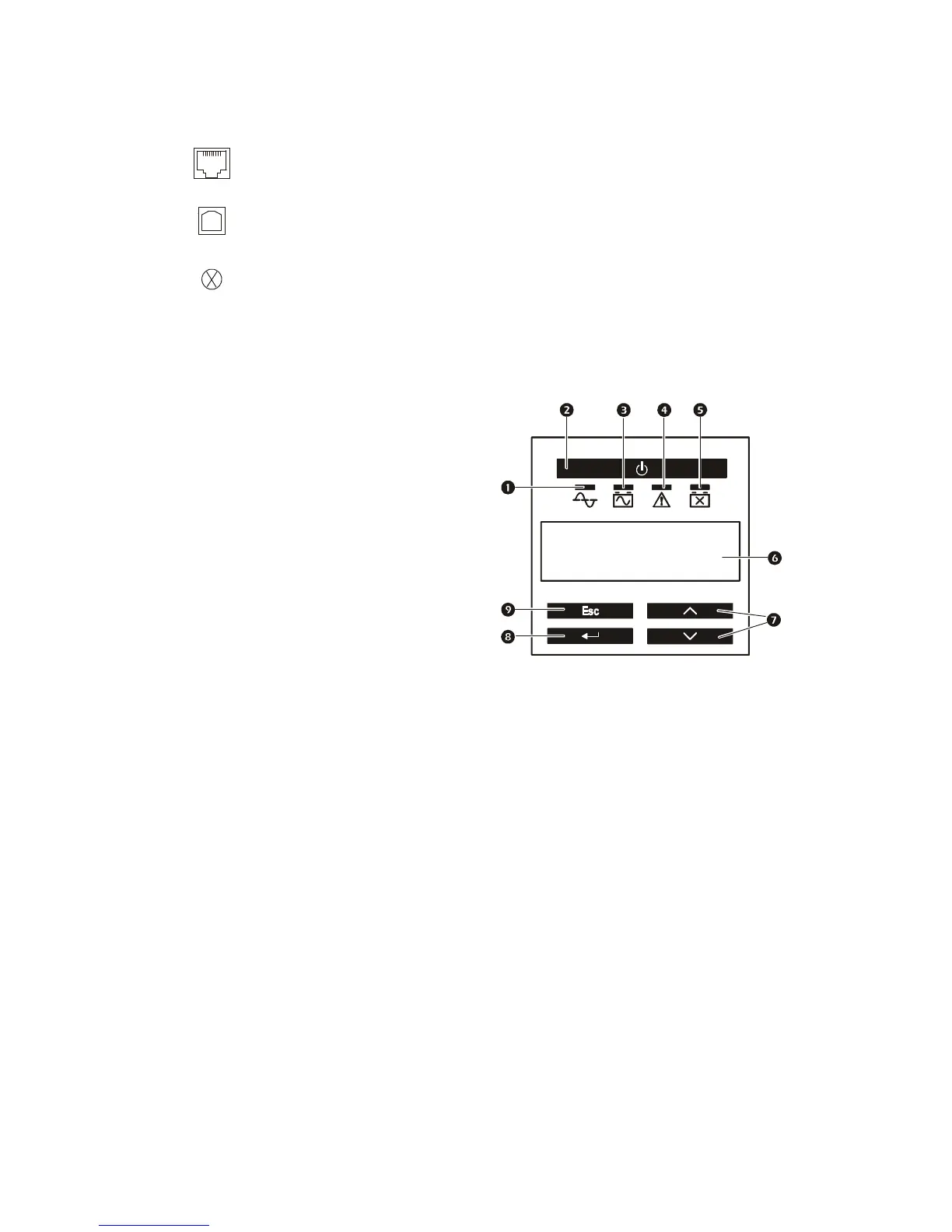
Display Panel Features
Display Interface Menus
Use the UP/DOWN arrow keys to scroll through the main menu options. Press ENTER to view the
submenus under each main menu option. Press
ESCAPE to exit a submenu and return to a main menu.
Serial port: Connect to a computer to use power management software.
USB port: Connect to a computer to use power management software.
Note: Serial and USB communication can not be used simultaneously.
Ground Screw: The UPS features a ground screw for connecting the ground leads
on transient voltage devices. Prior to connecting a ground lead, disconnect the UPS
from utility power.
1
Online LED
2
UPS
ON/OFF key
3
On Battery LED
4
Site Wiring Fault LED
5
Replace Battery LED
6
Display interface
7
UP/DOWN arrow keys
8
ENTER key
9
ESCAPE key



 To Next Page