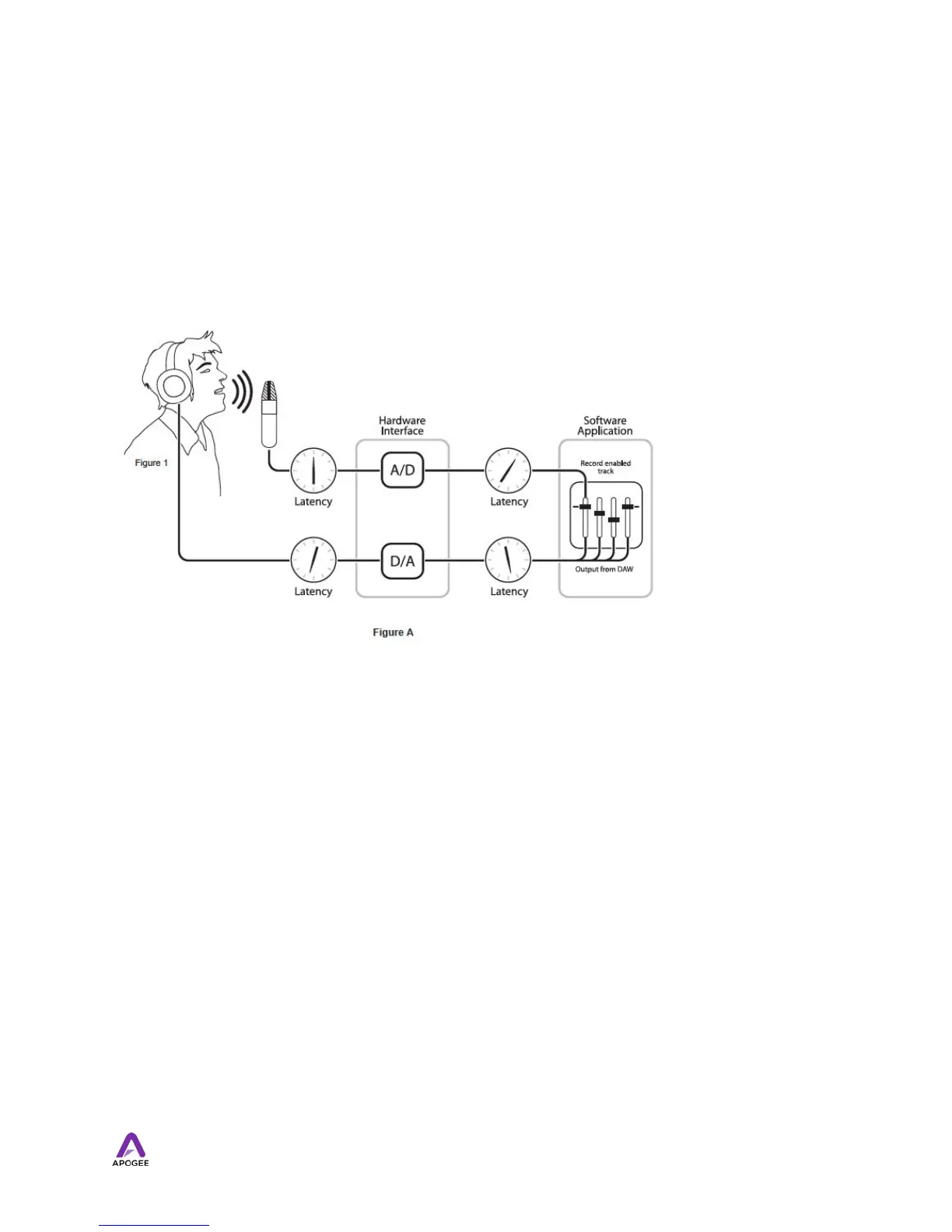
To illustrate the effect of latency, figure A depicts the typical signal path of a vocal overdub
session. A vocalist sings into a microphone, which is routed to an analog to digital
converter then to the audio software application for recording. In the software application,
the vocalist’s live signal is mixed with the playback of previously recorded tracks, routed to
a digital to analog converter, and finally to the vocalist’s headphones. A slight delay
accumulates at each conversion stage, while a much greater amount of delay occurs
through the software application, resulting in the vocalist hearing his performance in
headphones delayed by several milliseconds.
By routing the hardware input directly to the hardware output and mixing in playback as
shown in Figure B, it’s possible to provide the vocalist a headphone monitoring signal with
a much shorter delay.
First, the signal being recorded (in this case, a vocal mic) is split just after the A/D stage
and routed to both the software application for recording and directly back to the hardware
outputs without going through the latency-inducing software. This creates a low latency
path from mic to headphones. Next, a stereo mix of playback tracks is routed to the low
latency mixer and combined with the hardware input(s). This allows the performer to hear
himself while listening to playback tracks without a confusing delay in order to comfortably
record overdubs.
Note that the software application’s mixer is used to set a stereo mix of playback tracks
while the low latency mixer is used to set the balance between the stereo playback mix
and the hardware inputs.
34



 To Next Page