APOGEE ELECTRONICS
2
Symphony PCI card – User’s Guide
Installing Symphony PCI Cards
1. As a safety precaution, unplug the computer’s AC cable.
2. To avoid electrostatic damage to the Symphony card, it is recommended that a grounded anti-static wrist
strap be used when installing the card.
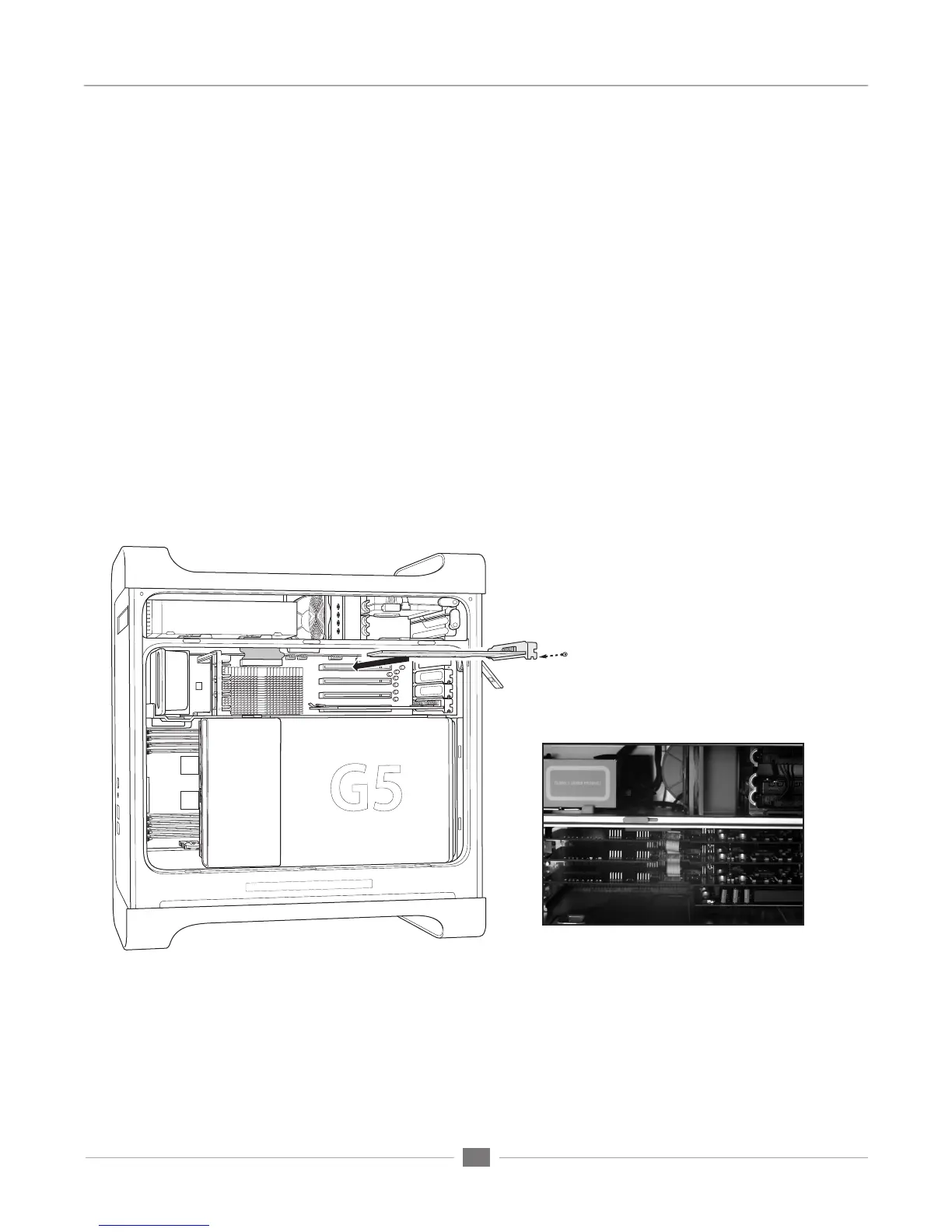
3. Remove the G5’s side cover and air deflector
4. Remove the screw(s) securing the port access cover(s) of the required PCI slots and set them aside for later
use. Remove the port access cover(s).
5. After verifying jumper settings of the PCI card, align the card edge connector with the desired PCI slot and
press the card firmly into place until the gold pins of the edge connector are just visible. Be sure to insert the
end of the card without the connector into the appropriate card guide. If the card does not slide into place
with minimal effort, remove the card, check alignment and check for foreign objects. Don’t force the card into
place.
6. Re-install the access cover screw to secure the Symphony PCI card.
7. If multiple Symphony cards have been installed, connect the supplied ribbon cable between each PCI card as
shown below, making sure to align the key on the ribbon cable connector to the slot on the PCI card socket. If
only two Symphony cards are installed, use the connector on each end of the ribbon connector.
8. Re-install the G5’s air deflector and side panel.
Installation of Symphony PCI-E card in G5
Multiple Symphony cards connected
by ribbon cable


 To Next Page