APOGEE ELECTRONICS
3
Symphony PCI card – User’s Guide
Installing the X-Symphony card
Your X-Symphony card should include the following:
1 X-Symphony circuit board
1 X-Symphony Coverplate
2 aluminium standoffs
1 plastic standoff
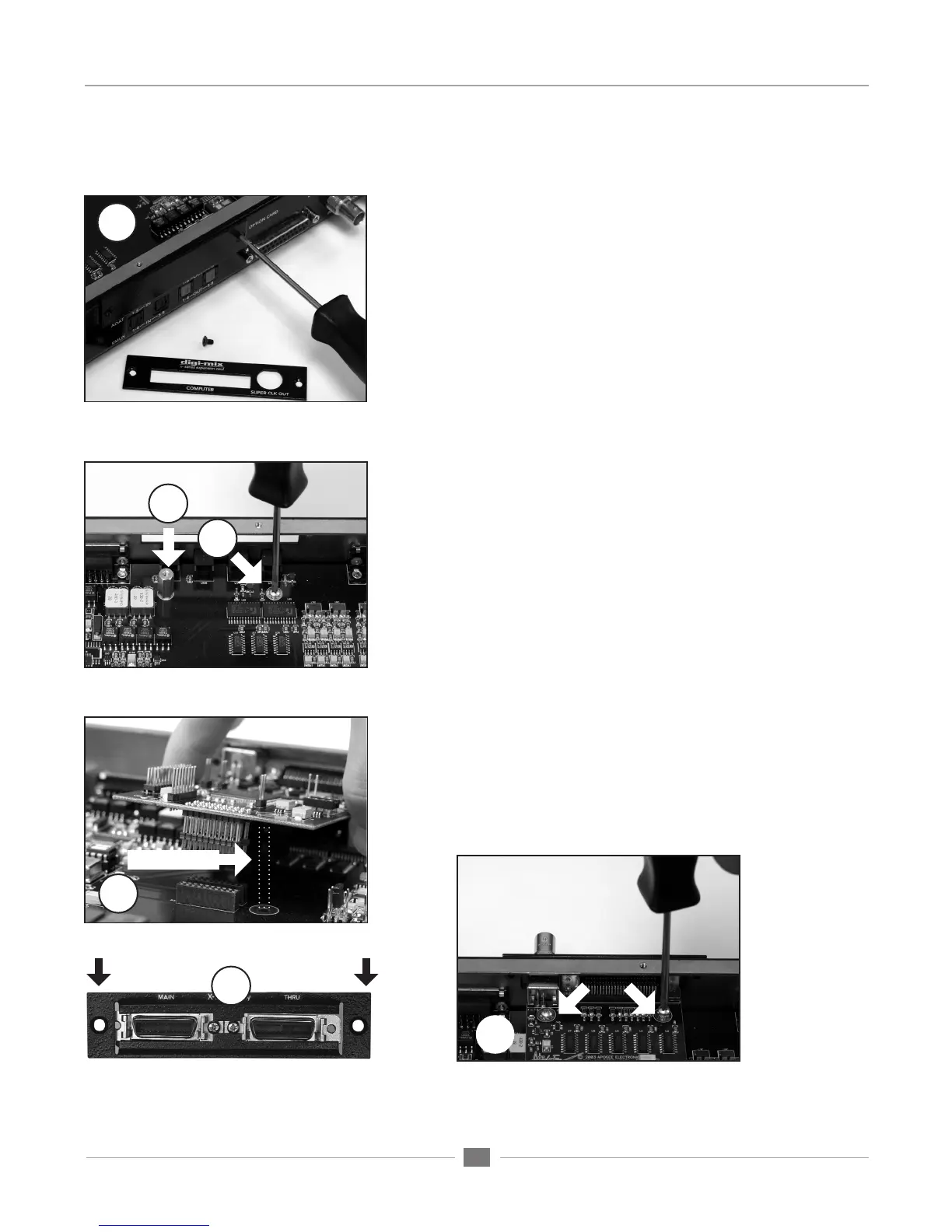
1 Remove the top cover of the host interface.
2 Remove the Option Card coverplate, and set aside the screws for
later use.
3 Remove the two interface circuit board screws indicated at left, and
set them aside for later use
4 Install the two aluminium standoffs in the threaded holes vacated
by the screws.
5 On the X-Symphony card, install the plastic standoff in the hole
adjacent to the multi-pin motherboard connector.
6 Install the X-Symphony Coverplate, and secure it to the host inter-
face using two screws from Step 2.
7 Insert the Port connector end of the X-Symphony card through the
appropriate cutouts in the coverplate, and carefully place the multi-
pin motherboard connector in the mating connector found on the
host interface motherboard.
8 After verifying the alignment of the multi-pin and the mating con-
nectors, firmly press down on the X-Symphony card, over the con-
nector, until the pins are completely seated in the mating connector.
9 Re-install the circuit board screws from Step 3 in the locations
indicated below.
10 Replace the top cover of the host interface.
2
9
6
Plastic standoff here
3
4
8


 To Next Page