APOGEE ELECTRONICS
7
Symphony PCI card – User’s Guide
Configuring Your DAW
Apple Logic Pro
In Apple Logic Pro, start a session and follow these steps:
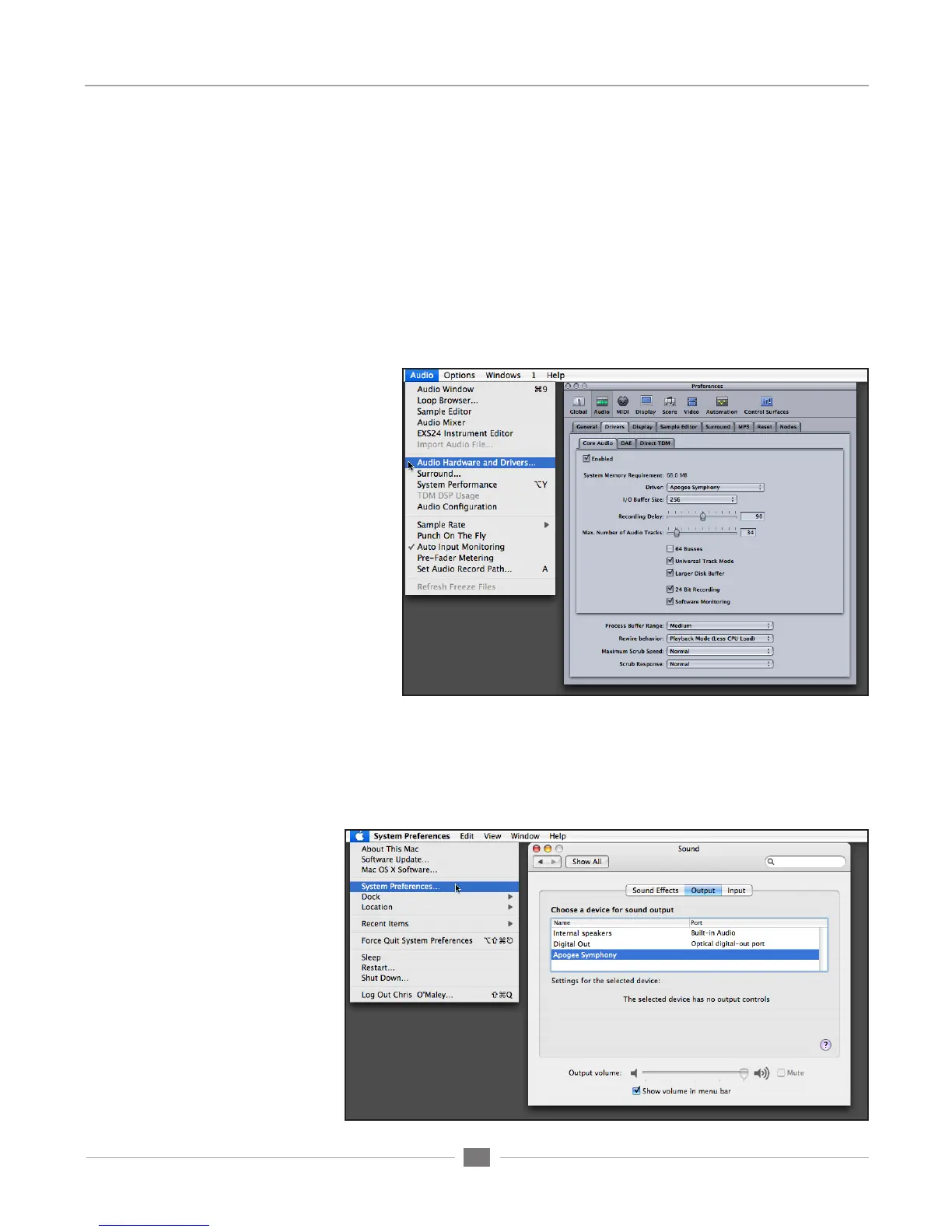
1. Open Audio > Audio Hardware and Drivers > Drivers > CoreAudio and check the
“Enabled” box.
2. Select “Apogee Symphony” in the “Driver” field, and click “Try (Re)-Launch” when prompted by
Logic.
3. In Logic’s Mixer page, verify that
32 inputs and outputs are available
per installed Symphony PCI card.
Please note that the number of
I/O available in Logic remains the
same regardless of the number of
interface I/O channels connected to
the card.
iTunes
1. From your Mac’s Menu bar Apple menu, open the System Preferences window, and click on the Sound
icon; in the Sound Preferences window, click on the Output tab and select Apogee Symphony.
2. Open iTunes, select an audio file, and initiate playback; signal is sent to outputs 1-2 of the first connected
Apogee interface.
Installing the Symphony Core Audio Driver


 To Next Page