12
Creating Your Wireless Network
The CFS10 Smoke Sensor communicates on its own private home network. This
network is created simply by powering up new units one at a time.
General Note: The radio network is limited to 18
total units. Only 12 of these units may be smoke
sensors, the remaining units can be CO and heat
sensors or bed shakers.
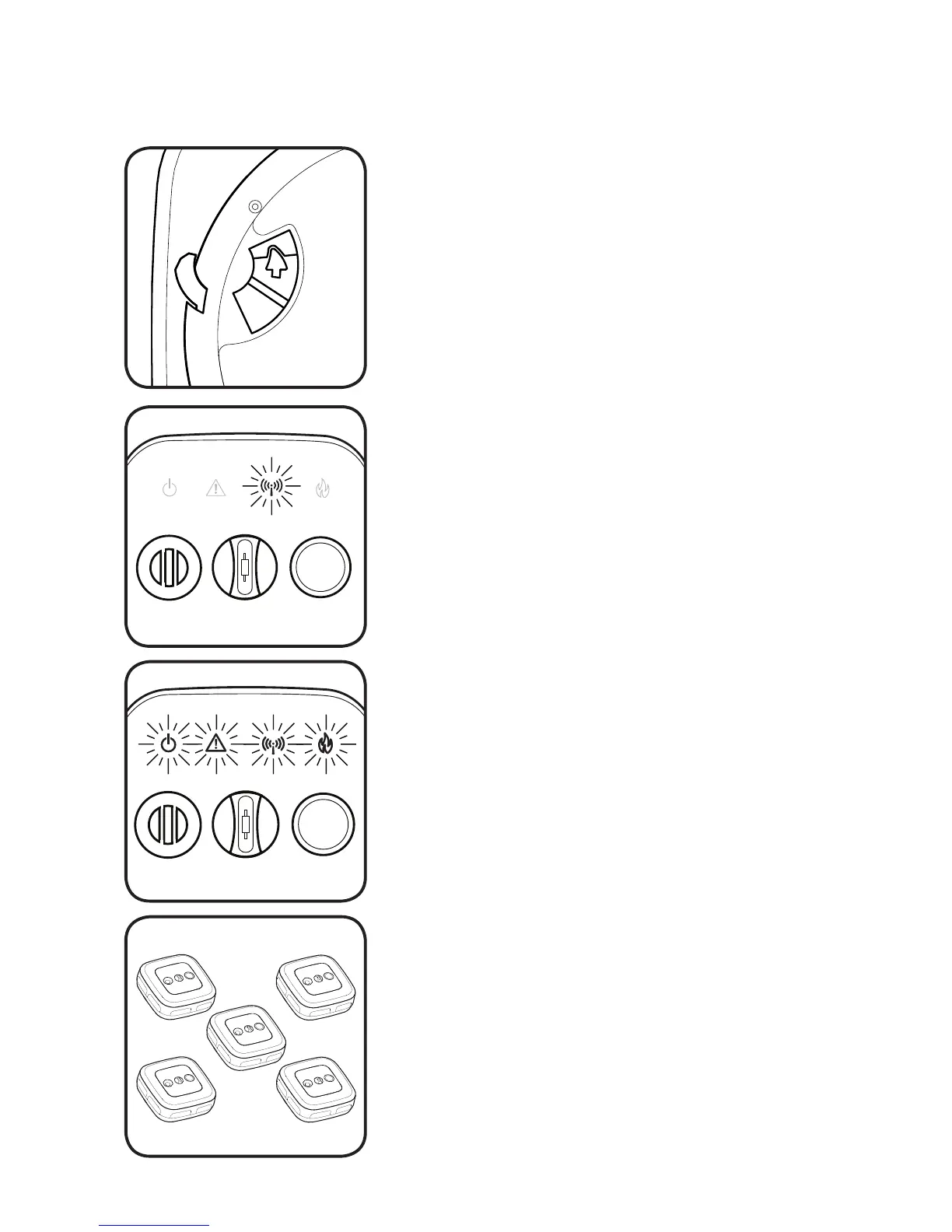
The blue WIRELESS light will begin to flash slowly.
While the blue WIRELESS light is flashing,
additional units may be added to your network.
Activate your next smoke sensor by moving its
slide switch as shown above.
This smoke sensor has been
added to your network!
Activate your first smoke sensor by moving the
slide switch located on the back side of the unit
in the direction indicated by the white arrow.
One minute after activating the last unit, the
WIRELESS light will stop flashing on the original
sensor, and it will join the network. The network
is now closed.
Continue activating each new smoke sensor, one
unit at a time, until all sensors have been added
to your network. This should include CO and heat
sensors as well.
General Note: It is easiest to first create the
radio network while all sensors are located
together, such as on a table.
The blue WIRELESS light will flash briefly, then the
unit will chirp twice and all four of the lighted
icons will strobe on in succession.
Note: This switch is connected to a lock-out
mechanism that will prevent installation on the
bracket until activated.
The slide switch will lock into place when fully
positioned.


 To Next Page