18
Cleaning Your Smoke Sensor
Over time dust and dirt might collect inside your smoke sensor, altering its
performance. If this occurs, the unit can false alarm or the WARNING icon will flash
and the horn will chirp every 30 seconds. To clean the unit perform the following:
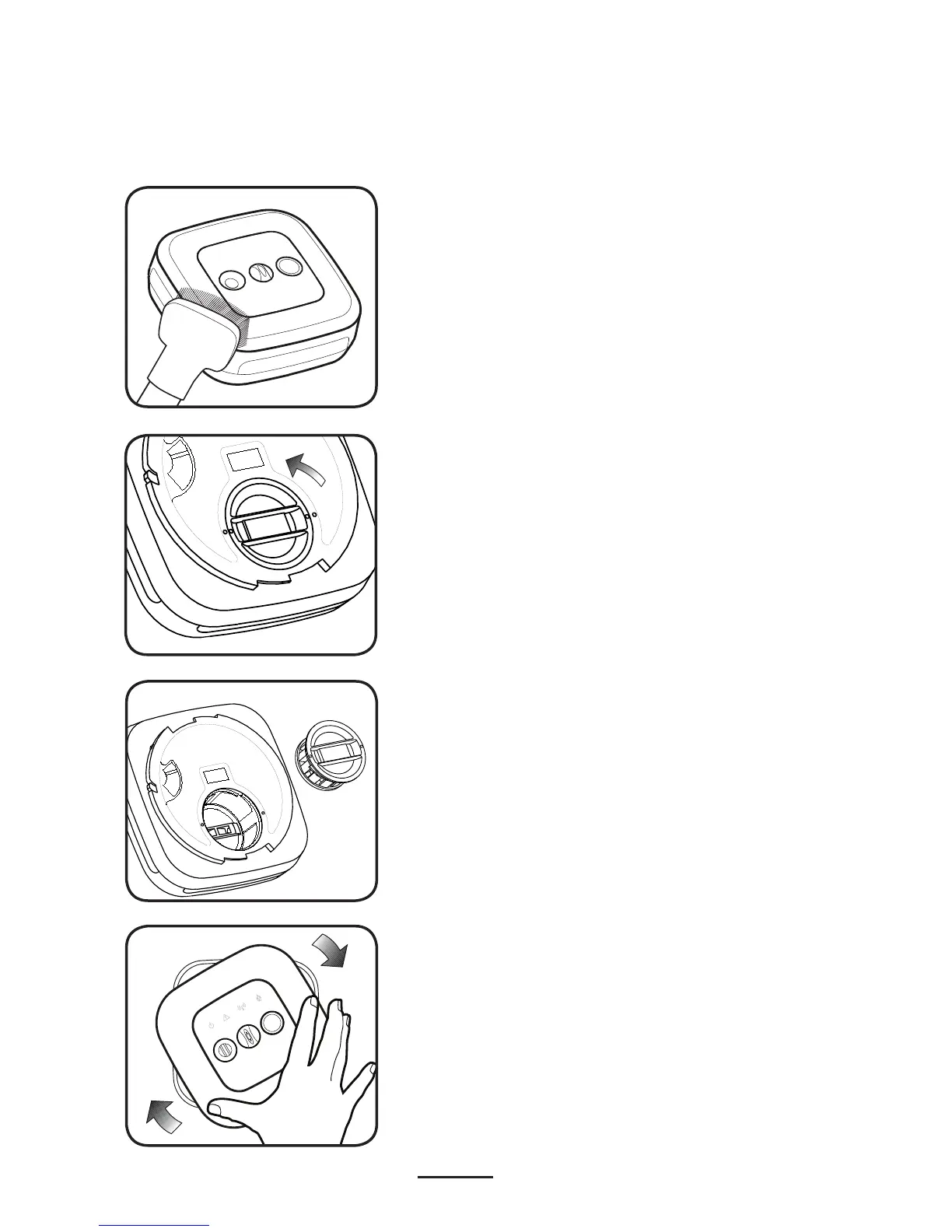
Remove the sensor from its bracket. If the
smoke sensor is wired to the AC power lines,
the wire harness must be disconnected.
Gently vacuum all the outside surfaces
carefully or wipe with a clean cloth.
Locate the black smoke chamber on the back
surface of the smoke sensor.
If the WARNING icon flashing persists,
contact the manufacturer to obtain
instructions on returning the unit.
DO NOT Deactivate the sensor.
Twist the chamber counter-clockwise to
remove.
Carefully clean both the chamber and the
empty alarm cavity with compressed air.
With the AC wire harness reconnected (if AC
smoke sensor type), re-install on the ceiling/
wall bracket with a clockwise twist.
Re-install the smoke chamber into the cavity
with a clockwise rotation. Align the dots on
chamber and housing to ensure a proper fit.
Press and release the Test button on the
front face to verify the unit is still functioning
properly.


 To Next Page