52
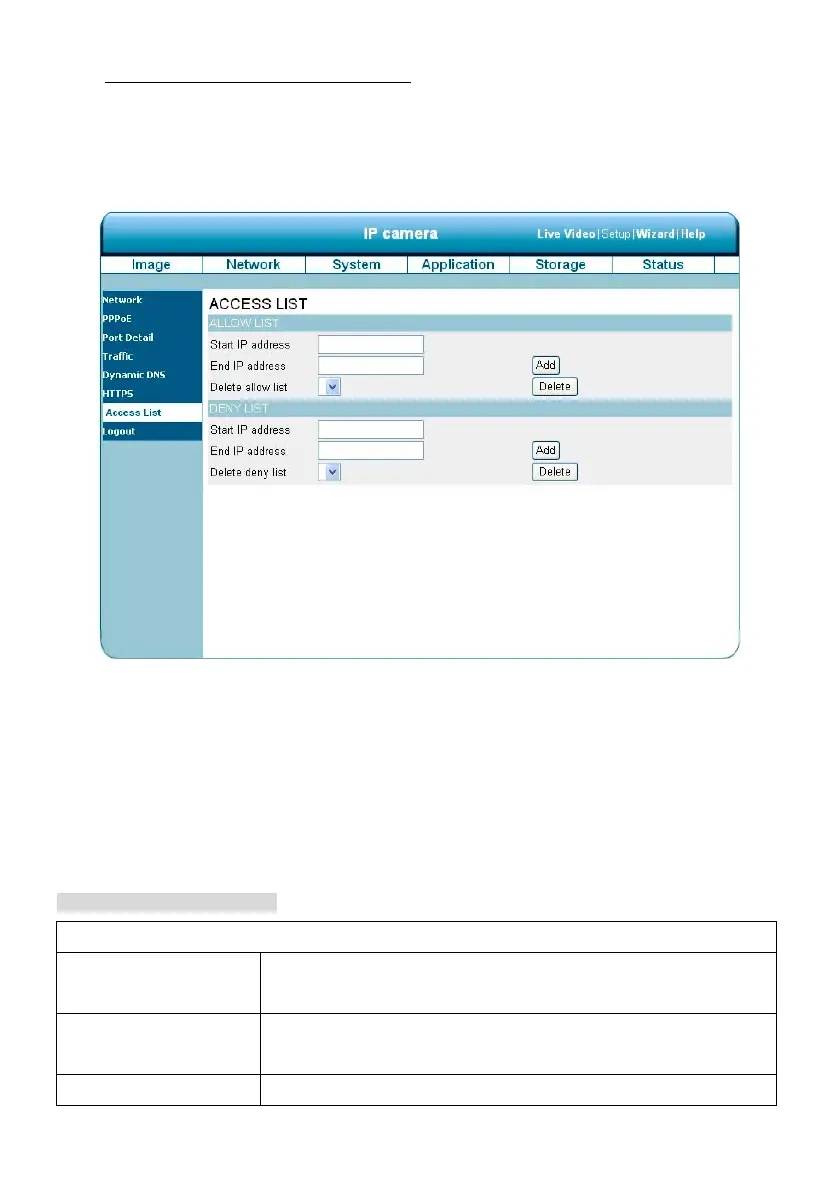
Change the Network Setting —Access List.
The “Network” page has, on its upper left, the “Access List” icon. Please follow the steps below to change
the Access List setting through the network as necessary.
1. Click on the Access List button on the upper left menu to enter the “Access List” page.
2. Fill in the “Start IP address”, “End IP address” and “Delete allow list” details of the “Allow List”. Press
the “Add” button to add or press “Delete” to erase it.
3. Fill in the “Start IP address”, “End IP address” and “Delete deny list” details of the “Deny List”. Press
the “Add” button to add or press “Delete” to erase it.
4. Click on the Submit button to submit the new setting.
Description of function keys:
Allow List:
Start IP Address The starting IP Address of the devices (such as a computer) which have
permission to access the video of the camera.
End IP Address The ending IP Address of the devices (such as a computer) which have
permission to access the video of the camera.
Delete Allow List Remove the customized setting from the Permission List.



 To Next Page