58
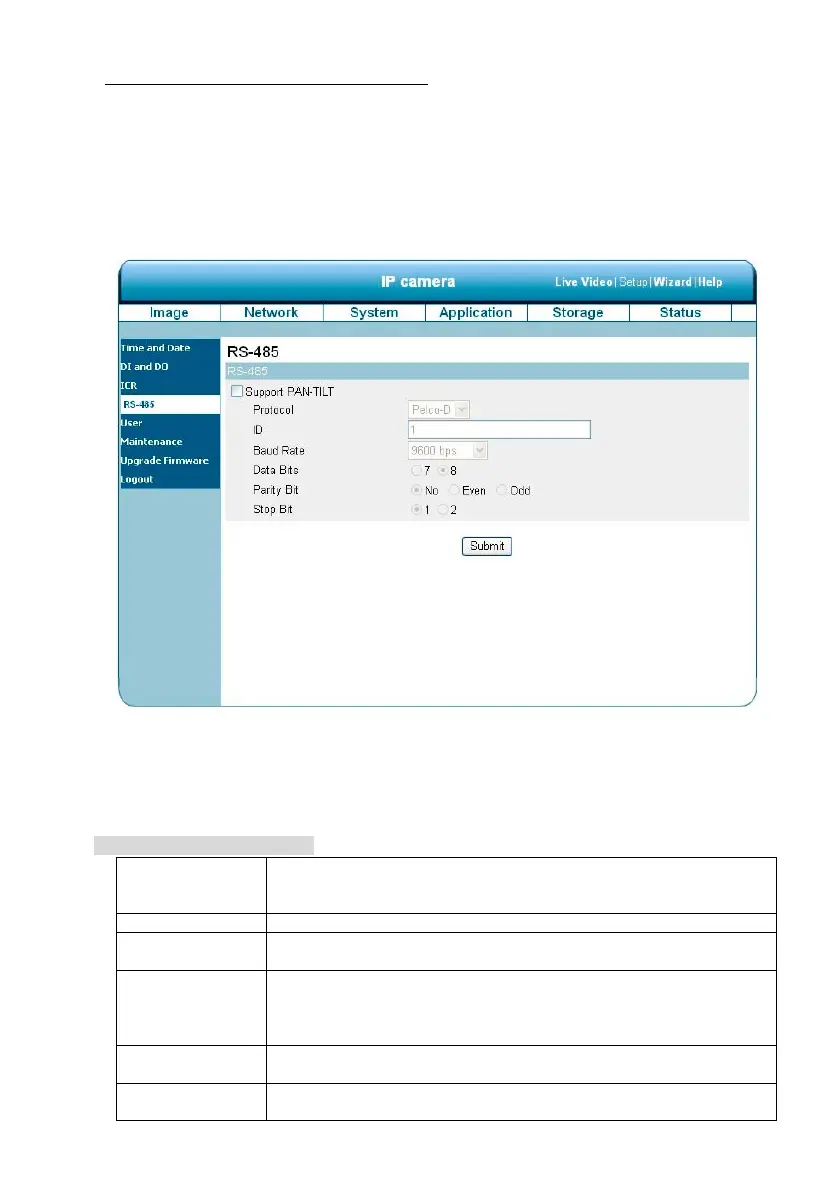
Change the System Setting — RS485 Setting (for the IP Box Camera only)
You may configure the RS-485 settings or communication specifications (baud rate, data bit, stop bit,
and parity bit) for your camera. The RS-485 is a serial communication method for computers and
devices. For your camera, the RS-485 is used to control a PAN/TILT device, such as an external
camera enclosure, to perform the PAN and TILT movement. Click on the RS485 Setting button on the
left side of the “System” page to enter the “RS485 Setting” page.
NOTE: Checkmark “Support PAN-TILT” and a RS-485 control panel will appear on the left
side of the Live View page.
Description of function keys:
Support PAN-TILT: When enabling Support PAN-TILT, a control panel will be displayed on
the Live Video page allowing control for an external camera enclosure
through the RS-485.
Protocol: Select one protocol type from the pull-down menu.
ID: Choose an ID between 1 and 255. This ID is the identifier for each
RS-485 device.
Baud Rate: Choose between 2400 and 115200 bps. This is a speed measurement
for communication between a transmitter and receiver, indicating the
number of bit transfers per second. A higher baud rate will reduce the
distance of the two devices (transmitter and receiver).
Data Bits: Either 7 or 8. It is a measurement of the actual data bits in a
transmission. By default, the value is 8.
Parity Bit: Choose from No, Even, and Odd. This is a simple form of error checking
used in serial communication and you may use no parity. For even and



 To Next Page