73
Snap_20090101_122030
The prefix file name
Date and time suffix
The format is: YYYYMMDD_HHMMSS
(e) Add date and time suffix to file name: Select the option to add the date/ time
suffix to the file name.
(f) Click Submit to activate the setting.
Video Clip: Select to send video clips when a trigger is activated.
(a) Source: Select to record video clips from the video profile.
(b) Pre-event recording: The IP camera has a buffer area; it temporarily holds
data up to a certain limit. Enter a number to decide the duration of recording
before a trigger is activated. Up to 4 seconds can be set.
(c) Maximum duration: Specify the maximum recording duration in seconds. Up
to 100 seconds can be set.
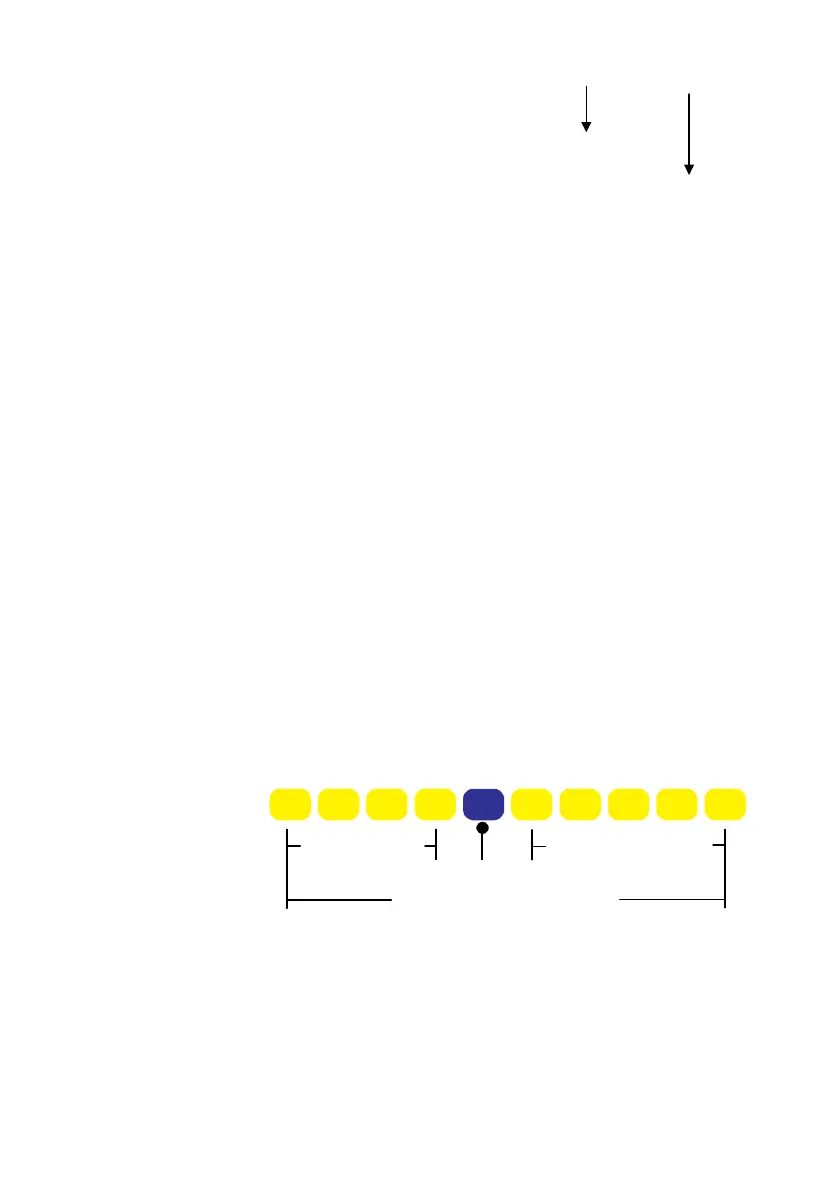
NOTE: For example, if pre-event recording is set to 4 seconds and the
maximum duration is set to 10 seconds, the IP camera
continues to record for another 5 seconds after a trigger is
activated.
1 sec. 2 sec. 3 sec. 4 sec. 6 sec. 7 sec. 8 sec. 9 sec. 10sec.5 sec.
Pre-event Recording
Continues to record
Trigger Activation
Maximum recording duration
(d) Maximum file size: Specify the maximum file size allowed.
(e) File Name Prefix: Enter the text that will be appended to the front of the file
name.
(f) Click Submit to activate the setting.



 To Next Page