Need help?
Do you have a question about the Aqua Computer OCTO and is the answer not in the manual?
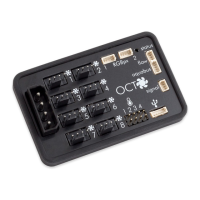
Diagram and explanation of all connectors on the OCTO device.
How to connect the power supply to the OCTO controller.
Details on connecting PWM fans to the OCTO controller.
How to connect the OCTO controller to a PC via USB.
Details on connecting the OCTO controller to other Aqua Computer devices via aquabus.
Information on connecting a flow sensor to the OCTO controller.
Information on connecting temperature sensors to the OCTO controller.
Details on connecting RGBpx LED strips and accessories.
Explanation of the signal connector and the status LED indicator.
Steps for installing the aquasuite software on your PC.
Overview of the aquasuite software's main features and interface.
Explanation of symbols used in the aquasuite software headlines.
Enabling overview pages to be displayed directly on the desktop.
Steps for creating new and editing existing overview pages.
How to add new data elements to overview pages.
How to edit existing elements, their values, and names.
Available styles for displaying detailed data elements.
Displaying log data charts on overview pages.
Creating custom elements using XAML and images.
Exporting and importing overview pages and elements.
Configuring log data sets, sources, and time intervals.
Visualizing logged data using charts and the chart manager.
Exporting logged data to an XML file manually.
Setting up automatic data export to XML files at regular intervals.
Configuration and calibration of hardware temperature sensors.
Configuration and calibration of the hardware flow sensor.
Using software sensors for third-party data integration.
Manually setting the output power for fan outputs.
Automatically adjusting fan speed based on temperature readings.
Automatically adjusting fan speed using temperature-based curves.
Configuring general fan settings like start boost and power limits.
How fan output is controlled when connected to an aquaero via aquabus.
Adding and configuring new RGBpx LED controllers and effects.
Modifying settings for already configured LED controllers.
Changing the assignment of LEDs to controllers.
Options for duplicating or deleting RGBpx LED controllers.
Visualizing audio output using RGBpx LEDs.
Replicating monitor content on RGBpx LEDs for ambient lighting.
Configuring the signal header for alarm outputs or PC shutdown.
Setting alarm limits and configuring how alarms are reported.
Manually selecting and activating saved profiles.
Automatically activating profiles based on configurable rules.
Saving current settings into a profile.
Creating and using virtual sensors with mathematical functions.
Managing and activating profiles across multiple devices simultaneously.
Defining key combinations for system-wide actions.
Publishing and accessing data via the Aqua Computer server.
Obtaining published data from the Aqua Computer server.
Importing data sets from the Aqua Computer server into aquasuite.
Selecting the display language for the aquasuite software.
Adjusting the order of overview pages and devices in the list.
Setting units and customizing application start-up behavior.
Managing background service settings for connected devices.
Enabling analysis of audio and video data.
Information on software activation and update service validation.
Power supply, dimensions, and ambient temperature range.
Guidelines for cleaning and maintaining the OCTO controller.
Instructions for disposing of the device as electronic waste.
How to get support, feedback, and contact information.
The Aqua Computer OCTO is an eight-channel PWM fan controller designed for both water-cooled and air-cooled computer systems, offering extensive functionality for managing and monitoring various aspects of PC cooling and lighting. It integrates multiple sensor inputs, communication interfaces, and a sophisticated RGBpx effect controller, making it a versatile solution for PC enthusiasts.
The primary function of the OCTO is to control up to eight PWM fans, each with speed signal processing, ensuring precise and efficient cooling. Beyond fan control, it features four temperature sensor inputs and one flow sensor input, allowing for comprehensive monitoring of critical system parameters. The device communicates with a PC via a USB interface and can also connect to other Aqua Computer devices through an aquabus interface, enabling a broader ecosystem of control and monitoring. A standout feature is its integrated RGBpx effect controller, capable of managing up to 180 individually addressable LEDs, providing extensive customization for system lighting.
The OCTO operates in conjunction with the aquasuite software, which serves as the central hub for configuration, monitoring, and control. The software allows users to create and customize overview pages to display current sensor readings and diagrams from all connected devices. These overview pages can be displayed directly on the desktop, offering real-time insights into system performance. The aquasuite also includes a robust data logging feature, enabling selective and permanent storage of data from Aqua Computer devices and hardware data supplied by the background service. This logged data can be analyzed through customizable charts and exported for further review.
Fan configuration is highly flexible, offering various modes such as power preset, temperature set point, and curve controller. The power preset mode allows manual setting of fan output power. The temperature set point mode automatically adjusts fan speed based on temperature readings from up to nine available temperature sensors. The curve controller mode provides advanced control, allowing users to define a curve that dictates fan speed based on temperature, with options for start boost to ensure reliable fan startup. The aquasuite software facilitates easy adjustment of these curves using drag-and-drop functionality and automatic generation from start and end points.
The RGBpx configuration is equally comprehensive, allowing users to create and manage multiple LED controllers for each RGBpx output. Each controller can be assigned a specific effect, and its position and the number of assigned LEDs can be modified. Effects can be extensively customized with color selection, speed adjustment, and even dynamic modification based on current sensor data. Special effects like sound-controlled lighting, which visualizes audio output, and AMBIENTpx, which replicates monitor content for background lighting, are also supported, enhancing the immersive experience.
Alarm configuration is a critical safety feature, enabling users to set alarm limits for various data sources, such as flow and temperature sensors. If a monitored value falls outside the defined limits, an alarm is triggered, and the aquasuite highlights the affected sources. The signal output can be configured for emergency shutdown of the PC, providing an additional layer of protection against critical system failures.
The OCTO also supports a profile management system, allowing users to save and activate up to four different configurations manually or automatically. This feature is integrated with the aquasuite's global profiles, which can change settings across multiple devices simultaneously and activate desktop pages based on configurable rules or hotkeys.
The OCTO is designed for ease of use through its intuitive aquasuite software. Installation of the aquasuite software is straightforward, and it automatically detects connected USB devices. The software's graphical user interface (GUI) is divided into several sections, including overview pages, data quick view, data log, aquasuite web, and basic settings, making navigation simple.
Overview pages are highly customizable, allowing users to add various elements such as sensor readings, charts, images, text, and drawing elements. These elements can be arranged and configured to provide a personalized dashboard for system monitoring. The aquasuite supports desktop mode, enabling overview pages to be displayed directly on the desktop, with mouse clicks passing through to underlying desktop symbols. Overview pages can be exported and imported, facilitating sharing of configurations between different PCs or users.
Data logging and analysis are powerful tools for long-term monitoring. Users can create multiple log data sets, define time intervals, and configure automatic deletion of old data. The logged data can be visualized through interactive charts, with options to zoom, pan, and save chart configurations. Data can also be exported manually or automatically in XML format, providing flexibility for external analysis.
Sensor configuration in the aquasuite allows for calibration of hardware temperature and flow sensors, including the ability to add offsets for temperature readings and adjust flow rates. The device also supports software sensors, which can receive data from third-party software like HWiNFO and AIDA64, expanding the range of monitored parameters beyond physical inputs.
Fan control offers granular adjustments for each of the eight fan outputs. Users can select from different fan modes and configure additional parameters such as minimum and maximum power settings, and a "hold minimum power" option to prevent fans from switching off completely. The aquasuite's graphical curve display makes it easy to visualize and adjust fan curves. When connected to an aquaero 5/6 device via aquabus, the aquaero takes over fan control, ensuring seamless integration within a larger Aqua Computer ecosystem.
The RGBpx lighting system provides extensive creative possibilities. Users can add multiple LED controllers to each RGBpx output, each with its own effect and assigned LED range. Effects can be customized with colors, speeds, and dynamic responses to sensor data. The AMBIENTpx effect, in particular, enhances the visual experience by synchronizing lighting with monitor content, requiring Windows 8.1 or newer and disabling certain graphics card features like NVIDIA G-Sync or AMD Eyefinity.
Alarm management is proactive, allowing users to define alarm limits for various sensors. The aquasuite visually indicates active and past alarms, helping users quickly identify and address potential issues. The signal output can be configured as a power switch for emergency PC shutdown, though users are cautioned to test this feature carefully and be aware of potential data loss.
Profile management simplifies switching between different system configurations. Users can save up to four profiles, each containing a complete set of settings for fans, RGBpx lighting, and other parameters. These profiles can be activated manually or automatically based on predefined rules, such as running applications or time of day. Hotkeys can also be configured to activate global profiles or desktop pages, providing quick access to desired settings.
The OCTO device itself requires minimal maintenance. It is recommended to use a dry and soft cloth for cleaning and to ensure that electronic components and headers do not come into contact with coolant or water.
The aquasuite software includes an update service that ensures the device firmware and software are kept up-to-date. The latest firmware versions are always included with the aquasuite software, and updates can be initiated with a single click. The update service also manages software activation, requiring a valid update service period for the initial release date of the aquasuite version. This service period is typically assigned to individual devices, and new devices automatically include a period. An internet connection is required for update service validation, but personal data like IP addresses are not stored.
The aquasuite also offers basic settings for language, units, and application start-up behavior, allowing users to customize the software to their preferences. The background service, which handles USB settings, hardware data, software sensors, profile management, and aquasuite web features, is designed to run reliably and should generally remain active.
For data security and sharing, the aquasuite web feature allows users to publish data on the internet or import data from it. Exported data sets are transmitted with transport security and stored in volatile memory on Aqua Computer servers, ensuring privacy as data is not permanently stored or correlated to personal information. This feature allows for public sharing of system data in various formats, including JSON and banner images for forums.
In case of issues, the aquasuite provides device information that can be helpful when contacting Aqua Computer support. Users can also reset the device to factory defaults through the software, allowing for a complete reconfiguration if needed. Aqua Computer also provides support through email, postal address, and a dedicated forum for community assistance and discussions.
 General
| Type | Fan and RGB Controller |
|---|---|
| Number of Channels | 8 |
| Aquabus ports | 1 |
| Temperature sensor inputs | 4 |
| Flow sensor input | 1 |
| Voltage inputs | 2 |
| Software Compatibility | Aquasuite |
| Power Supply | 12V |
| Power Connector | 4-pin Molex |
| Voltage | 12V |
| PWM Frequency | 25kHz |
| Weight | 200g |
| Connectivity/Interface | USB 2.0 |

 To Next Page