Visit www.aquatek.tv or email enquiries@aquatek.tv for more information
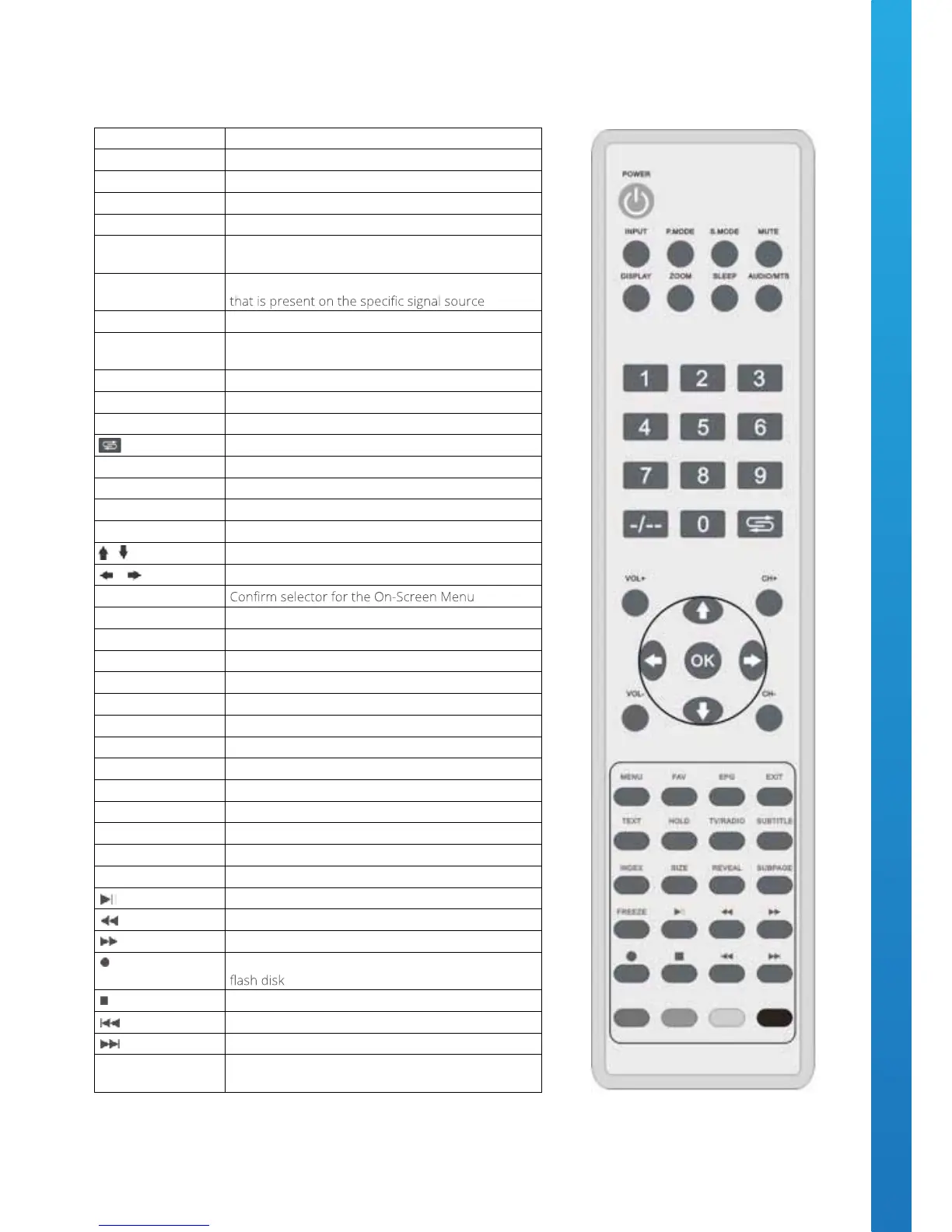
Remote Control Key Functions
Button Function
POWER ON / Stand-By
INPUT Change Source Mode
P.MODE Switch to Picture Mode
S.MODE Switch to Sound Mode
MUTE
Sound ON / OFF - The screen will display a MUTE
logo when the sound is OFF
DISPLAY
Display the channel name or any other information
ZOOM Switch aspect ratio of the displayed picture
SLEEP
This will turn the television OFF in a requested
amount of time
AUDIO/MTS Switch to NICAM under the ATV mode
0-9 Manual channel selection
-/-- Short cut to up to 10 channels
Back to the previous channel
VOL+ Increase the volume
VOL- Decrease the volume
CH+ Move up a channel
CH- Move down a channel
/ Up / Down selector for the On-Screen Menu
/ Left / Right selector for the On-Screen Menu
OK
MENU Enter or Exit the On-Screen Menu
FAV Display your favorite channel list
EPG Run the electronic program guide list within DTV
EXIT Exit On-Screen Menu
TEXT Open Teletext
HOLD Within Teletext press this key to hold a page
TV/RADIO Switch between DTV and DAB
SUBTITLE Language selection
INDEX Teletext Index Page
SIZE Teletext enlarge or reduce the size of the display
REVEAL Teletext reveal hidden text
SUBPAGE Teletext enter sub-page
FREEZE Freeze frame the current DVB screen
USB Mode ~ Play or Pause
USB Mode ~ Rewind
USB Mode ~ Fast Forward
DTV mode ~ record the current program to the USB
USB Mode ~ Stop
USB Mode ~ play the previous program
USB Mode ~ play the next program
COLOURED
BUTTONS
Teletext Selector
2 Remote Control Key Functions.pdf 1 08/06/2013 10:01
Remote Control Key Functions
Visit www.aquatek.tv or email enquiries@aquatek.tv for more information
Remote Control Key Functions
Button Function
POWER ON / Stand-By
INPUT Change Source Mode
P.MODE Switch to Picture Mode
S.MODE Switch to Sound Mode
MUTE
Sound ON / OFF - The screen will display a MUTE
logo when the sound is OFF
DISPLAY
Display the channel name or any other information
ZOOM Switch aspect ratio of the displayed picture
SLEEP
This will turn the television OFF in a requested
amount of time
AUDIO/MTS Switch to NICAM under the ATV mode
0-9 Manual channel selection
-/-- Short cut to up to 10 channels
Back to the previous channel
VOL+ Increase the volume
VOL- Decrease the volume
CH+ Move up a channel
CH- Move down a channel
/ Up / Down selector for the On-Screen Menu
/ Left / Right selector for the On-Screen Menu
OK
MENU Enter or Exit the On-Screen Menu
FAV Display your favorite channel list
EPG Run the electronic program guide list within DTV
EXIT Exit On-Screen Menu
TEXT Open Teletext
HOLD Within Teletext press this key to hold a page
TV/RADIO Switch between DTV and DAB
SUBTITLE Language selection
INDEX Teletext Index Page
SIZE Teletext enlarge or reduce the size of the display
REVEAL Teletext reveal hidden text
SUBPAGE Teletext enter sub-page
FREEZE Freeze frame the current DVB screen
USB Mode ~ Play or Pause
USB Mode ~ Rewind
USB Mode ~ Fast Forward
DTV mode ~ record the current program to the USB
USB Mode ~ Stop
USB Mode ~ play the previous program
USB Mode ~ play the next program
COLOURED
BUTTONS
Teletext Selector
2 Remote Control Key Functions.pdf 1 08/06/2013 10:01


 To Next Page