15
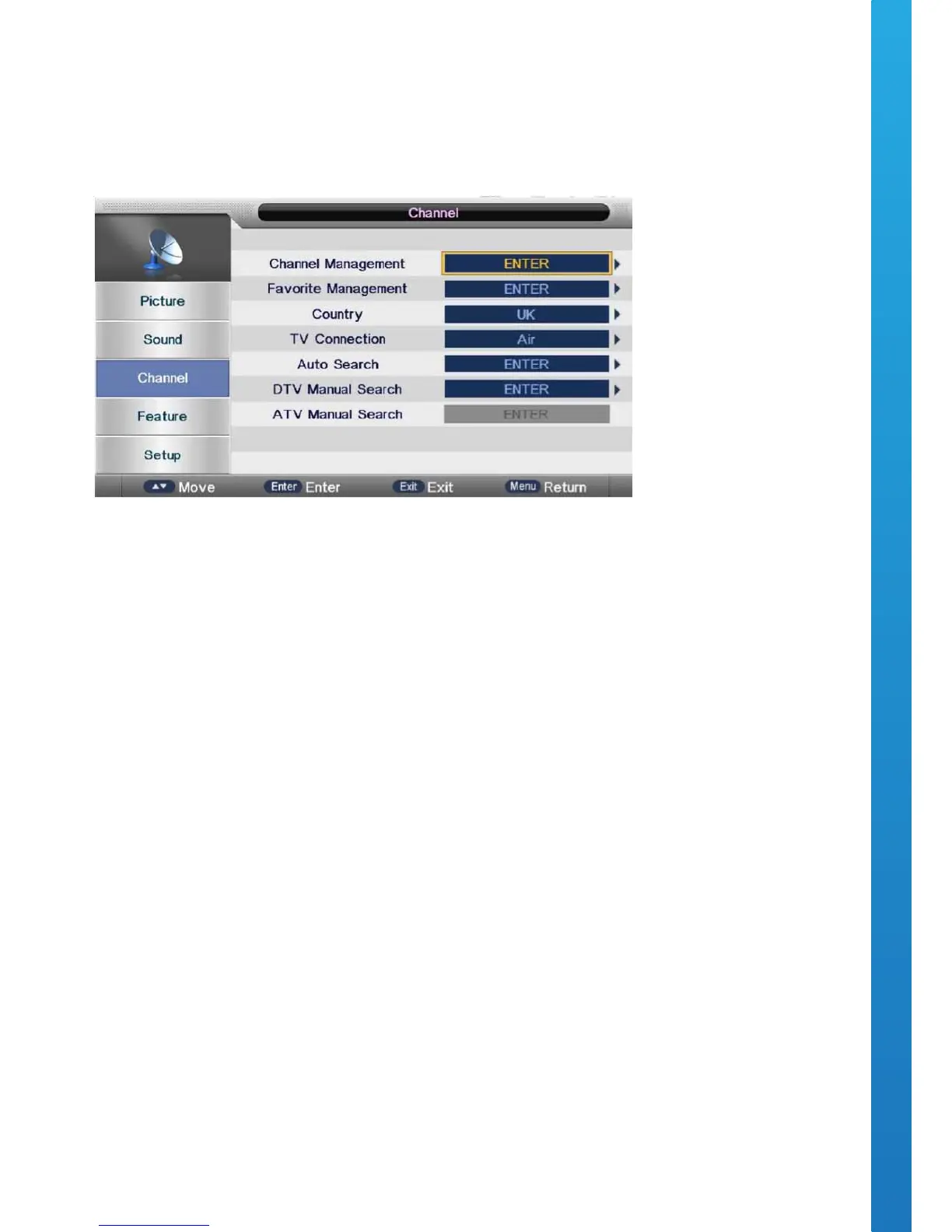
OSD Menu User Guide - 1.2 Channel Menu
Press the MENU button to display the main menu.
Press ▼ / ▲ buttons to select CHANNEL in the main menu.
Press ▼ / ▲ buttons to select the option that you want to adjust in the CHANNEL menu.
Press the OK button to adjust.
After nishing your adjustment, press the MENU button to save and return back to the previous menu.
AUTO TUNING
Press ▼ / ▲ buttons to select Auto Tuning, then press the OK button to start the auto search.
DTV MANUAL TUNING
Press ▼ / ▲ buttons to select DTV Manual Tuning, then press the OK button.
Press ◄ / ► buttons to select the channel, then press the OK button to search for the program.
ATV MANUAL TUNING
Press ▼ / ▲ buttons to select ATV Manual Tuning, then press the OK button.
Press ◄ / ► buttons to select the channel number you want to store.
Press ▼ / ▲ buttons to select the other options.
Press ▼ / ▲ buttons to select search, then press the OK button to start tuning.
Press the red button on your remote control to save the settings and menu button to go back to the previous
menu.


 To Next Page